

- Jun 4, 2010
- 2,132
- 56
- 48
I have been battling with my GS3 for a while now. I?m running Android 4.1.2. At first it was sporadic, but now seems to be happening more often. I am having long periods of time where the phone is staying awake without the screen on, this is also happening almost every time I charge the phone. It?s getting highly annoying. Used to be a battery pull would solve the problem, now that doesn?t work. Any ideas what could be causing this? I downloaded the Spare Parts app, but that has proven to be fairly useless.
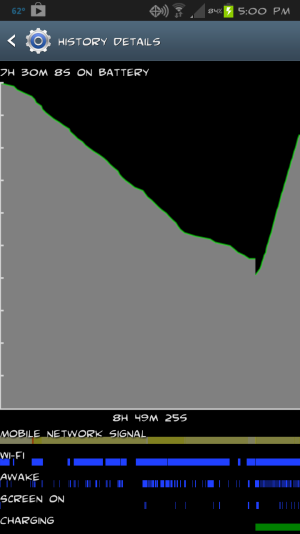
I unplugged the phone from the charger, because while it was charging overnight it was still awake the whole time. Awesome. So I turned back the clock and went Blackberry on the thing, aka battery pull. The battery drop in the picture is pretty catastrophic?.from 100% to the mid 40?s in 7 hours. During this time the screen was on for just 9 minutes. Android OS was the top killer, 28%, awake for 1 hour and 12 minutes. Phone checked in at #2, 19%, awake for 36 minutes, which is especially impressive considering I haven?t made or received 1 phone call all day. Device Idle and Cell Standby tied for 3rd, with 10%. Then at 5th place, 7%, is my 9 minutes when the screen was on. I should mention I?m on WiFi all day long, save for my five minute drive to the office. Any ideas what could be causing this?
I unplugged the phone from the charger, because while it was charging overnight it was still awake the whole time. Awesome. So I turned back the clock and went Blackberry on the thing, aka battery pull. The battery drop in the picture is pretty catastrophic?.from 100% to the mid 40?s in 7 hours. During this time the screen was on for just 9 minutes. Android OS was the top killer, 28%, awake for 1 hour and 12 minutes. Phone checked in at #2, 19%, awake for 36 minutes, which is especially impressive considering I haven?t made or received 1 phone call all day. Device Idle and Cell Standby tied for 3rd, with 10%. Then at 5th place, 7%, is my 9 minutes when the screen was on. I should mention I?m on WiFi all day long, save for my five minute drive to the office. Any ideas what could be causing this?



 Facebook
 Twitter
 Instagram