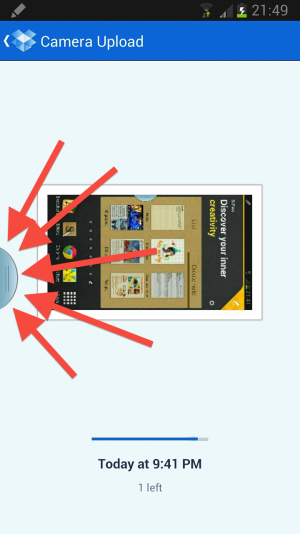
remove tab at side of all menus

charlieegan3

Member
Oct 18, 2012
15
0
0
How can I get rid of this totally rubbish feature?
 

Attachments

  • 2012-11-02 21.50.13.png
    2012-11-02 21.50.13.png
    429 KB · Views: 115
At least I wasn't the only one with this problem.

If this thing had a name on it we could search with it would have been so much better. Something like three threads on this "thing" so far.
 
At least I wasn't the only one with this problem.

If this thing had a name on it we could search with it would have been so much better. Something like three threads on this "thing" so far.

I thought the title was okay. This feature does allow you to have two apps up at once which is a nice option to have. I just don't like the little tab being there the whole time.

Sent from my GT-N7100 using Android Central Forums
 
Long press on the back button to activate multitasking and the same to remove the tab :)

Sent from my GT-N7100 using Android Central Forums
 
Long press on the back button to activate multitasking and the same to remove the tab :)

Sent from my GT-N7100 using Android Central Forums

Yeah, I worked it out. Thanks. It's actually quite useful to have it accessible, just don't want it there the whole time.

Sent from my GT-N7100 using Android Central Forums
 
Oops sorry. I see you answered your own question. Just looked at the last reply!

And I agree it does get kinda annoying to have that tab there all the time ;)

Sent from my GT-N7100 using Android Central Forums
 
Oops sorry. I see you answered your own question. Just looked at the last reply!

And I agree it does get kinda annoying to have that tab there all the time ;)

Sent from my GT-N7100 using Android Central Forums

Yeah, it's fine when you know how to get rid of it though :-)

Sent from my GT-N7100 using Android Central Forums
 
Long press on the back button to activate multitasking and the same to remove the tab :)

If that button always there while you are using the multitasking feature? Or is there some waty to hide it when two apps are open?
 
No it doesn't always need to be there. Just hold the back button to get it up, choose the apps, hold the back button to hide it again. It is pretty good.

Sent from my GT-N7100 using Android Central Forums
 
I thought the title was okay. This feature does allow you to have two apps up at once which is a nice option to have. I just don't like the little tab being there the whole time.

Sent from my GT-N7100 using Android Central Forums

I meat that when you encounter this thing on the phone there is no name on it to look up to figure out how to turn it off. No title, no settings menu for it nothing. People are getting a little confused with it.
 
A problem with the multi-window feature is that the tab sometimes pops up in an application and if you long press the Back key to make the tab disappear that undesirably may also exit you from the application not just get rid of the tab.

I like having the multi-window feature, but for multi-tasking (which multi-window is intended to promote) I get more mileage out of switching between apps using the task screen that appears when you long press Home key button. Did you know that you can go to the app you just left by long pressing the Home key by touching the watermark of that app that dimly appears behind the line of open tasks? This helps especially if you forget the app you were in before long pressing the Home key.
 
Last edited:
A problem with the multi-window feature is that the tab sometimes pops up in an application and if you long press the Back key to make the tab disappear that undesirably may also exit you from the application not just get rid of the tab.

I like having the multi-window feature, but for multi-tasking (which multi-window is intended to promote) I get more mileage out of switching between apps using the task screen that appears when you long press Home key button. Did you know that you can go to the app you just left by long pressing the Home key by touching the watermark of that app that dimly appears behind the line of open tasks? This helps especially if you forget the app you were in before long pressing the Home key.

IDK if its different on the Verizon version since they changed a lot of the little quick setting tabs in the Notification Drawer, but on the far right we have a Multiwindow selector that turns the feature off. The back button still works to show or hide the tab, but you can also use that selector.
 
IDK if its different on the Verizon version since they changed a lot of the little quick setting tabs in the Notification Drawer, but on the far right we have a Multiwindow selector that turns the feature off. The back button still works to show or hide the tab, but you can also use that selector.

Thanks for reminding me of that quick way to toggle multi-window versus going to Settings->Display->Multi-window. But I'd still like to be able to keep multi-window enabled and not have the tab pop up at times when I don't want it to.
 
sorry i dont understand the multi tasking bit, removal of tab and retrieving the tab fine but how do you multi task ? regards , paul
 

Members online

Forum statistics

Threads
963,229
Messages
6,992,904
Members
3,164,994
Latest member
simizen0611