s5 drain battery

Welcome to Android Central! Is the battery actually draining too fast, or is it just that Android OS and System are reported as higher percentage battery users than usual?

To get a better idea of the situation, it would be helpful to see some stats. Charge up to 100%, then let it drain to 20-30% with normal usage, without charging in between. Then show us:

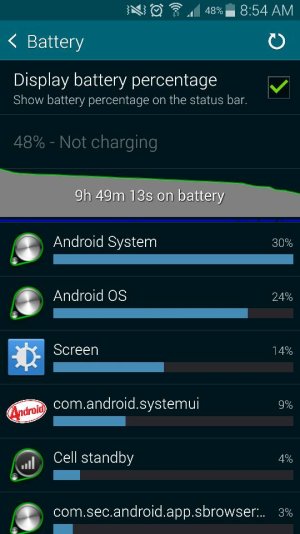
1. The main Settings>Battery screen.
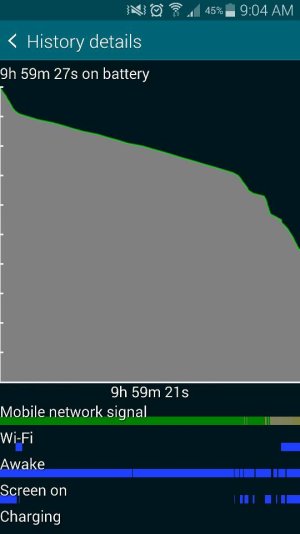
2. The fullscreen battery graph screen (which shows Awake time and Cell Signal Strength).
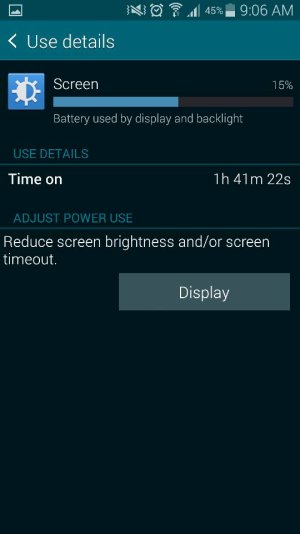
3. The Screen category (to see total Screen On time).
4. The Cell Standby category, if present (to see Time Without Signal).

http://forums.androidcentral.com/am...ide-how-post-screenshots-android-central.html
 
here is my s5 screenshot , hope to seek some helps for my phone :(

Posted via the Android Central App
 

Attachments

  • Screenshot_2014-11-18-09-06-32.jpg
    Screenshot_2014-11-18-09-06-32.jpg
    23.4 KB · Views: 26
  • Screenshot_2014-11-18-09-06-03.jpg
    Screenshot_2014-11-18-09-06-03.jpg
    34 KB · Views: 26
  • Screenshot_2014-11-18-09-04-57.jpg
    Screenshot_2014-11-18-09-04-57.jpg
    36 KB · Views: 26
  • Screenshot_2014-11-18-08-54-42.jpg
    Screenshot_2014-11-18-08-54-42.jpg
    60.6 KB · Views: 26
I have the same problem, draining even when i leave the phone just to sit there.
I did hard reset few times but no help.
I have only stock apps and everything is turned off. No wifi no data noa apps in background.
Is there any solution?
 
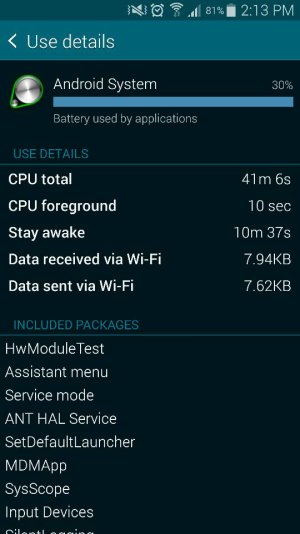
Something is keeping the phone awake almost the whole time. Select Android OS or System, and see how much it says they're keeping things awake.

Posted via Android Central App.
Please excuse any typos or autocorrect derps.
 
when i put standby in midnight, it will drain for about 20% of my battery.

Posted via the Android Central App
 

Attachments

  • Screenshot_2014-11-18-14-13-39.jpg
    Screenshot_2014-11-18-14-13-39.jpg
    52.6 KB · Views: 15
  • Screenshot_2014-11-18-14-13-46.jpg
    Screenshot_2014-11-18-14-13-46.jpg
    40.9 KB · Views: 15
It looks like the OS is what's keeping things awake. Does this persist after a reboot?
 
This probably won't help, but see what happens if you turn off your alarm. I've seen some instances where it seems that if the alarm is set, it causes a constant (and inappropriate) wakelock.
 
the problem solved after i turned off my alarm, never thought alarm is the main problem.

Posted via the Android Central App
 
A-ha! Yeah, I don't quite understand it either. It must be a bug, because simply setting an alarm shouldn't keep the phone awake. It's almost like the phone is staying awake to make sure it remembers to trigger the alarm.
 
Try a different alarm app. Timely isn't bad. At least it is a test to see if it is the stock alarm or any alarm.