S6 Novice Teething problems

ricmetcalfe

Member
May 31, 2015
5
0
0
Hi all, I'm a newbie to android so forget my naivety. I have been trying to amend my notification alerts, at current I have turned them off completely so only know about them when I go into messages, WhatsApp, Snapchat Facebook etc. I don't want the content displaying on my alerts or home screen but would like it displayed similar to when I had iPhone. Back then it would say 1 for messages received etc.. Can this be done on the s6???
 
Go to settings>quick settings>sounds and notifications. The option you want is here

Posted via the Android Central App
 
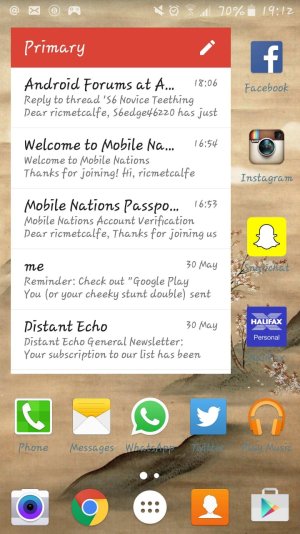
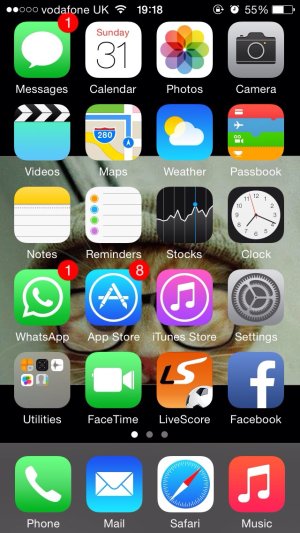
how it should look.jpg

how it looks.jpg

I've attached two pics above (one obviously from my old Iphone on how I want it to display) and how its displaying at current on my S6 - note i had messages when i went into the apps on the S6.

I want it to give a visual indication I've got a message but ideally not show who it is from or any content literally just to show a number.

It seems impossible to do at current?
 
So you are wanting the number in the small bubble by the app icon? Are you getting a pop up showing what the message says across your screen and want to turn that off?

Posted via the Android Central App
 
Exactly want the notification count on the app icon but want to turn the pop ups off.

It might be worth noting, I added Nova.
 
Exactly want the notification count on the app icon but want to turn the pop ups off.

It might be worth noting, I added Nova.

I think that if you want to turn off all notifications from your apps then you may get Nova to show you unread badges but just for some default apps like phone, messages, Whatsapp, Facebook Hangouts and emails, the rest of apps need to pull the information from your notification bar, so turning that off won't help, but for that you need to install the Tesla unread plug in, and I think that is part of the prime version not the free one.

If you don't want to pay for that then you need to go back to Touch wiz and see if turning off the notifications like it was suggested above will stop the Notifications bar previews and icons but still keep counter badges on.
 
Then you have to install Tesla Unread to get the badge numbers for the apps.

Also the screenshot you posted of your S6 shows the messages widget. If you dont want to see the messages on your screen, uninstall the widget.
 
Hey erasat,

Im having a bit of a different problem but in the small ball park as the poster of the thread.
Basically I had a wrong small whatsapp red bubble notification counter. I checked online and followed instructions by going to App Manager--->All--->Badge Provider---> Clear Data
It solved the problem my Whatsapp red bubble notification counter wasn't stuck on the wrong number anymore but now I dont get any notification counters even though I am getting messages. The counter still works on other apps calls, messages, games etc etc it seems only whatsapp isn't showing the red bubble anymore.

If you could help that would be awesome.

Thanks