Question Samsung A14 5G

Popcorns86

Member
Jan 28, 2026
11
4
3
Hi, I wanted to ask for some help with my android phone Samsung A14 5G. I have a problem with my hotmail and only hotmail. When I use the browser to login it logs in fine. But when I try to logout the page buffers like it's going to log out then it just returns to my inbox again or sometimes it stays buffering on a empty page or it leads to a error page. I can logout if i keep pressing the back button over and over but it still say signed in when i go to login and doesnt require a password anymore. Even if I try to logout the second time it still loops back to the inbox page like it stays signed in after i press logout on the top right corner, where the circle is to logout.

I've tried:
outlook app
other browsers
reseting phone and hard reset
clearing all history and cache and cookies etc...
trying my data instead of wifi
works fine on other phones
works fine on pc


The problem is on the Samsung A14 5g I don't understand

Below are the two pages it leads to when I click signout and the back button.
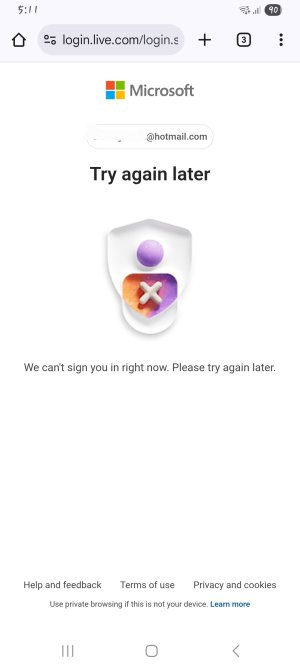
1000000109.jpg
1000000110.jpg


Someone please help me!!
 
Last edited by a moderator:
Hi, I wanted to ask for some help with my android phone Samsung A14 5G. I have a problem with my hotmail and only hotmail. When I use the browser to login it logs in fine. But when I try to logout the page buffers like it's going to log out then it just returns to my inbox again or sometimes it stays buffering on a empty page or it leads to a error page. I can logout if i keep pressing the back button over and over but it still say signed in when i go to login and doesnt require a password anymore. Even if I try to logout the second time it still loops back to the inbox page like it stays signed in after i press logout on the top right corner, where the circle is to logout.

I've tried:
outlook app
other browsers
reseting phone and hard reset
clearing all history and cache and cookies etc...
trying my data instead of wifi
works fine on other phones
works fine on pc


The problem is on the Samsung A14 5g I don't understand

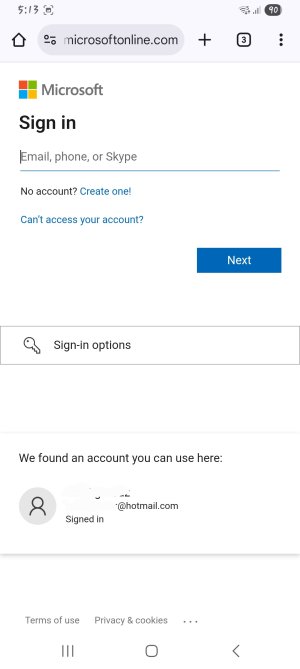
Below are the two pages it leads to when I click signout and the back button.


Someone please help me!!

I just popped in quickly to say thay your screenshots include personal information. (Name & email address)
You probably don't want that info shown in a public forum.

Can you delete those from your post, edit the screenshots to blur out the personal info & then repost the pictures?
 
So you get buffering on the Outlook app the same as when you logout using the browser?

I know you said it happens on different browsers. Which browser is the main one you use.
 
The problem is just with the browser, there's no problem with the outlook app (no buffering does exactly what it needs to) its self, so i uninstalled it .

I am using the google chrome on samsung a14 5g , i tried every other browser but still the same problem even on those other browsers.
 
This sounds like a Chrome/Microsoft session token issue on that specific device, not the account itself. Try clearing cookies and site data for all time, not just recent history. Also disable Chrome sync, Google Smart Lock/password auto sign-in, and any ad-blocker or privacy filter.

Check Microsoft Account → Security → “Sign me out from everywhere” and remove the A14 from trusted devices. Then reboot and test again.
 
  • Like
Reactions: B. Diddy
Ok so I deleted everything of all Time history/cache everything , Didn't work

I turned off sync and sign me out from everywhere and remove all trusted devices, that didnt work too

I click sign out and it the page just buffers and leads me back into the inbox page after i click sign out
 

Forum statistics

Threads
960,833
Messages
6,983,885
Members
3,164,579
Latest member
LilmissSunshine