Samsung Gear manager V2.2.14090599 crashes

  • Thread starter Thread starter AC Question
  • Start date Start date
A

AC Question

Is anyone else having a problem with the Samsung Gear manager V2.2.14090599 crashing thus making your Galaxy gear 2 a bit useless.

Anyway to fix this?
 
I'm having the same problem. I casually let the Samsung Gear App update this morning to V2.2.14090599 and now it crashes every time I attempt to open it - With Unfortunately Gear Plugin has stopped.

I've attempted to clear data and cache of all Gear and related apps (which factory reset the Gear itself). Now it's factory standard, and I can't launch the app to customise or even you it!!! :'(

Is this a wide spread issue?
 
Problems everywhere - sad thing is this update was for the gear circle headphones - so to add the circle they screwed up the gear-lol

Posted via the Android Central App
 
Same problem with me and this update and I get the following message when I try to run the Gear Manager app - Unfortunately, Gear Plugin has stopped.

Very frustrating!
 
Ok, cool. So I've downloaded and installed the previous version no problem, BUT the second I launch it, it says it needs to update. Options are Ok or Cancel.
If you Cancel, the app exits. If you OK, it proceeds to update... then crash (obviously).

How do you run it, without updating it?
:confused:
 
If you go to the Settings of the Galaxy App store and tell it not to auto update your apps, it seems to let you use Gear Manager.
Every now and then, when you launch Gear Manager, it does try to force you to update. But if you just cancel and relaunch (maybe even a few times), it seems to stop asking. At least for a while.
Not the best solution, but may get us by until they fix the latest update.

Does anyone have any word on a time frame for the fix? Any news?
 
I went and deleted everything associated with Gear manager and all Gear apps - reset watch, downloaded Gear manager, set up watch again and everything is working fine

Posted via Android Central App
 
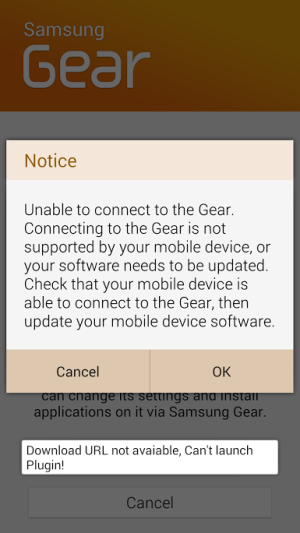
I uninstalled Gear Manager on the S5 and reset my Gear 2. I then re-installed Gear Manager and tried to set up the Gear 2 again. When I try to connect, I get an Install window on the phone indicating it would like to install additional software and a white error pop-up appears on the phone stating, "Download URL not avaiable, Can't launch Plugin!" (the typo is real - I copied verbatim) followed by a Notice stating "Unable to connect to the Gear. Connecting to the Gear is not supported by your mobile device or your software needs to be updated. Check that your mobile device is able to connect to the Gear, then update your mobile device software."
Screenshot_2014-09-22-20-53-17.png
Sounds like there is a plug-in that Samsung Gear would like to install but is not available at the correct address anymore.

My Gear 2 worked a few days ago before the software update was pushed.

Any suggestions besides waiting for Samsung to fix this piece of crap?
 
I had exactly these symptoms and this worked for me after a lot of other resets and messing with missing some of the steps:

(actually not these symptoms above but those described earlier b other.. Gear Manager crashes with "Unfortunately plugin has stopped" and the watch is pretty much bricked..

Deleted Gear Manager
Ran Android Assistant to clear the cache
Unpaired the phone and Gear (I have a feeling this is the critical part)
Reset the watch from the on board setup menu
Rebooted the phone
Downloaded and installed Gear manager
Paired with the watch from within Gear Manager (For no real reason, I also think this may be critical)

...and now it works like a dream.

If it's this easy why isn't Samsung publicising this??
 
For installing 2.1 and don't be replaced by 2.2:
1. disconnect from internet. Turn off wifi and 3G.
2. Let the Install additional software do the job _(it's software of 2.1)
3. Do the pairing with the wath.
3. After finishing, you'll strt to get FC fo goprovider. Install this one: forum.xda-developers.com/showthread.php?t=2758364 (goprovider-signed-20140529.apk )
4. In Configuration of Gear Manager, uncheck the Automatic Update.
5. That's all. You have the 2.1 without errors and normal battery life (3 days)

**** BUT ***** This version of Gear Manager doesn't enable the Notification for all Apps... So, no Whatsapp, skype, Fb, nothing. So, what solution for that??
 

Trending Posts

Members online

Forum statistics

Threads
959,847
Messages
6,980,374
Members
3,164,317
Latest member
XAUxUSD