Screen staying on after notification ?

TouchWiz on the Note 4 is not so bad, even with animations. And Themer IS a launcher (it uses Zooper Widgets for the widgets needed, but they are included in the launcher and in the themes when you download them). I just love making my phone look entirely different, not just adjusting grid sizes and icon packs. It's TRULY a different phone.

Nova drained my battery on the Tab S, so I stopped using it and didn't want to try it on the Note hehe
What phone and carrier are you using currently , it was such a toss up for me between this Note 4 and Nexus 6 ..I'm still within my 14 day return policy and I'd be lying if I said I haven't thought about returning it for the nexus ...but that's without ever holding one and I think I would miss all the features on this.. S pen/multitasking and how it capitalizes on the bigger screen a lot more from what I see..Lollipop on the nexus 6 looks amazing though. And on a side note the screen on thing happened again ..only once so far today and this time without any notifications and without it being plugged in. Lost for words right now..may really have to do a factory reset after all. I really only downloaded the apps I needed though so I would most likely download the same ones again smh
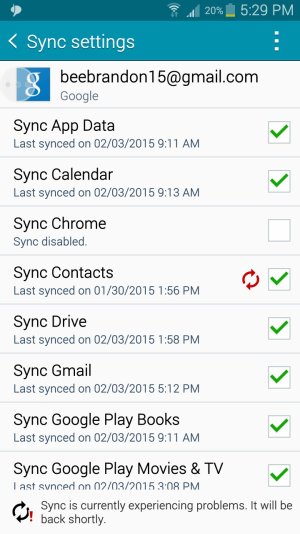
 
Could this possibly be the issue ...I've noticed a problem with sync happening since i hooked up my account . Which is weird because it DOES sync...got all my contacts I needed and such. But every time I check my account it's saying there's a sync error . How could I go about fixing this possibly, without losing my data ?
 

Attachments

  • uploadfromtaptalk1423006192603.jpg
    uploadfromtaptalk1423006192603.jpg
    213.3 KB · Views: 19
That is weird... it shows as your contacts not being synced since 5 days ago... If you un-tick Contacts and re-check it, does it do anything?

My phone is T-Mobile Note 4. I played with the Nexus a bit and didn't like the screen or the back of the phone. But it's a good phone (you'll definitely miss the S-Pen if you're used to it now and the camera of the Note 4 if you change, though).

If it keeps failing I'd just take it in for them to see and get an exchange unit if you still want the Note 4 (I would, but that's personal preference).
 
That is weird... it shows as your contacts not being synced since 5 days ago... If you un-tick Contacts and re-check it, does it do anything?

My phone is T-Mobile Note 4. I played with the Nexus a bit and didn't like the screen or the back of the phone. But it's a good phone (you'll definitely miss the S-Pen if you're used to it now and the camera of the Note 4 if you change, though).

If it keeps failing I'd just take it in for them to see and get an exchange unit if you still want the Note 4 (I would, but that's personal preference).
I un-tick and tick it again and it goes back to the same thing..Sync error..says it's experiencing problems and will be available shortly . Which when I first seen it I assumed it was a network issue and not a personal one . But the fact that it's been that way for a few days now, is starting to sway me towards the latter . If I remove my account and add it again will I lose my data ? Basically would I be better off to just do a factory reset ?
 
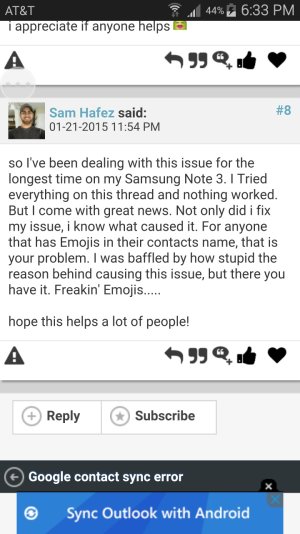
Did a quick Google search and came up with this ..

Sure enough..I had one contact name with an emoji in it, took out the emoji and contacts synced perfectly. Well that fixed my contact sync error . Now to see if THAT fixes the screen problem . What a mess ha
 

Attachments

  • uploadfromtaptalk1423010055779.jpg
    uploadfromtaptalk1423010055779.jpg
    211.9 KB · Views: 20
So now my screen won't even turn off unless I press the power button . Can be messing with my phone, set it down (as I said with the time out time to 30 seconds and also tried 15, smart stay or awake in developer options off) and itll literally stay on for hours unless I press the power button. Going to try to run a factory reset right now and see what comes of it . Will keep this thread posted, even though I seem to be the only one in the techverse dealing with this issue . Lol 😤
 
Alright mission accomplished, seems that a factory reset fixed the issue . Screen is timing out as normal, Thanks for the help Spook !
 
Glad it worked! Weird about the emoji bug and the screen one... Hope it doesn't come back, but if it does, don't sweat it, just get the phone replaced. It's not standard behavior, so it's not that every phone will do it.
 
Glad it worked! Weird about the emoji bug and the screen one... Hope it doesn't come back, but if it does, don't sweat it, just get the phone replaced. It's not standard behavior, so it's not that every phone will do it.
Absolutely , although I emailed Samsung support and the rep said they don't do exchanges only repairs . Which is odd I suppose, but for now the problem is gone
 
I had the same problem. I think I fixed It by disabling peel smart remotes lock screen bubble. Did you have that app?
 
Last edited:
I also had a problem with my Note 4 screen staying on. The problem was fixed when I turned all switches to off in the settings of the remote control app Peel.
 
Hello,

I have been having the same issue with my Note 4.
After troubleshooting, I found out that Peel Smart Remote was causing it.
It came with my phone, but it updated itself, and the update added a little "peel remote" shortcut onto my locked screen, and it caused the screen to stay on after receiving a notification, or after pressing home button.
I emailed peel support, and I have uninstalled the application, and my phone's screen doesn't stay lit anymore! :)
 
WOWWWWWW I was wondering why my new extended battery was not fully charged after 8 hours of sleep. This morning I woke up and it had 1% left after being charged all night. I thought it was my alarm that was keeping the screen on and I just turned it off. I just got this note 4 and replaced the stock battery because it died in only a few hours.

Turned off the PEEL remote switches so hopefully that fixes everything. Love the app though and love my extended battery. Cant wait to see how long it lasts now.
 
As far as I can tell yes with all of them, I'll wake up in the morning with an instagram like and my phone screen on. Assuming it's been on all night . Or a sms as you said or a twitter notification or even just a Clash of clans' "your troops are ready" notification . Happens whether it's charging or not as well.. which if it was only on the charger it wouldn't be as big of a deal.. but the screen on constantly after a notification while not being attended to is killing my battery somethin serious . Havent really seen anyone with this issue thus far so it's strange
 
Turn off LED indicator ...that will not let the screen come on if you get a notification of any kind...go to settings ,click on display ,then uncheck LED INDICATOR
I have a T-mobile Galaxy note 4 ....should work for the note 5 as well