Send video clip via text problems

Coney718

Well-known member
Jan 7, 2015
208
0
0
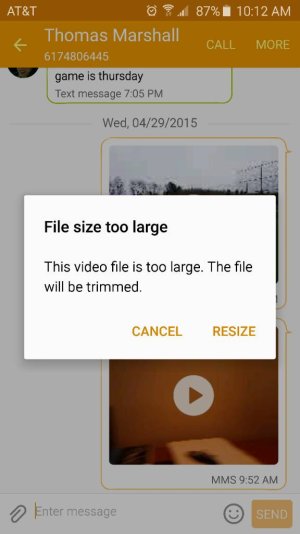
So i ran into a issue last night that could be a big problem for me down the road. I recorded a 15 sec video clip on my son saying something cute. I tried to text it to my sister (who has an iPhone) but it wouldnt attach. It said file is too large. a 15 sec video is too large??? It wasnt even on the highest setting (4K). It was on the default HD. I went into the details of the video and it was 29mb. Luckily I still have my iPhone 6 so I grabbed that, recorded my son again (of course it wasnt as good as the first time) and sent it to my sister via iMessage with no issue at all.

This may seem like a minor thing to some but the fact I cant text a 15 sec video clip to my family is ridiculous. I couldnt even email it. I love my S6 for the most part but for little things like this I can see why people prefer iOS. So my question, Is there a way to compress a video to send it via text? Am I doing something wrong? I did this all the time with my iPhone not only to other iPhone users but users on other platforms as well.
 
from what I recall on iOS you have the option to record it upfront in MMS compatible size (horrible quality).

If you are using the stock texting app on the s6 and you try to attach a file that is too large, it will ask you to compress it and it will come out in horrible quality. Another way is to go into camera settings and try recording at the lowest possible video quality and see if it's still too large.
 
FWIW For any video that I want to send to anyone and have it be in quality that they would actually want to see I use a cloud service (Google Drive). Take the video, upload to drive and then send them the link.
 
So i ran into a issue last night that could be a big problem for me down the road. I recorded a 15 sec video clip on my son saying something cute. I tried to text it to my sister (who has an iPhone) but it wouldnt attach. It said file is too large. a 15 sec video is too large??? It wasnt even on the highest setting (4K). It was on the default HD. I went into the details of the video and it was 29mb. Luckily I still have my iPhone 6 so I grabbed that, recorded my son again (of course it wasnt as good as the first time) and sent it to my sister via iMessage with no issue at all.

This may seem like a minor thing to some but the fact I cant text a 15 sec video clip to my family is ridiculous. I couldnt even email it. I love my S6 for the most part but for little things like this I can see why people prefer iOS. So my question, Is there a way to compress a video to send it via text? Am I doing something wrong? I did this all the time with my iPhone not only to other iPhone users but users on other platforms as well.

Yeah I went from an iPhone to my Note 3 and I noticed the same problem. I would say it's my single biggest complaint with Android and a valid reason to stay worth iPhone. There's no resolution.

The way it's like this is because Apple controls what you send on there phones while the carriers control Android, plain and simple add it pisses me off to no end. It really does ruin an otherwise topnotch Android experience.

Posted via the Android Central App
 
a 15 sec video is too large??? It wasnt even on the highest setting (4K). It was on the default HD. I went into the details of the video and it was 29mb.
I am asked about this all the time by my wife and friends. The length of the video is immaterial. The fact that it was 29mb and the max MMS size is typically 2mb means yes, the file is too large. You're talking about sending a 1080p video over lines that were originally set up to handle 320 x 240 clips. 29mb is too large for most email systems as well.

When you send it over iMessage, it's a purely data connection, and the max file size either doesn't apply or is much larger than 29mb (I'm not up on the ins and outs of iMessage). It's not like you can send a 29mb video clip over MMS just because you're using an iPhone.

The easiest thing to do is, assuming you and the recipient have Facebook, is to upload it to Facebook Messenger. Alternately, upload it to Dropbox or OneNote or Google Photo and share the link (at least one of those should be backing up your photos anyway).

I'm trying to get my wife to use Facebook Messenger and stop sending compressed pictures over MMS to her friends, but old habits die hard, I guess.
 
When you send it over iMessage, it's a purely data connection, and the max file size either doesn't apply or is much larger than 29mb (I'm not up on the ins and outs of iMessage)

iMessage will not let you send the large video file either...it compresses it to an unwatchable(IMO) quality, just like any other messaging service.

BTW - are you guys not reading my previous replies :) ?
 
from what I recall on iOS you have the option to record it upfront in MMS compatible size (horrible quality).

If you are using the stock texting app on the s6 and you try to attach a file that is too large, it will ask you to compress it and it will come out in horrible quality. Another way is to go into camera settings and try recording at the lowest possible video quality and see if it's still too large.

I see what you're saying but I disagree about the horrible quality. I used to send and receive video clips through iMessage all the time and the quality was just fine.
 
Yeah I went from an iPhone to my Note 3 and I noticed the same problem. I would say it's my single biggest complaint with Android and a valid reason to stay worth iPhone. There's no resolution.

The way it's like this is because Apple controls what you send on there phones while the carriers control Android, plain and simple add it pisses me off to no end. It really does ruin an otherwise topnotch Android experience.

Posted via the Android Central App

Couldnt agree more. This issue is damaging an otherwise great Android experience for me. Its a shame really.
 
Lol. The video quality of those files are HORRIBLE on iPhones. Just share it through a cloud service and the recipient can enjoy the video in its original quality
 
So frustrating as we shouldn't have to upload to a server. I want my family members to experience my moments with my son, immediately not in a while... My son walked for the first time today and I got conned into a Samsung when my entire family is iPhone (they failed to include the compression issues when upgrading recently) I've had to share the videos on messenger as I can't even send them as a message... I'm taking this phone back in tomorrow as I'm not happy and I was sold the incorrect phone most compatible with my family which they failed ti mention would be an issue...
 
So frustrating as we shouldn't have to upload to a server. I want my family members to experience my moments with my son, immediately not in a while... My son walked for the first time today and I got conned into a Samsung when my entire family is iPhone (they failed to include the compression issues when upgrading recently) I've had to share the videos on messenger as I can't even send them as a message... I'm taking this phone back in tomorrow as I'm not happy and I was sold the incorrect phone most compatible with my family which they failed ti mention would be an issue...

Sadly it is a carrier issue.
 
Sadly it is a carrier issue.

Truth! You would think this would be an easy problem to solve and one high on the priority list, especially with cameras on every single phone they sell.

That being said sending a video through imessage is essentially the same as uploading the clip to a cloud service. The only differnce being the extra steps of telling the service to upload the video and then sending the video link. Imessage just uploads the clip to its cloud and sends the link which appears as a video preview image. Then it downloads and plays for the recipient.

I agree that the imessage model is easier, but the benifit of using a cloud service is that it will show the video in its native resolution.

Posted via the Android Central App
 
Turn on enhanced mms in the messaging settings. Been sending videos of my son to my mom without issue.

Posted via the Android Central App
 
If you go into the messaging plus, go to the recipient, got to the conversation, hit the +, go to videos, hit camcorder and record a video. You can send one that way. It is really inconvenient in your case since your kids are being cute :( But for those of us who are use to sending a video rather than a long text it works well enough.
 
A friend of mine sent me a video through iMessage to my Android and the quality was terrible. I viewed it on his iPhone and it looked great. It was a video of me catching a white marlin, so I want a something watchable. This tells me that iMessage compresses video as well. Really, imo, the best way for everybody, if it's a video you wish to keep, is to upload it and send a link from Dropbox, Drive, etc. This insures you get quality video every time.

Posted via the Android Central App
 
I've got most of my family to use Google Photos. Just about everyone in my family has iPhone's. So I just share via that.

Sent from my SAMSUNG-SM-G920A using Tapatalk
 
A friend of mine sent me a video through iMessage to my Android and the quality was terrible. I viewed it on his iPhone and it looked great. It was a video of me catching a white marlin, so I want a something watchable. This tells me that iMessage compresses video as well. Really, imo, the best way for everybody, if it's a video you wish to keep, is to upload it and send a link from Dropbox, Drive, etc. This insures you get quality video every time.

Posted via the Android Central App

iMessage only works on Apple devices. If he sends something to your Android phone, it will change to a regular compressed MMS. That's why the quality was so poor. IPhone to iPhone, iMessage videos look pretty good.

Sent from my SM-G920V using Tapatalk
 
It all makes sense. You can't send a high quality video through mms. The file size is just 2 big
 

Trending Posts

Forum statistics

Threads
962,592
Messages
6,991,015
Members
3,164,871
Latest member
gamersOnedge
