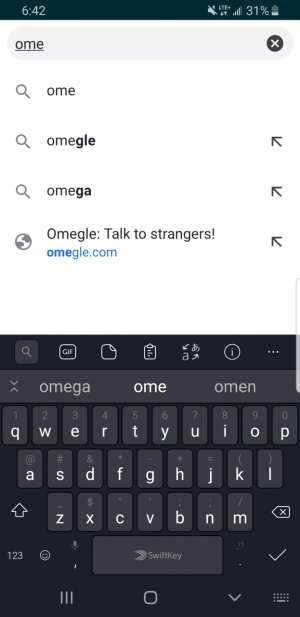
Site not disappearing in address bar

dusty500135762

New member
Feb 12, 2020
4
0
0
Using Google Chrome, i start to type in the first few letters of a site, and at the bottom it shows the rest of the word and the hyperlink. have tried cleaning the history and everything, along with my activity, but still won't go away. Please help, it's kind of annoying
 
Try this.
Open the Google browser.
Tap 3 dots select Settings
Select Search Engine.
Tap Google, this will bring you to the screenshot.
Clear the data I've circled.
Good luck
2761bee61608435072ba4eaf5799b195.jpg
 
tried doing all of the advice here and through searching, even uninstalling. Still type in a couple of letters and at the bottom of the suggested searches is that site and its link. also has a little globe to the left, if that's a hint.
 
Just posted a screenshot of the site. Can't seem to get rid of it no matter how much I try and clear settings and whatnot
 

Attachments

  • Screenshot_20200218-184227_Chrome.jpg
    Screenshot_20200218-184227_Chrome.jpg
    134.5 KB · Views: 6
Just posted a screenshot of the site. Can't seem to get rid of it no matter how much I try and clear settings and whatnot

Mine does the exact same thing and that's normal. You cannot change how it performs and predicts. Not sure why it's bothering you so much.
 
After launching Chrome, I went to the Settings, cleared the cache, turned off saving and autocomplete, and nothing remains but what you see now, regardless of the first letter(S) typed. Good luck
52fcdf941d4568f963ab34d9635d1d03.jpg
 

Members online

Forum statistics

Threads
960,933
Messages
6,984,264
Members
3,164,608
Latest member
Bride96