
- May 22, 2013
- 3
- 0
- 0
Hey all!
I'm knew, this is my first post. I'm having trouble with my LG Nexus 4 running Android 4.2.2. I've owned it for just around 2 months.
I've never had a problem with it before. At all. I'm in absolute love with my phone. However...
Monday (as in, two days ago) I noticed I was suddenly having trouble with unlocking my phone using Pattern. It would break at one point in the pattern almost every time - and while it would mostly NOT work, it would randomly work about 10% of the time.
That night I also noticed that hitting buttons in a certain section (basically, one row of smilies in Skype) had no results on tap and random results when swiping. Texting suddenly got 1000 x's more difficult as buttons around the backspace, b, and m (in landscape mode, as that's how I text best) misfired or never responded (again, randomly).
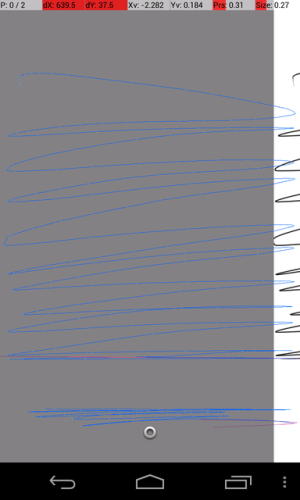
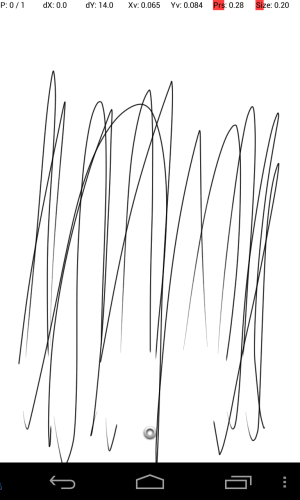
I finally found the developer tools that let me see where the touch traces, but the thin blue line was kinda hard to see. It inspired me, though, to use Sketchbook Pro to do the same thing. I've uploaded two results - one of an upward swipe, and one of a side to side swipe. You can see the unresponsive bar towards the bottom of the screen (and how sometimes it randomly works and sometimes it doesn't). Note on the side to side swipe, it actually moved my white background over (meaning it was taking two contact points like a two finger pinch - as in this program, you can use two fingers to move the page).
I haven't dropped my phone, haven't gotten it wet - in fact that day it got pretty much neglected and sat on my work desk. My first inclination was to remove the battery, as I hadn't done so to that point - and quickly realized this little bugger isn't unlike the iPhone in that you can't exactly get to it
I need to know if this is a software issue (and how to fix it), or if this is something I should take back to T-Mobile and exchange under warranty.
I'm knew, this is my first post. I'm having trouble with my LG Nexus 4 running Android 4.2.2. I've owned it for just around 2 months.
I've never had a problem with it before. At all. I'm in absolute love with my phone. However...
Monday (as in, two days ago) I noticed I was suddenly having trouble with unlocking my phone using Pattern. It would break at one point in the pattern almost every time - and while it would mostly NOT work, it would randomly work about 10% of the time.
That night I also noticed that hitting buttons in a certain section (basically, one row of smilies in Skype) had no results on tap and random results when swiping. Texting suddenly got 1000 x's more difficult as buttons around the backspace, b, and m (in landscape mode, as that's how I text best) misfired or never responded (again, randomly).
I finally found the developer tools that let me see where the touch traces, but the thin blue line was kinda hard to see. It inspired me, though, to use Sketchbook Pro to do the same thing. I've uploaded two results - one of an upward swipe, and one of a side to side swipe. You can see the unresponsive bar towards the bottom of the screen (and how sometimes it randomly works and sometimes it doesn't). Note on the side to side swipe, it actually moved my white background over (meaning it was taking two contact points like a two finger pinch - as in this program, you can use two fingers to move the page).
I haven't dropped my phone, haven't gotten it wet - in fact that day it got pretty much neglected and sat on my work desk. My first inclination was to remove the battery, as I hadn't done so to that point - and quickly realized this little bugger isn't unlike the iPhone in that you can't exactly get to it
I need to know if this is a software issue (and how to fix it), or if this is something I should take back to T-Mobile and exchange under warranty.



 Facebook
 Twitter
 Instagram