Syncing S-Memo with Evernote

Dec 25, 2012
9
0
0
Hi,

I have copied across various notes from my old phone to my S4, using Samsung's Smart Switch utility. The notes are automatically placed into S-Memo.

Now, I'd like to get them into Evernote. The problem is that the syncing in S-Memo does not seem to work. I have gone into the 'Accounts' page in the menu and added my Evernote account. Then..... nothing happens. Syncing does not happen automatically, and there is no actual Sync button in the app to manually sync either. I added my Google Docs account too, and nothing happens with that either. No sync button, and no automatic syncing.

It is strange because I have used S-Memo on the Galaxy Note, and in that version there is a 'Sync' button in the menu. On the S4, the menu just contains these options:

Search
Delete
Sort by
List view
Import
Export
Create folder
Move
Copy
Settings
Help

... No Sync! It's listed in that menu on my Galaxy Note, but not on my S4.

So S-Memo lets you add your Evernote/Google Docs accounts but it doesn't seem possible to actually sync your notes?
 
My wife has the same problem with her S4...she switched from Iphone and wants all her notes in something else besides S Memo. I have written the developer of colornote to see if they can help me.
 
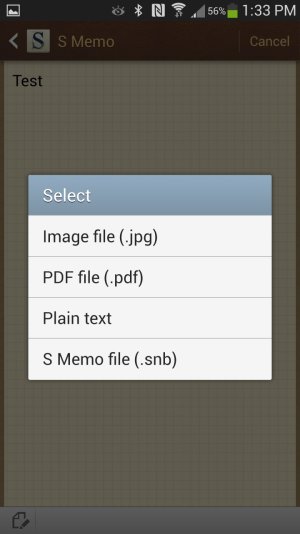
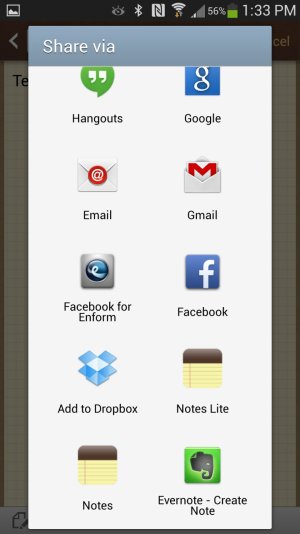
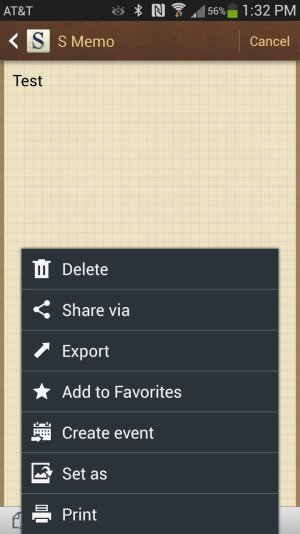
I wasn't able to sync, but I could transfer a note to Evernote from S Memo.
Share via, plain text, Evernote

John
 

Attachments

  • Screenshot_2013-06-03-13-32-44.jpg
    Screenshot_2013-06-03-13-32-44.jpg
    169 KB · Views: 32
  • Screenshot_2013-06-03-13-33-07.jpg
    Screenshot_2013-06-03-13-33-07.jpg
    141.5 KB · Views: 32
  • Screenshot_2013-06-03-13-33-19.jpg
    Screenshot_2013-06-03-13-33-19.jpg
    125.5 KB · Views: 33
Thanks...she has about 170 or so notes....so doing these 1 at a time would be tough..I wonder if there is a way to export those and then do a share of them all...humm...I will try that...what could it hurt.
 
Not sure if this is still an issue for people, but you can import or export, but not sync. I import all of my notes from my 10.1
 
Same problem here. It unfortunate because I see the ability to sync these notes to my Evernote as a huge plus.
 
I have just synced S Memo with Evernote. Didn't know I could until I read your posts :-)
Make sure the master sync is turned on; create a note and save it, then it's automatic.
When you view your notes on the start screen, you see a little circle in the top left corner of each note. They will change to little clouds when the app has synced. ;-) .
 
Can you say some more about this, Rodney? What do you mean by "master sync"? On the main S Memo screen, I see my notes with the little circle you describe (which I don't remember seeing before; maybe this is new in the recent update?). I don't see anything anywhere in S Memo, though, about syncing, except for syncing to my Samsung account, which is every bit as useless as it sounds.

From the main S Memo screen, I can press the Menu key and go to Settings, where there are accounts to sign in to, including my Evernote account. I signed in to that, but I still didn't see any sync option, nor have the circles changed to clouds. I tried exporting a note to Evernote. When I went to Evernote, there was a new notebook for S Memo, and it had the note I exported in it. But I couldn't view the note because it was in S Memo's native .SNB format, which nothing else can read. Thus the export was meaningless.

f you can clarify this process for me, I'd love it. S Memo is in some ways a more capable editor than Evernote, as regards copying and pasting, anyway, though it can't do what Evernote can do in terms of formatting. Being able to coordinate/sync the two would be great.
 
Dave_in_Decateur?
Go to settings-notification panel and you will see a lot of buttons you can press to turn on different features. One of them is called SYNC which is the ?master sync?; an expression I got from my outlook email app.
SYNC will sync all your apps.
Make sure it is on.
It is easily accessible if you swipe down from the top of you home screen.
Type your note in S Memo and save it.
It should sync with your accounts automatically.
I have checked with Evernote and my synced note is there and it is readable.:-)
 
Hmm, OK, that's what I thought "master sync" would be, and it's on and stays on. I'll have to play with S Memo some more.

So you find that your S Memos automatically sync to Evernote as plain text? Is there some setting in Evernote that I need to set? Thanks!
 
Yeah, play with S Memo more.
You don't have to use any settings or convert to text; it's simple and automatic.
Evernote handles .SNB files and displays them as text.
I am using JB 4.2.2 and Evernote 5.4.2.
I added another note today and it synced just fine.
If yours won't sync it must be a software problem. :-[

So Be It.
 
I am having the same issue.
The smemo of my S4 does not sync with evernote even though i have the master sync ON and the settings of the smemo syncing logged in to my evernote account . No sync button anywhere.
The Samsung account seems to work and i am getting the clouds to my note, but where can i find my notes (is there a website that i can log in to my samsung account and view my notes?)
 
Yeah, play with S Memo more.
You don't have to use any settings or convert to text; it's simple and automatic.
Evernote handles .SNB files and displays them as text.
I am using JB 4.2.2 and Evernote 5.4.2.
I added another note today and it synced just fine.
If yours won't sync it must be a software problem. :-[

So Be It.
Figured it out: I'm not only using Evernote 5.3.1, it's the free version. I imagine they require the paid version for this to work (I would if I were they). Thanks for your help, RodneyK!
 
I am not so sure about the paid version Dave. I am starting to believe that its a Samsung Galaxy S4 Smemo version issue.
But how about the samsung account? Is there a web version that we can view our notes?
 
Hi,

I have copied across various notes from my old phone to my S4, using Samsung's Smart Switch utility. The notes are automatically placed into S-Memo.

Now, I'd like to get them into Evernote. The problem is that the syncing in S-Memo does not seem to work. I have gone into the 'Accounts' page in the menu and added my Evernote account. Then..... nothing happens. Syncing does not happen automatically, and there is no actual Sync button in the app to manually sync either. I added my Google Docs account too, and nothing happens with that either. No sync button, and no automatic syncing.

It is strange because I have used S-Memo on the Galaxy Note, and in that version there is a 'Sync' button in the menu. On the S4, the menu just contains these options:

Search
Delete
Sort by
List view
Import
Export
Create folder
Move
Copy
Settings
Help

... No Sync! It's listed in that menu on my Galaxy Note, but not on my S4.

So S-Memo lets you add your Evernote/Google Docs accounts but it doesn't seem possible to actually sync your notes?