Themes question

JC8865

Well-known member
Feb 8, 2018
45
0
0
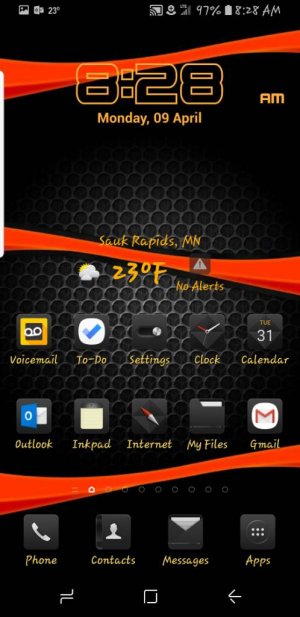
Is there a way to save what's on your phone as an actual "theme"...I'm using a wallpaper and icons from different places sort of a mix and match but don't see anywhere to actually save it.

JC
 
Here's what I have now... wallpaper from the web and the icons from the Samsung themes store..just some free ones..but I cant actually save it as anything.Screenshot_2018-04-09-08-28-25.jpg
 
You lost me on how Smart Switch could save as Themes..isn't that just for transferring data to a different phone?..I used that when I bought my S8+

JC
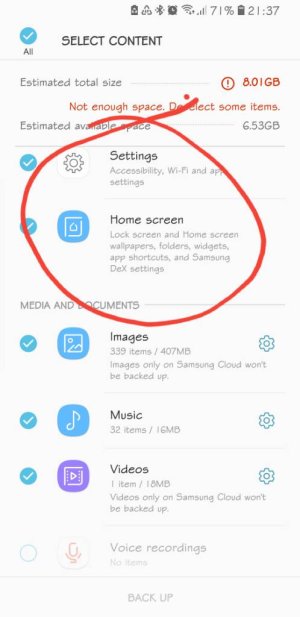
Check the pic. The Smart Switch app can back up your homescreen data to the SD card.
 
Check the pic. The Smart Switch app can back up your homescreen data to the SD card.
I understand the backing up but it still doesn't save it as an actual "Theme"... It saves what you currently would have but if you change it and want to revert back it's not saved as an actual"Theme" that would be listed anywhere.
 
I understand the backing up but it still doesn't save it as an actual "Theme"... It saves what you currently would have but if you change it and want to revert back it's not saved as an actual"Theme" that would be listed anywhere.
Actually you can make a backup of just the setup and copy that backup to another storage. It's easier using the PC version of the program. Since that allows you to view and choose from multiple backups to restore. If you use that, you can create several backups of just the homescreen setup. The downside is you need to use the PC everytime you restore. Or you have to manually move around files in the My Files app.
 
Actually you can make a backup of just the setup and copy that backup to another storage. It's easier using the PC version of the program. Since that allows you to view and choose from multiple backups to restore. If you use that, you can create several backups of just the homescreen setup. The downside is you need to use the PC everytime you restore. Or you have to manually move around files in the My Files app.
Seems like alot of screwing around..you'd think that with S8 and the S9 being so big on Customization there would be a simple way to "save current theme as" I can never find an actual theme I like so I constantly mix and match stuff.
 
Seems like alot of screwing around..you'd think that with S8 and the S9 being so big on Customization there would be a simple way to "save current theme as" I can never find an actual theme I like so I constantly mix and match stuff.
Yeah. But the Samsung theme thing is pretty new still and it's changing every iteration. It's not like it already had the 10 years of Android launchers. Personally though I still stick to Nova.
 
I made a backup through PC and smartswitch . But after the factory reset only some apps and my wallpaper came back on the home screen. Not all, but I made some screenshots to be sure so was back at it in no time.
I use a memory card for storage which does make things quicker.
 

Trending Posts

Forum statistics

Threads
961,295
Messages
6,985,642
Members
3,164,695
Latest member
kabarba2