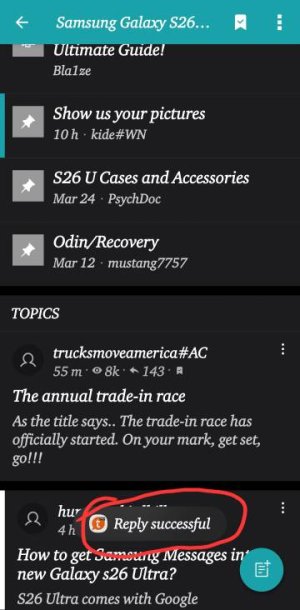
T trucksmoveamerica#AC Trusted Member Jul 20, 2010 8,877 1,856 113 Yesterday at 11:59 AM #1 Does anyone know how to control those, or even turn them off? On my S26U they stay on the screen too long for my liking.
Does anyone know how to control those, or even turn them off? On my S26U they stay on the screen too long for my liking.
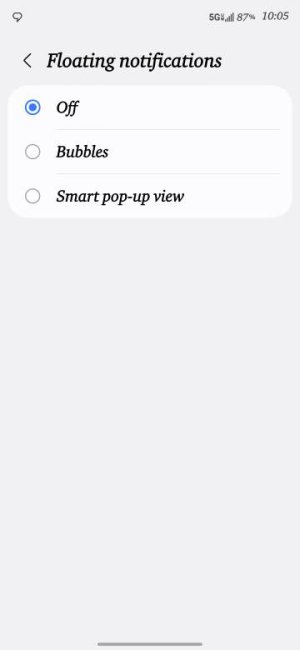
Bkdodger1 Well-known member Jun 27, 2019 6,026 6,847 113 Yesterday at 12:11 PM #2 trucksmoveamerica#AC said: Does anyone know how to control those, or even turn them off? On my S26U they stay on the screen too long for my liking. View attachment 374257 Click to expand... Search under the settings for floating notifications and you can turn off Smart pop-up view Reactions: BerryBubbles
trucksmoveamerica#AC said: Does anyone know how to control those, or even turn them off? On my S26U they stay on the screen too long for my liking. View attachment 374257 Click to expand... Search under the settings for floating notifications and you can turn off Smart pop-up view
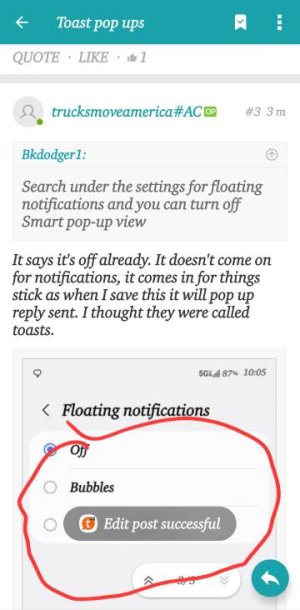
T trucksmoveamerica#AC Trusted Member Jul 20, 2010 8,877 1,856 113 Yesterday at 3:06 PM #3 Bkdodger1 said: Search under the settings for floating notifications and you can turn off Smart pop-up view Click to expand... It says it's off already. It doesn't come on for notifications, it comes in for things stick as when I save this it will pop up reply sent. I thought they were called toasts. Last edited: Yesterday at 3:13 PM
Bkdodger1 said: Search under the settings for floating notifications and you can turn off Smart pop-up view Click to expand... It says it's off already. It doesn't come on for notifications, it comes in for things stick as when I save this it will pop up reply sent. I thought they were called toasts.
T trucksmoveamerica#AC Trusted Member Jul 20, 2010 8,877 1,856 113 Yesterday at 3:13 PM #4 Here's another example
Bkdodger1 Well-known member Jun 27, 2019 6,026 6,847 113 Yesterday at 3:24 PM #5 trucksmoveamerica#AC said: Here's another exampleView attachment 374264 Click to expand... I wonder if that's from your keyboard or AI
trucksmoveamerica#AC said: Here's another exampleView attachment 374264 Click to expand... I wonder if that's from your keyboard or AI
T trucksmoveamerica#AC Trusted Member Jul 20, 2010 8,877 1,856 113 Yesterday at 3:55 PM #6 Bkdodger1 said: I wonder if that's from your keyboard or AI Click to expand... If I remember right it's a Samsung thing, but I can't remember.
Bkdodger1 said: I wonder if that's from your keyboard or AI Click to expand... If I remember right it's a Samsung thing, but I can't remember.
B. Diddy Senior Ambassador Moderator Mar 9, 2012 169,647 11,065 113 Yesterday at 4:24 PM #7 Search for "Time to take action" in your system settings, and make sure that's set to Default. Reactions: mustang7757 and BerryBubbles
T trucksmoveamerica#AC Trusted Member Jul 20, 2010 8,877 1,856 113 Yesterday at 11:46 PM #8 B. Diddy said: Search for "Time to take action" in your system settings, and make sure that's set to Default. Click to expand... I'll check that out That was it, I set it to 30 seconds so the pop up notifications would stay on longer than a second. Last edited: Today at 12:01 AM Reactions: B. Diddy
B. Diddy said: Search for "Time to take action" in your system settings, and make sure that's set to Default. Click to expand... I'll check that out That was it, I set it to 30 seconds so the pop up notifications would stay on longer than a second.
mustang7757 Admin Moderator Moderator Feb 6, 2017 98,903 15,548 113 Today at 7:26 PM #9 trucksmoveamerica#AC said: I'll check that out That was it, I set it to 30 seconds so the pop up notifications would stay on longer than a second. Click to expand... Yeah Time to take Action should always be set to default otherwise those toast notifications look like be on your screen forever
trucksmoveamerica#AC said: I'll check that out That was it, I set it to 30 seconds so the pop up notifications would stay on longer than a second. Click to expand... Yeah Time to take Action should always be set to default otherwise those toast notifications look like be on your screen forever
T trucksmoveamerica#AC Trusted Member Jul 20, 2010 8,877 1,856 113 Today at 8:23 PM #10 mustang7757 said: Yeah Time to take Action should always be set to default otherwise those toast notifications look like be on your screen forever Click to expand... I know, but I want the notification pop ups to stay on longer. I would just as soon lose the toast pop ups, they are kind of useless in my mind
mustang7757 said: Yeah Time to take Action should always be set to default otherwise those toast notifications look like be on your screen forever Click to expand... I know, but I want the notification pop ups to stay on longer. I would just as soon lose the toast pop ups, they are kind of useless in my mind
mustang7757 Admin Moderator Moderator Feb 6, 2017 98,903 15,548 113 Today at 8:24 PM #11 trucksmoveamerica#AC said: I know, but I want the notification pop ups to stay on longer. I would just as soon lose the toast pop ups, they are kind of useless in my mind Click to expand... I don't like them at all even at default
trucksmoveamerica#AC said: I know, but I want the notification pop ups to stay on longer. I would just as soon lose the toast pop ups, they are kind of useless in my mind Click to expand... I don't like them at all even at default





 Facebook
 Twitter
 Instagram