
Hello guys,
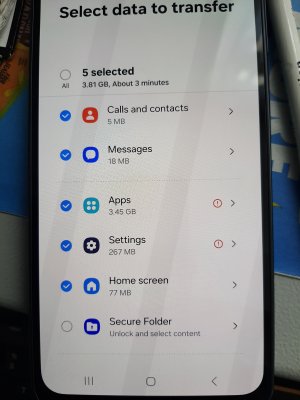
New phone > select data to transfer
On your old phone, unlock Secure Folder & select content to copy
So, I Enter PIN in the A50. I get >
SECURE FOLDER
Contacts
Calendars
Photos
Videos
Music
Documents
All the above greyed out.
Apps (tick)
Secure folder settings (tick)
Done
Secure Folder Password.
Remember this password. You’ll need it to bring your Secure Folder data to a new phone or tablet.
This password can’t be recovered.
Your password must contain at least 6 characters, including at least 1 letter.
Please see attachment from A16
Thank you.
But now the A50 keypad has letters & numbers, so I cannot use numbers only.
New phone > select data to transfer
On your old phone, unlock Secure Folder & select content to copy
So, I Enter PIN in the A50. I get >
SECURE FOLDER
Contacts
Calendars
Photos
Videos
Music
Documents
All the above greyed out.
Apps (tick)
Secure folder settings (tick)
Done
Secure Folder Password.
Remember this password. You’ll need it to bring your Secure Folder data to a new phone or tablet.
This password can’t be recovered.
Your password must contain at least 6 characters, including at least 1 letter.
Please see attachment from A16
Thank you.
But now the A50 keypad has letters & numbers, so I cannot use numbers only.



 Facebook
 Twitter
 Instagram