Verizon MM / Updates

Re: Verizon S5 blocking the upgrade to Marshmallow.

Yes, I understand this too - but has also stated in many other posts that he will not install the "latest" Lollipop update because of some issues reported by various users. If this update is a problem, and he is planning to upgrade to 6.0.1, then the "issue" is moot because it will be erased as soon as Marshmallow is installed.

Correctomundo can3gxw. I was trying to preempt any other suggestions, including flashing firmware via Odin. I'll get me coat!
 
Re: Verizon S5 blocking the upgrade to Marshmallow.

Update on Marshmallow

I'll make a long story short. The advice I received here worked. There were a few maddening moments, but overall, I was finally able to install Marshmallow. I believe the uninstalled 5.0 update from 6 months ago created the problems. After 3 attempts to install 6.0.1, it finally succeeded.

Your persistent help to this hard-headed worry wart is much appreciated. Thanks again.

Samsung Galaxy S5 Lollipop 5.0 Verizon
 
Re: Verizon S5 blocking the upgrade to Marshmallow.

Woohoo! I love happy endings. Glad you're on board with the sticky gooiness that is Marshmallow! Now before you do ANYTHING, do a factory reset to be sure that any lingering Lollipops have been eaten. Then go about your day and enjoy your brand new phone.
 
Wipe cache

I have 2 year old instructions on how to clean the cache. I just tried it because I upgraded to Marshmallow. I last used it after I upgraded to Lollipop. It gave me strange screens so I interrupted the process. How do I clean the cache with Marshmallow? Thanks.

Samsung Galaxy S5 Marshmallow 6.0.1 Verizon
 
Re: Wipe cache

I simply go to Settings/Storage/Cached data and click it then click Ok.
 
Re: Wipe cache

I simply go to Settings/Storage/Cached data and click it then click Ok.

I'm aware of that and clean the cache weekly. There used to be a procedure in where you would press the power Key, volume Key and the home Key simultaneously. I assume it's no longer available.

Samsung Galaxy S5 Marshmallow 6.0.1 Verizon
 
Re: Wipe cache

That procedure is a complete recovery. To keep my "available" space fairly stable I do the clean cache and use CCleaner to do this.

Posted via the Android Central App
 
Marshmallow problem

I recently upgraded to Android Marshmallow 6.01. I want to change what happens when I use the SHARE command. I've read all the instructions but they refer to items that my system doesn't have. I. E. COG wheel on the app settings screen. I'm trying to change what happens when I select the SHARE icon, especially in news readers. Can anyone help? Thanks.

Samsung Galaxy S5 Marshmallow 6.0.1 Verizon
 
Re: Marshmallow problem

Do you have any specific examples of what and where you're trying to share? My thought was that the "share" option was app specific, and perhaps the app developer has not properly updated the app for Marshmallow. I have a couple of apps that didn't work all that great when I upgraded, but reinstalling fixed the issue.

Have you done a factory reset on your phone yet? If not, maybe try uninstalling the app and reinstalling? You might get a better version.

What newsreader app are you using? Where are you trying to share it to? Maybe I can try to reproduce it...
 
Re: Marshmallow problem

Do you have any specific examples of what and where you're trying to share? My thought was that the "share" option was app specific, and perhaps the app developer has not properly updated the app for Marshmallow. I have a couple of apps that didn't work all that great when I upgraded, but reinstalling fixed the issue.

Have you done a factory reset on your phone yet? If not, maybe try uninstalling the app and reinstalling? You might get a better version.

What newsreader app are you using? Where are you trying to share it to? Maybe I can try to reproduce it...

I upgraded to Marshmallow yesterday. The share command worked fine. I always had the option to "perform once or always" once selected, it would not question me again. The cog icon specified in the instructions, is not shown in the app settings. I still need help. Thanks.

Samsung Galaxy S5 Marshmallow 6.0.1 Verizon
 
Re: Marshmallow problem

The cog icon specified in the instructions, is not shown in the app settings

It may have been replaced with either three dots (...) or three horizontal lines. This is where you would go to get to the settings.

What app, specifically, are you using? The settings may be in a different place (developers put stuff in weird places)
 
Re: Marshmallow problem

It may have been replaced with either three dots (...) or three horizontal lines. This is where you would go to get to the settings.

What app, specifically, are you using? The settings may be in a different place (developers put stuff in weird places)

I don't have the 3 dot menu either. As I mentioned, this worked yesterday. The newsreaders I'm using are among others but a few are :SmartNews, Feedly and others.

Samsung Galaxy S5 Marshmallow 6.0.1 Verizon
 
Marshmallow settings

I just upgraded 5.0 to 6.01. What happened to the ability to scroll to see Running apps, disabled apps, etc,. Thanks.

Samsung Galaxy S5 Marshmallow 6.0.1 Verizon
 
Re: Marshmallow settings

Running apps now are included in the Developer Options. To see the disabled ones tap on the little down arrow right of 'all apps'.
 
Re: Marshmallow problem

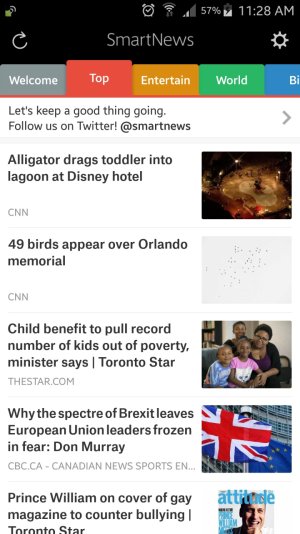
I just downloaded and started up SmartNews and I have the cog at the top - it disappears when I move through the app, but dragging the screen down makes it reappear. Here is a screen shot:

Screenshot_2016-06-15-11-28-56.jpg

So you're saying that you do not see that cog at all, even if you gently pull down from the top?
 
I just downloaded and started up SmartNews and I have the cog at the top - it disappears when I move through the app, but dragging the screen down makes it reappear. Here is a screen shot:

View attachment 230102

So you're saying that you do not see that cog at all, even if you gently pull down from the top?
Thanks but That's not what I'm saying. The cog I'm mentioning is the cog described in the instructions after opening the Application setting. What I meant was after viewing the headline in SmartNews, when you click on it, click Mail, I used to get options like, Mail to Self, New Mail etc. It doesn't happen now with Marshmallow. Any other suggestions?

Samsung Galaxy S5 Marshmallow 6.0.1 Verizon
 
Last edited:
Re: Marshmallow problem

What instructions are you following? Where are these instructions from?
 
Running apps now are included in the Developer Options. To see the disabled ones tap on the little down arrow right of 'all apps'.

There is no such little down arrow in any category in Developer setting. What am I doing wrong? Please remember, we're talking about Marshmallow.
Thanks.

Samsung Galaxy S5 Marshmallow 6.0.1 Verizon
 
Re: Marshmallow settings

There is no such little down arrow in any category in Developer setting. What am I doing wrong? Please remember, we're talking about Marshmallow.
Thanks.

Samsung Galaxy S5 Marshmallow 6.0.1 Verizon

They were two different sentences :)

Running apps - open the Developer Options and they should be in the first section.

Disabled apps. Open the 'all' menu in your app manager. Maybe it's a little bit different in the S5.
 

Trending Posts

Forum statistics

Threads
960,746
Messages
6,983,548
Members
3,164,560
Latest member
nonyabizness