Verizon MM / Updates

Re: Marshmallow settings

That's interesting. We have identical phones, identical operating system versions. Are you using TouchWiz?

Samsung Galaxy S5 Marshmallow 6.0.1 Verizon

Like can3gxw, I'm using Nova Launcher (Prime). However, I tried it with TouchWiz, and the option was still there.
 
Re: Marshmallow settings

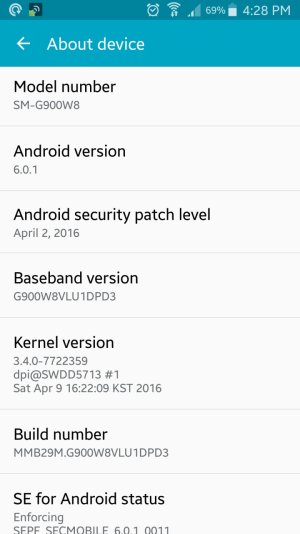
What about the section that shows the actual model number, android version, baseband and build number? This part of the screen?

Screenshot_2016-06-17-16-28-58.jpg
 
Re: Marshmallow settings

Can anyone else see IMANUT's screenshots? I only see one, but directly above it, it shows "attached thumbnails". I have no option to view them all...
 
Re: Marshmallow settings

I can only see one screenshot in post #21 from IMANUT46. Is this the one you mean old stick...

 
Re: Marshmallow settings

When I attached the screenshots, all of them show. When I view the post, I can see all of the attachments. I'll resend them in a separate post.

Samsung Galaxy S5 Marshmallow 6.0.1 Verizon
 
Memory use Marshmallow

Marshmallow instructions for the display of memory use states "Go to the Settings app, then tap Memory". I have no such category in my settings. Does anyone know why?

Samsung Galaxy S5 Marshmallow 6.0.1 Verizon
 
Re: Memory use Marshmallow

it is under storage, then long press internal storage until the details of the internal storage are shown. that will give you the details on what is using what. If you press explore at the bottom of the list you get My Files which allows you to look at each individual file, organized by folders

Verizon
6.01
 
Re: Memory use Marshmallow

Thanks for your help. I can readily see what memory is being used.

I see apps that I use, but some of them are not needed, ie ESPN, until I click on them. Some of these apps need to be running in the background so I can get notifications. How do I stop these apps from using memory, without uninstalling. Thanks for your patience in helping me understand Marshmallow.

Samsung Galaxy S5 Marshmallow 6.0.1 Verizon
 
Links not opening in marshmallow.

I've been using this forum for several years and links posted by other users have always worked. Since the update to Samsung Galaxy S5 Marshmallow 6.0.1 Verizon edition, they no longer work. Does anyone know why, and if so, what is the fix? Thanks.

Samsung Galaxy S5 Marshmallow 6.0.1 Verizon
 
Re: Links not opening in marshmallow.

You would think that this forum is staffed with experts and could figure out the problem, especially since the links used to work. Go figure!

Samsung Galaxy S5 Marshmallow 6.0.1 Verizon
 
For the record the forum is not staffed. We are enthusiasts who try and help. At least to the best of my knowledge. Not even ironass is paid

Posted via the Android Central App
 
For the record the forum is not staffed. We are enthusiasts who try and help. At least to the best of my knowledge. Not even ironass is paid

Posted via the Android Central App

OK. Sorry. You folks do a good job. Thanks.

Samsung Galaxy S5 Marshmallow 6.0.1 Verizon
 

Latest posts

Trending Posts

Members online

Forum statistics

Threads
960,680
Messages
6,983,204
Members
3,164,543
Latest member
rajaryson24