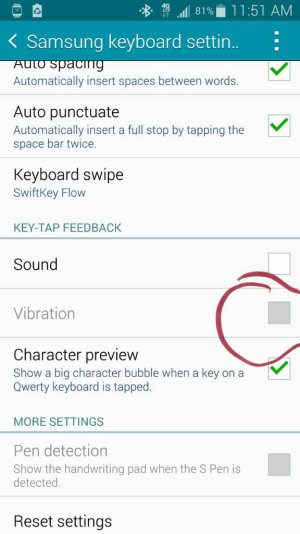
Vibration on Keyboard not available?

Sammuel1973

Well-known member
Nov 24, 2013
990
3
18
Not sure if it matters. I have T Mobile. The option to activate is not available. Please see the attached pic. Is there any other way to enable it? Thanks!
 

Attachments

  • 1414598186158.jpg
    1414598186158.jpg
    59.3 KB · Views: 25
re:

I have the Verizon version and the vibrate mode in the keyboard settings is not grayed out. I am clearly no help.
 
re:

That's weird. It shouldn't matter, but in Settings>Sound, do you have Vibration turned off there? If so, see what happens if you turn it on there, then go back to the Keyboard settings.

Does vibration work at all on your phone, apart from the keyboard?
 
re:

I have the Verizon version and the vibrate mode in the keyboard settings is not grayed out. I am clearly no help.
Thanks though.
That's weird. It shouldn't matter, but in Settings>Sound, do you have Vibration turned off there? If so, see what happens if you turn it on there, then go back to the Keyboard settings.

Does vibration work at all on your phone, apart from the keyboard?
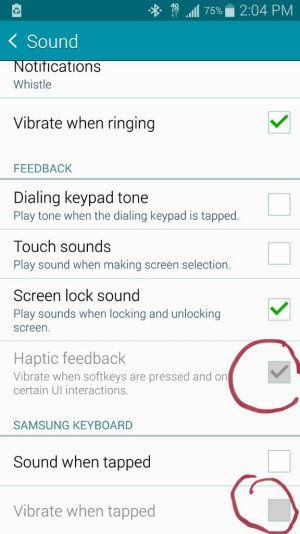
I have tried to turn off/on vibration in Sound under Setting; see attached pic. I also did the same in the Notification bar on top in Toggles, but no luck. Interestingly, vibration has been working perfectly when I get email notifications, alerts, calls, etc. Seems like I can't get it to work in the keyboard.
 

Attachments

  • 1414606241332.jpg
    1414606241332.jpg
    58.1 KB · Views: 19
re:

Turn off power saving mode. If mine is on it won't work.

Posted via the Android Central App
 
re:

Turn off power saving mode. If mine is on it won't work.

Posted via the Android Central App
That did it, problem solved! Thank you. I wonder what other features I can't access cuz of having power saving mode on the whole time.
 

Trending Posts

Forum statistics

Threads
961,132
Messages
6,985,076
Members
3,164,657
Latest member
Rocky _ AV