Weird spell check comes on when holding the delete button, how do I turn it off?

  • Thread starter Thread starter AC Question
  • Start date Start date
A

AC Question

Weird spell check comes on when holding the delete button

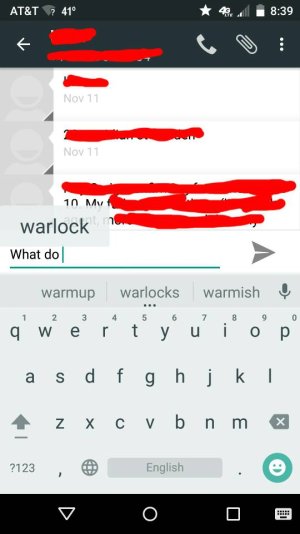
So I have this weird spell check thing that pops up above the auto complete bar after I hold the delete button when in any messenger app including the default texting app. Does anyone know what it is and how to turn it off? I have a picture but I don't know how to upload I'm new to the forums.

Thanks
 
Re: Weird spell check comes on when holding the delete button

I have a moto X (gen 2 2014). Here is the picture of the issue.

Posted via the Android Central App
 

Attachments

  • 74739.jpg
    74739.jpg
    40.8 KB · Views: 2
Thanks for registering! Is that Google Keyboard? If so, I can see if it happens on my devices as well.
 
Re: Weird spell check comes on when holding the delete button

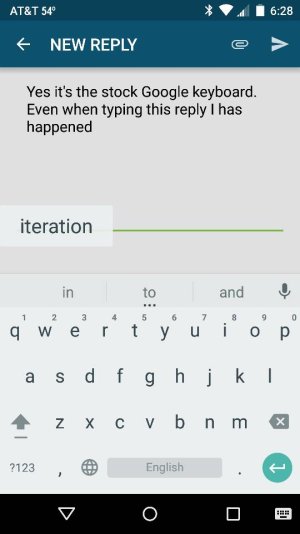
Yes it's the stock Google keyboard. Even when typing this reply its happening.

Posted via the Android Central App
 
Re: Weird spell check comes on when holding the delete button

You can't click the work iteration it just sits there. It gets in the way of longer post or texts

Posted via the Android Central App
 

Attachments

  • 74740.jpg
    74740.jpg
    37.2 KB · Views: 1
That's strange--I can't duplicate that. When I'm using Hangouts and composing a text, if I hold down the backspace button, all it does is backspace repeatedly. Sorry, I'm not sure what's causing that--hopefully someone else can chime in!
 
Re: Weird spell check comes on when holding the delete button

Tried a soft rest which solved the issue. Thanks for the help

Posted via the Android Central App
 
Great! I should've thought of that.;) Do you mean you just did a reboot, or an actual factory reset?
 

Trending Posts

Members online

Forum statistics

Threads
963,112
Messages
6,992,665
Members
3,164,979
Latest member
bukablokiratmpaninmobile