Question Which music player for Samsung S10+, files are on a Mac

Dougoid

Member
Jan 31, 2018
9
0
1
I drive older cars with no connectivity. Until recently I played my toonz through an iPod Classic via an FM transmitter which suited me fine. The iPod became unresponsive and I accidentally factory reset it, and since Apple don't support it any more I can't configure/operate it via the iMac.

I'm hoping someone can suggest a means of getting the music copied to my Samsung S10+. The tracks are on an external drive connected to my iMac, and accessed through the Apple Music App which I understand replaced iTunes. Having searched for Android music players and viewed a few YouTube videos, there seem to be few which can deal with a Mac, and reviews are not universally reassuring.

I can't be the first to face this inconvenience, and hope for some helpful suggestions.

Many Thanks and if you're observing - season's greetings.
 
Depends on how you obtained the files. If they are iTunes purchases, you're pretty much out of luck. iTunes downloads are encrypted and can only be accessed through iTunes. You should be able to, however, sync your iTunes library to an Android phone using apps like iSyncr or DoubleTwist (but you still need iTunes on your PC/Mac).

If the music is available through Apple Music, you can just install that on an Android device as well.

If the files are non-DRM MP3/MP4 files, then you can just copy those to the phone either through USB (just like a flash drive) or wirelessly through Bluetooth or a cloud service. Then you can either use the phone's native music player or use a 3rd party one (DoubleTwist is usually considered the 'iTunes of Android' or PowerAmp; plenty of options here!).
 
Thanks. Should have said - all the music is mp3 or mp4 from CDs, done on the previous disc drive-equipped iMac.

I'll look again for a music player - I can't find the expected Samsung one. The list in apps doesn't include "Samsung Music" or anything similar.

Can anyone confirm PowerAmp or Double Twist will communicate with Mac and do I have to install on the 'phone and the Mac?

Thanks again.
 
You may have to download it from the Galaxy Store. Samsung stopped pre-loading some apps but it should be available there. I used DoubleTwist in the past (read AGES ago) but only on a PC. It was highly rated and useful back then, hopefully it still is today. But if the files are MP3, you just have to transfer them to the phone (the 'beauty' of DoubleTwist is that it tried to preserve your Playlists instead of just the bulk of the files). You should be able to do this with a Mac, IIRC and the phone would show up as an external drive. Then any music app on your phone would see the audio files and be able to play them.
 
Thanks for the comments.

When I configure the phone and plug into the Mac, AFT opens but says nothing is connected. I might just get a used iPhone, which will presumably be easier to copy the music to, and use that as a music source in the car via bluetooth to an FM transmitter. Or something like that.

Thanks again.
 
Sorry a little late to the party on this one. I skimmed through the comments. Just a few questions before I offer any advice.

What do you mean when you say, I configured the phone..., do you mean you put the phone in external storage mode? Please describe the steps used to perform this configuration step.

I usually have more questions but I can't think of any more for the moment.

Based on your last comment it sounds like you didn't set the USB connection to "external storage" or it might be called "data transfer" for you. Either way, if you just plug in the phone the USB setting defaults to Charge only. This is a safety feature to prevent someone from plugging your phone into a computer and just taking any of your data or media. Your comment reads that you something to the phone first, then plugged it in to the Mac. Changing this setting would be something you could only do after it was plugged in. You may have mis-spoke when you talked about the order but we need to know your steps and in the correct order to offer you the right advice. Not having this setting correct would explain why you would see your phone in Mac's file manager but when you open it, the folder would be empty.

To switch to data transfer mode follow these simple steps. Make the USB connection between the devices>unlock the phone and pull down the notification shade>locate the USB notification (it usually shows the USB icon)>tap this notification to open the USB options>select data transfer. You may have to unlock again in this settings menu, but I'm sure that will be obvious to you when you are performing these steps. After making this change the folder on your Mac should contain your phone storage.

Let us know what those steps are you used to configure the phone, and if making this change enabled you to view your files for transfer.
 
  • Like
Reactions: Laura Knotek
I appreciate your taking an interest!

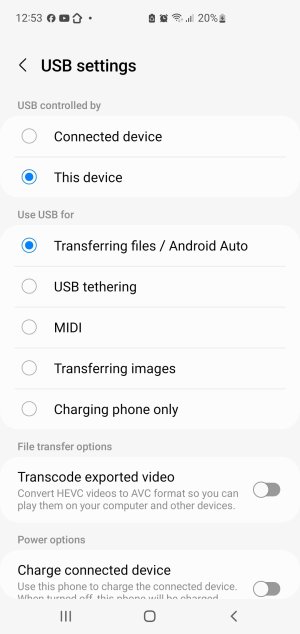
When I mentioned "configured the phone" I meant connected it to Mac, pulled down notification shade, and there's "USB for file transfer". "Tap for other options".
I then see my previously selected "USB controlled by - This Device", and "Use USB for - Transferring files/Android Auto".
The 'phone doesn't appear in "locations" in the left margin of "Finder", where the other connected volumes are.
I notice that I cannot change the "USB controlled by" option to Connected Device, although I can change the "Use USB for" options.
When I reselect "Transferring Files...", a window invites "Allow access to phone data - the connected device will be able to access data on this phone. Deny / Allow". But of course my objective is transferring music to the phone.


Screenshot_20260101_125355_Settings.jpg
 

Forum statistics

Threads
960,360
Messages
6,982,185
Members
3,164,496
Latest member
Gasho