Why does my mom's phone say null when I try to factory reset it?

  • Thread starter Thread starter Android Central Question
  • Start date Start date
A

Android Central Question

Cannot do a hard reset on my mom's Coolpad. Does null mean it's hacked so I can't erase everything?
 
Welcome to Android Central! Where do you see it say null? Why are you trying to factory reset it in the first place?
 
I have the same issue here so what does that mean

I'm trying to reset it so I can contact anyone besides who is in the same house with me. I get zero calls back from anyone I try to contact. I have thinks I need to get done and I've literally been trying and trying for days and ZERO RESPONSES. NOW OUT OF 100 Different PPL AND NO RESPONSE WHAT SO EVER... MAJOR PROBLEM.
 
Last edited by a moderator:
I'm trying to reset it so I can contact anyone besides who is in the same house with me. I get zero calls back from anyone I try to contact. I have thinks I need to get done and I've literally been trying and trying for days and ZERO RESPONSES. NOW OUT OF 100 Different PPL AND NO RESPONSE WHAT SO EVER... MAJOR PROBLEM.
Welcome.

Presumably something is wrong with the phone, assuming that the people whom you wish to call you, try to do so, but fail.

By all means give more details so that members will be better able to help.
 
The same thing happens with Motorola Moto E6 when I try from the Bootloader. Try Factory reset from Recovery Mode. Mine says "No command" when I go into recovery mode. Note, Mine is Android PIE
 
I have the same issue here so what does that mean

I'm trying to reset it so I can contact anyone besides who is in the same house with me. I get zero calls back from anyone I try to contact. I have thinks I need to get done and I've literally been trying and trying for days and ZERO RESPONSES. NOW OUT OF 100 Different PPL AND NO RESPONSE WHAT SO EVER... MAJOR PROBLEM.

Welcome to Android Central! First, are you saying that you have the same phone as the OP (i.e. some kind of Coolpad phone)? It always helps to specify which phone brand and model you have. Are you saying that your phone is completely nonfunctional, and says "null" when you try to factory reset it? If so, I would suspect that the firmware is completely corrupt, or the hardware has failed.

Second, can you clarify what you mean when you say you get zero calls back from anyone you try to contact? Are you able to make calls and leave voicemail messages? Can you see if your phone receives calls by calling your cell phone number using some other phone (like a landline)?

What 100 different people are you referring to who haven't responded?
 
The same thing happens with Motorola Moto E6 when I try from the Bootloader. Try Factory reset from Recovery Mode. Mine says "No command" when I go into recovery mode. Note, Mine is Android PIE

Are you unable to boot your phone to the homescreen normally? If so, and you're only getting a "null" message when you try to factory reset it, then as I mentioned above, the firmware is likely corrupt, or the motherboard has failed.
 
The same thing happens with Motorola Moto E6 when I try from the Bootloader. Try Factory reset from Recovery Mode. Mine says "No command" when I go into recovery mode. Note, Mine is Android PIE
It says that even if you try to give a command?
 
The same thing happens with Motorola Moto E6 when I try from the Bootloader. Try Factory reset from Recovery Mode. Mine says "No command" when I go into recovery mode. Note, Mine is Android PIE

After you enter recovery mode you still have to give it a command to get to the menu. You hold up on the volume button and push the power button once and the menu appears with all the options. You're just missing the last step ;)
 
Are you unable to boot your phone to the homescreen normally? If so, and you're only getting a "null" message when you try to factory reset it, then as I mentioned above, the firmware is likely corrupt, or the motherboard has failed.

No I'm able to fully boot I'm just wondering what recovery mode is
 
Not working

So you're getting to the screen that shows the Android robot on his back with an exclamation mark across him, and underneath it says no command? That's when you hold the power button and push up once on the volume button...then let them both go...then the phone will boot into the recovery menu. I'm sorry I gave you the wrong directions earlier :( I always get those confused :confused:
 
No I'm able to fully boot I'm just wondering what recovery mode is

Recovery mode is what the name implies -- it's a way to try to recover from a problem with the system (like a glitch in the firmware). Most of the time, it's useful in that it gives you the ability to do a factory reset if you're unable to reach the system settings menu. On some phones, it's also a way to download and install a custom firmware.
 
So you're getting to the screen that shows the Android robot on his back with an exclamation mark across him, and underneath it says no command? That's when you hold the power button and push up once on the volume button...then let them both go...then the phone will boot into the recovery menu. I'm sorry I gave you the wrong directions earlier :( I always get those confused :confused:
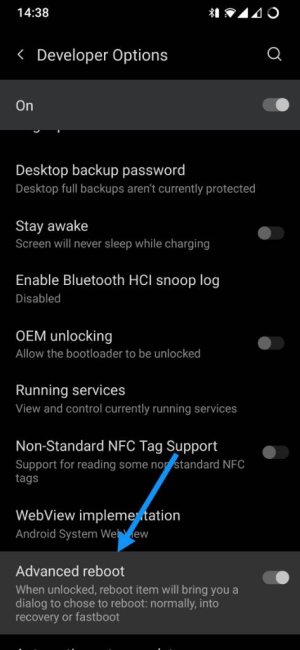
I'm not sure about Android 12 but in previous versions you can enable Advanced Reboot in the Developer Options. This way you can have a quick access to Recovery and Bootloader after holding the Power button.

Screenshot_20220402-143815.jpgScreenshot_20220402-143851.jpg
 
So do I, as well as other such button-pressings on Androids, iPhones, and Windows phones. It’s annoying, isn’t it?

Yes it is lol. And Javier P just decided to share an amazing shortcut to get there, that I could have used years ago when I could still wipe the cache partitions on my phones, when I did it regularly lol. Just teasing you Javier ;)

Since I've switched to pixels I don't need to access the recovery menu much anymore.
 
I'm not sure about Android 12 but in previous versions you can enable Advanced Reboot in the Developer Options. This way you can have a quick access to Recovery and Bootloader after holding the Power button.

View attachment 343719View attachment 343720

That's an awesome tip :D I wish I would have known it years ago.... but better late than never ;) I'm still going to put it to use on some of the older devices around the house. And I'm sure tons of readers will also use it :cool:
 

Trending Posts

Forum statistics

Threads
960,346
Messages
6,982,085
Members
3,164,488
Latest member
CrazyParis