Why does my S5 Active Battery drain fast even in Power save and U Power Save Mode?

T_Camp

New member
Jan 6, 2015
2
0
0
I recently (3-4 months) purchased a S5 Active and for the last month or so I have been getting horrible battery life. I attempted different apps such as CCleaner and Battery Doctor to improve time with no improvement. I use my phone moderately during the day and when I do, I have a strong wifi signal. My battery depletes in about 4 hours from a full charge. Even when I put my phone in Ultra Power Saving Mode, it still will rapidly drain. Power Saving mode functions as the normal rate of depletion. Do I have a bad battery or is there a rogue app? Lookout states I have no Malware on the phone. Help please as i'm not getting nowhere near the time I use to have when i first purchased the phone.
 
Welcome to Android Central! It would help to see some stats. Charge up to 100%, then let it drain to 20-30% with normal usage, without charging in between. Then show us:

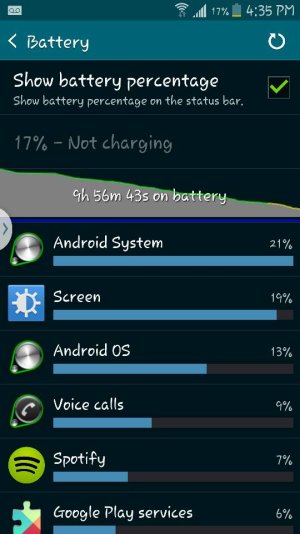
1. The main Settings>Battery screen.
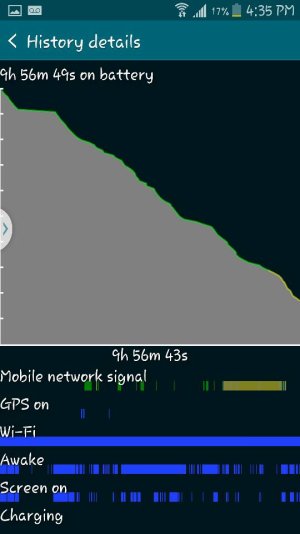
2. The fullscreen battery graph screen (which shows Awake time and Cell Signal Strength).
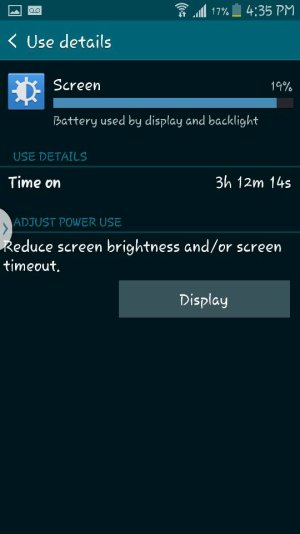
3. The Screen category (to see total Screen On time).
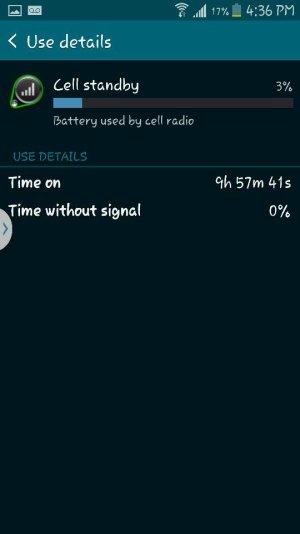
4. The Cell Standby category, if present (to see Time Without Signal).

http://forums.androidcentral.com/am...ide-how-post-screenshots-android-central.html
 
See attached. Sorry I let it get to 18/17 percent. This is from a full charge. Let me know your thoughts.

Posted via the Android Central App
 

Attachments

  • Screenshot_2015-01-10-16-36-41.jpg
    Screenshot_2015-01-10-16-36-41.jpg
    27.3 KB · Views: 2
  • Screenshot_2015-01-10-16-35-57.jpg
    Screenshot_2015-01-10-16-35-57.jpg
    34.3 KB · Views: 2
  • Screenshot_2015-01-10-16-35-48.jpg
    Screenshot_2015-01-10-16-35-48.jpg
    38.4 KB · Views: 2
  • Screenshot_2015-01-10-16-35-39.jpg
    Screenshot_2015-01-10-16-35-39.jpg
    57.3 KB · Views: 2
First, make sure the apps like Battery Doctor aren't set up to automatically kill any apps. Doing that can actually be counterproductive and use more battery, since the apps that are killed will probably just start up again. This can set up an endless loop of killing and restarting, which uses battery.

Second, there is a lot of Awake time. Go through the apps that are using the most battery, and see which ones are keeping the phone awake. If it's Android System, make sure your Location Reporting is turned off. See this guide for more tips: http://forums.androidcentral.com/am...how-tos/298919-guide-battery-saving-tips.html
 

Trending Posts

Forum statistics

Threads
963,116
Messages
6,992,669
Members
3,164,979
Latest member
Crissy Doug