Why is my phone battery losing power so quickly since I did a reboot (S5)?

RON SANDY

Member
Nov 26, 2014
10
0
0
S5 reboot issue

since i did it my phone gets warm quickly just sitting there no apps brightness 0. I lose 1% every 5-6 mins before it 1% an hour and adroid systems are at 20%+ did i do something wrong.
 
Probably not. Perhaps something has triggered Android OS, or something else. Could you post a screenshot of your battery usage stats at the end of a day's use, before you recharge? Also touch the battery usage graph to open it, showing mobile signal, wifi etc at the bottom, and also post a screenshot of that? Please mention also your screen-on time, and typical brightness.

Posted via Android Central App
 
Re: S5 reboot issue

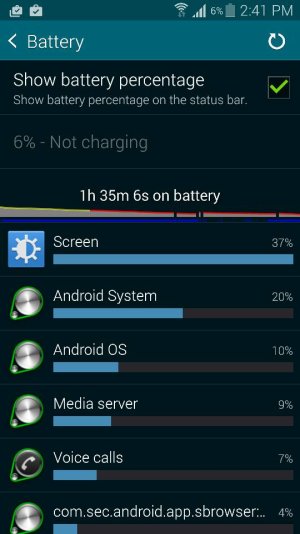
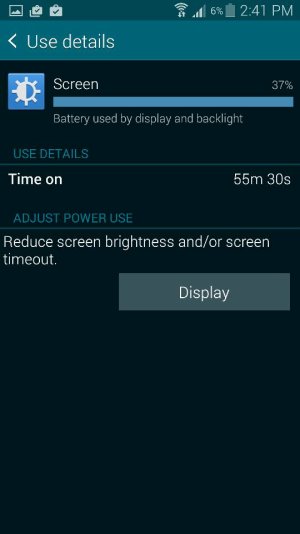
Here are the stats

Posted via the Android Central App
 

Attachments

  • Screenshot_2014-11-26-14-41-26.jpg
    Screenshot_2014-11-26-14-41-26.jpg
    57.9 KB · Views: 3
  • Screenshot_2014-11-26-14-41-35.jpg
    Screenshot_2014-11-26-14-41-35.jpg
    33.7 KB · Views: 3
  • Screenshot_2014-11-26-14-44-03.jpg
    Screenshot_2014-11-26-14-44-03.jpg
    37.9 KB · Views: 3
Did you only charge it to 20% capacity rather than 100%? If so, that is not good practice, as well as being impractical. Battery experts on these forums have taught me to recharge when the battery has discharged to no lower than about 40%, and I trust them.
The app percentages look normal enough, and the screen-on time actually looks quite good starting from that 20% charge. A discharge to 6% with that much use in that much time seems okay to me....but again I don't see why you did not charge fully.
The mobile signal is not the best, which will tend to use battery, although I don't know that it would cause overheating. Could you charge to 100%, use normally, and post more stats as above?

Try turning mobile data off for a while and see whether the overheating stops. That signal looks abnormal to me.

Posted via Android Central App
 
Also the phone is awake far too much. Install Wakelock Detector and see what's keeping it awake. Install Greenify to hibernate (temporarily freeze, until you run them) apps that are keeping the phone awake that shouldn't be. (Alarms, email, etc., should be - they have to wake up periodically to see if it's time to do something. Your Contacts app doesn't need to run until you run it.) Keeping the phone awake too much kills the battery quickly. (And that 40% figure belodion mentioned comes from Battery University - How to Prolong Lithium-based Batteries, the battery analyzer company. 50% is the ideal point, but to be realistic I say 40% to 60%.)
 

Trending Posts

Forum statistics

Threads
960,065
Messages
6,981,003
Members
3,164,373
Latest member
luigui443