Why wont my phone update?

  • Thread starter Thread starter Android Central Question
  • Start date Start date
A

Android Central Question

My Note 9 from AT&T has not been able to update. Whenever I prompt, it says that my software is up to date but my security patch is from July 01, 2018.
 
Welcome to Android Central! Your Note9 is from AT&T -- but are you currently on AT&T's network, or did you bring it to a different carrier?
 
That's probably why. For phones that originated from a particular carrier, you typically have to be on that carrier's network to get the official update. You could try using Smart Switch to update, but I'm not sure that works -- it may depend on the carrier.

Instructions to respond to a specific message depends on if you're using one of the apps or the forum website to view the AC forums. Which are you using?
 
Yes Mustang, I am stuck on Oreo. I have the latest Odin software and I have Samsung Drivers installed but I cannot find a downloadable file for the firmware. Not really sure how to use Odin either.
 
Yes Mustang, I am stuck on Oreo. I have the latest Odin software and I have Samsung Drivers installed but I cannot find a downloadable file for the firmware. Not really sure how to use Odin either.
Odin 3.13.1
Sammobile website for your model firmware
Once you download the firmware zip extract with 7 zip , load the 4 files in corresponding slots if you use home csc it won't wipe data , if you use csc it will .
 
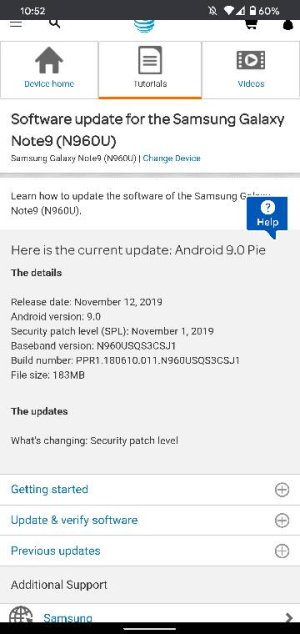
Look at the last 4 of the build number on my screen shot that's what your looking for .

I'm not sure if December out but once you install this go to software update and check
 

Trending Posts

Members online

Forum statistics

Threads
961,215
Messages
6,985,378
Members
3,164,679
Latest member
leilani