WiFi keeps turning on

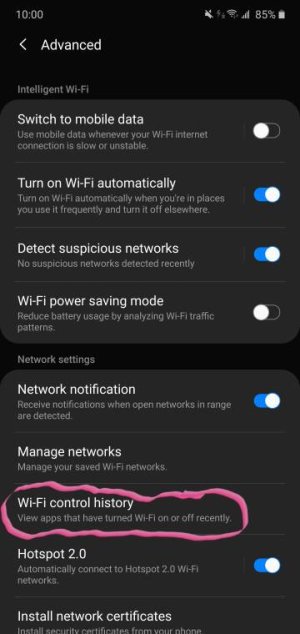
Maybe the "Settings/Connections/WiFi/Advanced/Turn on Wi-Fi automatically" is enabled? That feature, if on, apparently turns on WiFi when you are in frequently visited places.
 
Most likely you have auto reconnect turned on for the network you keep auto connecting to.
 
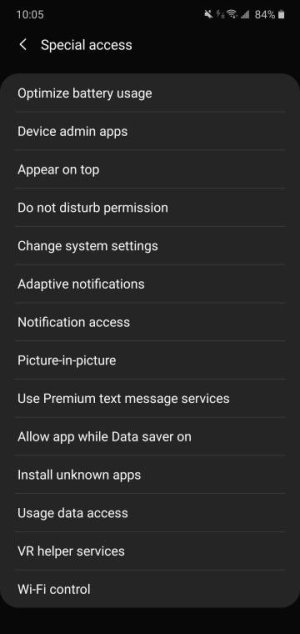
Look at what controls wifi history , also check in settings type special access in search bar and tap it under wifi control tap disable apps thereScreenshot_20200329-100559_Settings.jpeg20200329_100113.jpeg
 
Go to your Network and Internet settings. Look for Wifi. Move the slider to OFF. Your WiFi should not come on unless the slider is turned On. If the slider is turned to On then, those other things you say could happen depending on phone, carrier and network settings and other mysterious reasons.
 
August kept cutting it back on.
Go to your Network and Internet settings. Look for Wifi. Move the slider to OFF. Your WiFi should not come on unless the slider is turned On. If the slider is turned to On then, those other things you say could happen depending on phone, carrier and network settings and other mysterious reasons.
 
Go to apps, permissions, and turn off Wi-Fi for August. You will need to manually turn it on to use going forward. Good luck
 

Latest posts

Trending Posts

Members online

Forum statistics

Threads
960,971
Messages
6,984,423
Members
3,164,619
Latest member
mystiqarelab