Windows 7 does not see my Galaxy S3, SGT 1747M

shinnen

Active member
Sep 13, 2024
32
18
8
I bought this phone at a used items store. At the time it did not have a battery or back cover but did have SD and SIM cards; so I took it home and gave it a battery, and back cover from a previous S3, which has a faulty camera. So far so good. It booted right up, and works like a charm, except that my Windows desktop, and device manger do not see it. I installed, what I believe, are the correct USB drivers, still no love. I have tried all of the solutions I could find on the net (different ports, different cables, removing the SIM card, removing the battery for 30 seconds, deleting the cash from recovery mode, removing the cash from many apps, even trying (another computer) but nothing helps. Two things I noticed: It tells me that the USB cable is connected. The other thing is that the notifications panel does not show any option for choosing what type of USB connection I want, no reference to PTP or MTP or anything else. I would try to reset it, but other net users have said that a factory reset did not resolve the issue for them.
Any help is appreciated.
..... john
P.S. It does record images and videos, to the SD card, which I can access via my card reader.
 
When you swipe the notification panel down, can you tap the USB notification? If so, what options do you see there? Show us a screenshot if you can.
 
  • Like
Reactions: shinnen
Hi B. Diddy,
No, there's no mention of USB at all in the Notification Panel. Several sights said to check that panel, and then set the USB option to MTP, but there's nothing at all referring to USB. If you still want to see the panel, I will send you pictures tomorrow, but there will be two, since the panel is wider than the phone.
.... john
 
Hi B. Diddy,
Oh yes, I've scoured the settings in order fix it. Any of the other phones I've had, have an option to set the USB connection to charge, media transfer (MTP) etc., as I suspect this one also should; but for some strange reason does not. I noticed this morning that there are three new entries in Window's device manager, all with yellow circles enclosing exclamation marks: "Samsung android" [twice] and "CDC serial" That's hopeful! That would suggest a driver issue to me. What do you make of that?
. ... john
 
Hi B. Diddy,
Oh yes, I've scoured the settings in order fix it. Any of the other phones I've had, have an option to set the USB connection to charge, media transfer (MTP) etc., as I suspect this one also should; but for some strange reason does not. I noticed this morning that there are three new entries in Window's device manager, all with yellow circles enclosing exclamation marks: "Samsung android" [twice] and "CDC serial" That's hopeful! That would suggest a driver issue to me. What do you make of that?
. ... john
Due to the age of that device and no support in a long time might be the reason.
 
Hi,
I re-installed my drivers and noticed that the entries I mentioned above have disappeared, and there is now a new entry in the Device Manger under "Android Device" called "Samsung Android ADB Interface" What do you make of that?
... john
 
Hi Again,
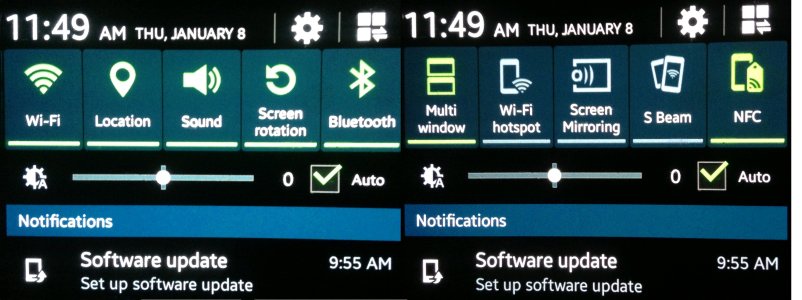
I have pasted together two images showing the notifications panel. It looks the same regardless of whether the phone is plugged in or not.
Notifications Panel Galaxy S3 resized.jpg
 
Hi notforhire,
As well you should. My entire purpose in life is to attempt the impossible; to thumb my nose at new technology; to boldly go
where no man should dare to go; to exhume what should remain buried; and to breathe new life into the zombies of yesteryear.;)
... john
 

Forum statistics

Threads
960,472
Messages
6,982,523
Members
3,164,523
Latest member
mama baer