Yellow Booster Issues

Rickgsx

Well-known member
Jul 15, 2010
306
3
0
Hey guys...

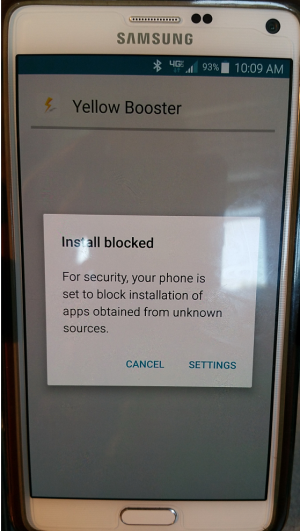
I need some assistance here. I just blew away and upgraded my galaxy note4 and upgraded to marshmallow. I did absolutely nothing that I haven't done 100 times before. For some reason, I'm now getting a "Yellow Booster pop-up dialog box" that is prompting me to install the application. Clearly, I'm hitting cancel. The issue is I cannot find it to uninstall it.

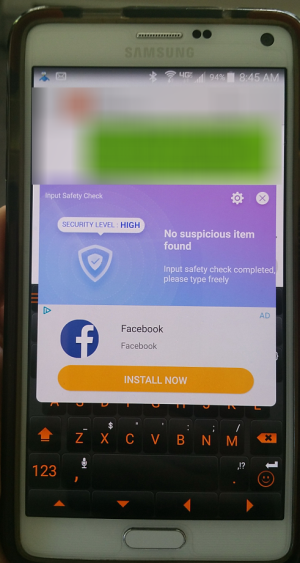
I tried installing Malwarebytes, look up, and it all comes back clean. I disabled many of the apps that I don't use and still having the same issue. Now recently as of a few days ago, I'm now getting a Facebook pop-up screen when I unlock my phone.

Do you guys have any suggestions on what I could look at...

Thanks for any help
 
Sorry, but what do you mean that you "just blew away" and upgraded your Note 4? Was this an official OTA system update?

Can you show us screenshots of this Yellow Booster popup and Facebook popup?
 
Sorry for the confusion... when I said "blew away" I meant that I had Android 5.xx on my phone. I did a Factory Reset ("Blew it away") and started all over again...

- Downloading the OS
- Doing all the necessary upgrades to 6.xxx
- Performing a Cache Wipe
- Downloaded each and every application I had
- Restored the setting that I had configured (were applicable) I.e. Maildroid, CHOMP, Nova, etc...
- After all the apps were installed and made sure they were all up to date from the play store..

** Please note, these are the EXACT same apps I was using when I was on 5.xxx of the OS nothing has changed other than the upgrade to 6.x

So now I'm getting this Yellow Booster pop-up... I've read that several people have it on the site and I'm not see any real fix just yet.. .or at least not for me.

In addition, I'm also getting this SPAM facebook popup as well. Just not sure whats going on here..

.face.pngYellow booster.png
 
There's some adware or malware hiding out somewhere. Was this an official OTA system update, or did you manually download it and install it from some website?

Also, it's possible that some app that you reinstalled is carrying some sort of adware, and perhaps before the update you had a previous version that didn't have it. It can be hard to pinpoint the app, but common culprits include "RAM cleaner" apps (i.e., anything from Clean Master or DU), ES File Explorer, and apps from APUS.

Can you show us a full list of apps that you installed, or will that be a really long list?
 
Oh.... I agree with you its some adware or malware hiding... I just dont know where or what to look at.

To answer your question... Yes, this was an official OTA update from Verizon...nor is the phone rooted or modified in anyway. I also do not run any RAM cleaners or "speed up" type of programs... however, I do run ES File Explorer and have it installed on both units.... I'll have to look up what app's are developed by APUS.

Now here is the funny thing thats not so funny... I have two note 4's ... I did the same reinstall and download process for each... and BOTH have the same issue.

Yes, the app list is long, but heck... if it can help me determine what it is... I'll type it... Good news it, I can type..lol

Alarm Clock Xtreme...........Amazon Shopping..... American Airlines... App Lock... Backgrounds....Beautiful Widgets
Brightest Flashlight............Brilliant QUotes........Business Calendard... Business Calendar Pro... Calculator Plus
Carly for BMW Pro..... ChompSMS........Chrome..... Cisco Webex Meetings......Clock........ Compass........Contacts Sync Fix
Converter........Craigslist...... Custome ICS Search.........Dictonary......OneDrive.........Dropbox.........Dumpster.......ebay
ES File Explorer......exdialer......Exdialer Elegant Theme.......Facebook (disabled).........Flixter........FMC.......FolderSync
Foxfi.... Foxfi Key..........GateGuru.....Google text to speech Engine..... Google Plus (disabled).......Hancom Office 2014
Hangouts (disabled).....HD Widgets......IMDB........Instagram.......iVMS-4500.....LectureNotes Trial......LightFlow Legacy
Lotto Results.....Maildroid....Message+ (disabled).... Messages... MX Player.... MY IP....Network Info II.... Network Subnetting
NFL Mobile....Nova Launcher.... Nova Launcher Prime...OneNote.... Package Tracker Express.....Paper Toss 2.0.... Peel Smart Remote
Pen.up..... Polaris Office.....Poweramp ... Poweramp Full Version unlocked... QuickPic...Real Calc... RoboForm.... Roku....
Seat Alerts.... SeatGuru.... SEPTA..... Skype... Slacker Radio.... Smart Voice Recofder....SMS Backup... SMS Backup & Restore...
Solitair... Stopwatch & Timer... Swiftkey Keyboard... Tapatalk...The Score...Timeriffic.... Tip Me... Translate... Tunein Radio...
TweetCaster... Uber...Ultrachrom Lite.... unblock Me Free... United Airlines...Wallpaper Wizardrii.... WaterColor Pencil Lite
Waze...Weather Bug... WebMD....Wifi Analyzer....Wikipedia.... Word Search.... World Clock....Yelp.... Youmail... Zedge...Zillow...

and there you have it...!! My only thought would be to uninstall one or two apps a day from my backup phone to see if it goes away... but how do I know its not embedded in the OS...? I'm up for ANY ideas...
 
Disable "smart manager" in settings. It contains a version of CleanMaster from Cheetah Mobile. Restart the note.
 
I am also having the same issue, the only apps i have downloaded are tunnelbear, netflix, youtube, relay for reddit, xfinity, and capitol one. The thing is, i reset my samsung tablet the same way i did my samsung note edge and the tablet does not have the issue. It has the same apps installed. So it has to be something in the verizon version of android m for phones.
 
Now that I look more closely at that Input Safety Check popup, it does seem to have the same design language as other Cheetah Mobile apps. I agree with Bosbouer--disable or get rid of anything related to Clean Master or Cheetah Mobile.

By the way, ES File Explorer is also notorious for having associated adware as well, so I'd recommend against using it. Try Total Commander instead, which is free and ad-free.

Looking through more of your list--

QuickPic was bought by Cheetah Mobile within the last year, so you should also consider getting rid of that.
Brightest Flashlight could be a suspect--flashlight apps seem to have adware or even malware more frequently than other kinds of apps.
 
Disable "smart manager" in settings. It contains a version of CleanMaster from Cheetah Mobile. Restart the note.
Okay.. After researching, I've read that Smart Manager is not an option on Verizon phones... So I'm unable to find and/or disable it.. I also uninstalled ES FILE EXPLORER on my backup phone and rebooted to see if that corrects the problem... I'll keep you posted.

I'd really hate to delete Qickpics as I like that app... But if it has to go then so be it..

I'll keep you posted... Thanks for all your help guys
 
Hey guys...

I need some assistance here. I just blew away and upgraded my galaxy note4 and upgraded to marshmallow. I did absolutely nothing that I haven't done 100 times before. For some reason, I'm now getting a "Yellow Booster pop-up dialog box" that is prompting me to install the application. Clearly, I'm hitting cancel. The issue is I cannot find it to uninstall it.

I tried installing Malwarebytes, look up, and it all comes back clean. I disabled many of the apps that I don't use and still having the same issue. Now recently as of a few days ago, I'm now getting a Facebook pop-up screen when I unlock my phone.

Do you guys have any suggestions on what I could look at...

Thanks for any help
Try avast mobile and avast cleaner and get rid of other cleaners
 
Your SPAM Facebook pop-up is actually the SwiftKey keyboard feature doing an 'input safety check' - but they do that with an ad. I like the swiftkey keyboard, but not enough to put up with the pop-ups - so I removed SwiftKey and they went away.

John
 
Your SPAM Facebook pop-up is actually the SwiftKey keyboard feature doing an 'input safety check' - but they do that with an ad. I like the swiftkey keyboard, but not enough to put up with the pop-ups - so I removed SwiftKey and they went away.

John

Welcome to Android Central! Good call--that makes sense!
 

Trending Posts

Members online

Forum statistics

Threads
962,731
Messages
6,991,573
Members
3,164,910
Latest member
vik