Anyone else's ram keeps decreasing?

Ok not quite sure if you are serious or trolling but I'll bite.

The more applications or services you have running the more ram they are going to use. Some apps can be more memory intensive than others games for example. You are utilizing less than half of your ram capacity that is not bad at all. The amount you use will fluctuate depending on what is running. If you notice unusually high memory usage you can stop your apps one by one untill you find the culprit. Android handles multitasking pretty well so no need to bother with a task killer they tend to cause more problems than they fix. Your usage shown in your picture looks just fine to me. My suggestion is don't stress unless you are experiencing a problem and enjoy your phone.

Sent from my SCH-I535 using Tapatalk 2
 
I have a feeling the original poster is confusing the RAM memory used by the phone to operate with the "storage space" the device has.
 
I think it changed with latest update

Sent from my SPH-L710 using Android Central Forums
 
I have a feeling the original poster is confusing the RAM memory used by the phone to operate with the "storage space" the device has.

I have no idea, im no tech wiz but I know they said the phone comes with like 2gb of ram but mine never says 2 gb, even after I clear the memory

Sent from my SPH-L710 using Android Central Forums
 
The Android OS is always running (that is what is telling you how much memory you have left) and that takes up some room in memory. .4GB of space taken up by the OS is not really THAT bad.

HTH,

Mike
 
  • Like
Reactions: Soundtrack to Chaos
The Android OS is always running (that is what is telling you how much memory you have left) and that takes up some room in memory. .4GB of space taken up by the OS is not really THAT bad.

HTH,

Mike

Oh ok, thanks, I didn't know that,well atleast I know everythings fine now, thx

Sent from my SPH-L710 using Android Central Forums
 
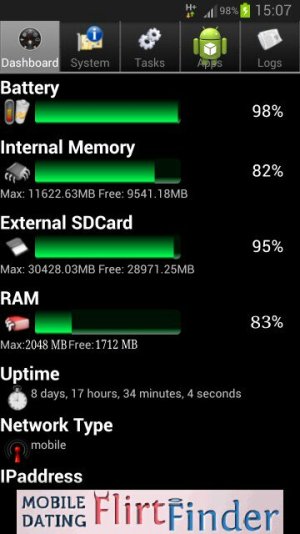
I know that my ram usage even after 20 min of use usually shows up as ive used like 1.32g of 1.59 it doesn't even show that I have 2g which I know that is normal but it shouldnt use 1.xgb of ram in twenty min after clearing it. Is yours doing the same

---------- Post Merged at 03:04 PM ---------- Previous Post was at 03:02 PM ----------

Ive got an international version too and it shows it has less than a half gb after clearing ram
 
Ok not quite sure if you are serious or trolling but I'll bite.

The more applications or services you have running the more ram they are going to use. Some apps can be more memory intensive than others games for example. You are utilizing less than half of your ram capacity that is not bad at all. The amount you use will fluctuate depending on what is running. If you notice unusually high memory usage you can stop your apps one by one untill you find the culprit. Android handles multitasking pretty well so no need to bother with a task killer they tend to cause more problems than they fix. Your usage shown in your picture looks just fine to me. My suggestion is don't stress unless you are experiencing a problem and enjoy your phone.

Sent from my SCH-I535 using Tapatalk 2

trust me he's not trolling and he's talking about the TOTAL ram, not used RAM

global s3, UK. Ask me anything and ill reply even if its just an intelligent (or stupid) guess ;)
 
I'm having the same issue. My TOTAL RAM started at 1.79. Now it's down to 1.59. Any ideas on why it keeps decreasing? Any help to increase the RAM is appreciated.
 
maybe background apps which cant be stoped by task manager are counted into the unavalable ram making total available ram less?
just a theory.. things like Light Flow etc that run in background....

global s3, UK. Ask me anything and ill reply even if its just an intelligent (or stupid) guess ;)
 
I know that my ram usage even after 20 min of use usually shows up as ive used like 1.32g of 1.59 it doesn't even show that I have 2g which I know that is normal but it shouldnt use 1.xgb of ram in twenty min after clearing it. Is yours doing the same

---------- Post Merged at 03:04 PM ---------- Previous Post was at 03:02 PM ----------

Ive got an international version too and it shows it has less than a half gb after clearing ram

international s3 only has 1gb ram to start with, the N American ones have 2 :thumbup:

global s3, UK. Ask me anything and ill reply even if its just an intelligent (or stupid) guess ;)
 
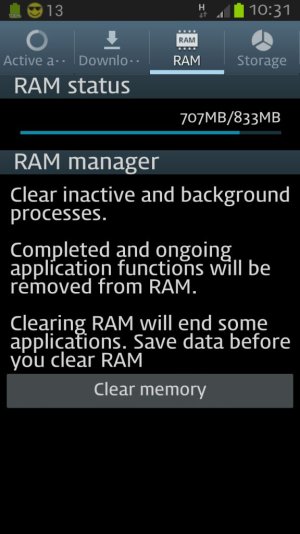
My ram is at 800 and something. My s3 is an international phone.

Sent from my GT-I9300 using Android Central Forums
 
used ram or available total mate? ive got 833 available total uploadfromtaptalk1352629941104.jpg

global s3, UK. Ask me anything and ill reply even if its just an intelligent (or stupid) guess ;)
 
U can Download android system info from Google playstore
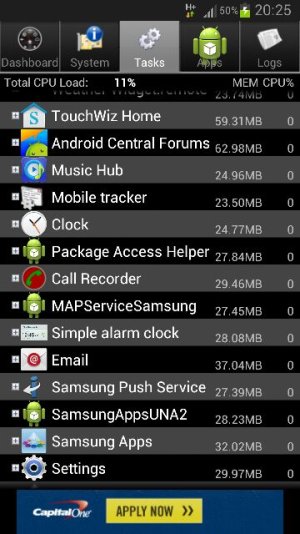
look how much ram android central uses
uploadfromtaptalk1352665891257.jpg
Sent from my GT-I9300 :)
 
I have no idea, im no tech wiz but I know they said the phone comes with like 2gb of ram but mine never says 2 gb, even after I clear the memory

Sent from my SPH-L710 using Android Central Forums

It is 2GB, but it will never actually say 2GB because some of the memeory is used for other things on the phone....they round it off I think

How did you get to that screen though? I don't see how to get to "Ram Manager"
 
It is 2GB, but it will never actually say 2GB because some of the memeory is used for other things on the phone....they round it off I think

How did you get to that screen though? I don't see how to get to "Ram Manager"

Oh ok, thanks

I'm not on stock anymore but I think you hold down the home button and then press task manager at the bottom and u shld get there

From my amazing samsung galaxy s3 running cyanogen mod 10 and android version 4.1.2

Designed for humans and not for isheep
 

Trending Posts

Members online

Forum statistics

Threads
962,822
Messages
6,991,924
Members
3,164,929
Latest member
Haris18