Cannot download and cache Google Maps

ayjcee

Member
Oct 2, 2012
8
0
0
Help please. I am just getting used to my new Nexus 7 (with Android 4.1.1) and one of the things that I really want to do is play with maps offline. The only trouble is that I cannot seem to download them. My first attempt (via 'Make available offline') resulted in a 'My Places' screen with the relevant map listed but shown as paused - the X alongside it does not work and it has just sat in that state for a couple of hours. I then tried to download another one and, after selection, it appeared in the 'My Places' list but has been shown as 'Queued for download' (in a sort of yellowy orange) for the last hour. The WiFi connection is on and good. Have I missed anything?

Apologies for the newbie problems - this is my first venture into the world of Android and, indeed, tablets.
 
Justin, That's a shame but I could live with them not being availableat all. It's when they are supposed to work but don't that it gets annoying! Regards, Ayjcee
 
Hit the pause, the X will turn into a drop down arrow, click that then hit cancel. Now make your map area smaller then try again. Try to keep it around 80mb.
 
Dubbin1, Not on my Nexus 7 it don't!! When I hit pause, it turns blue and a click sounds but nothing else happens. Same with the X. As before, if I leave that on in the list and try another, it appears on the list as 'Queued for download' but doesn't do anything else - at least on the second one, there is a down arrow via which I can cancel that particular map. The original doesn't seem to have anyway to do even that (but I might be acting thicker than usual and missing something signifiocant and equally obvious!). At first I thought it might be because I had chosen too small an area but I made the second one about 45mb which. to me, seemed to cover a vast area - in landscape, over 90 miles across as the crow flies!

Thanks for the contribution, grateful for any further help / advice.
 

Its an article from june. They moved it out of lab as a feature since last map update.

---------- Post Merged at 11:11 AM ---------- Previous Post was at 11:10 AM ----------

Help please. I am just getting used to my new Nexus 7 (with Android 4.1.1) and one of the things that I really want to do is play with maps offline. The only trouble is that I cannot seem to download them. My first attempt (via 'Make available offline') resulted in a 'My Places' screen with the relevant map listed but shown as paused - the X alongside it does not work and it has just sat in that state for a couple of hours. I then tried to download another one and, after selection, it appeared in the 'My Places' list but has been shown as 'Queued for download' (in a sort of yellowy orange) for the last hour. The WiFi connection is on and good. Have I missed anything?

Apologies for the newbie problems - this is my first venture into the world of Android and, indeed, tablets.

post a screenshot so that we get a clear picture. Volume Down+ power button at the same time to take screenshot.

try to clear data/Cache for the maps app. open maps and set it up again andt try downloading the maps again.
 
The clearing cache idea seems to have worked - at first nothing but then I got a a screen saying 'New offline map' which i clicked and things happened normally from there. That said, I did try to take the screen shot as requested and it didn't work (I had already researched it and found the relevant instructions all over the net, including videos!!!). I thought the ability to take screen shots was native to Android 4.1.1 BUT do I also need to install a camera app? Again, sorry if I am being stupid.
 
The clearing cache idea seems to have worked - at first nothing but then I got a a screen saying 'New offline map' which i clicked and things happened normally from there. That said, I did try to take the screen shot as requested and it didn't work (I had already researched it and found the relevant instructions all over the net, including videos!!!). I thought the ability to take screen shots was native to Android 4.1.1 BUT do I also need to install a camera app? Again, sorry if I am being stupid.

glad it worked for you. Taking screenshot is native in Android 4.0 and above. you dont need a camera app to do it.
you have to press both the button at the same time and for about 1-2 seconds.
 
Offline maps works fine for me....

Sent from my Nexus 7 using Android Central Forums
 
Yep, did that for the screen shot - tried for one, two, three and a few more seconds to no avail - something else to cause a head scratch. Anybody else with that issue?
 
Yep - already read that book and watched the movie. As it's new and I haven't got much on it yet, I might think about a restart if things don't resolve. But I will keep trying as it might be like the map thing and work after a while - quite why that should be is, however, beyond me.

Thanks for all the help guys.
 
I suggest you do a reset

Sent from my Nexus 7 using Android Central Forums
 
My first maps I made available offline worked without a hitch. I then. at a later time tried to make offline maps and had similar problems to what the OP had one paused and then one queued, nothing happened for several minutes. I then cleared the offline maps and tried again, this time it worked. Maybe there is some hiccup with the map server, who knows.
 
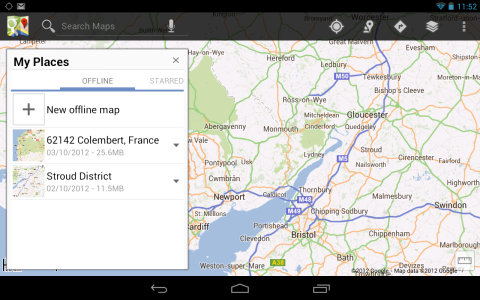
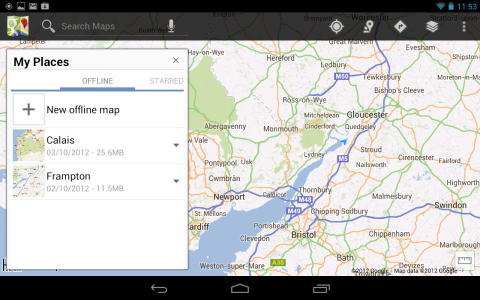
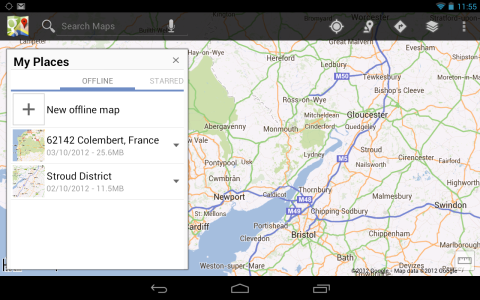
Didn't have to do the reset in the end as the camera started taking screenshots for no apparent reason other than I restarted. Although I have only DLd two maps, they are both saved to the Nexus OK. I will be trying more as and when I feel the need. That said, a remaining gremlin in the works is that of renaming the maps - when I do it, the rename doesn't appear until I close and reopen 'My Places' but the next time I power off and restart, they are back to the original name.

1. Before rename:
Screenshot_2012-10-04-11-52-35.png

2. After rename, closing 'My Places' and reopening:
Screenshot_2012-10-04-11-53-39.png

3. After power off and restart:
Screenshot_2012-10-04-11-55-29.png

At the risk of being accused of blasphemy, maybe I am too used to my iPad but android does seem a bit buggy. Any ideas please.
 
I have noticed this issue too (after reading this thread). More specifically (and for the benefit of others) did you clear the cache for the Maps app or something else?
 
Yep, did that for the screen shot - tried for one, two, three and a few more seconds to no avail - something else to cause a head scratch. Anybody else with that issue?

Consistently getting a screen shot can be hit-and-miss. Sometimes I was successful but usually not. Either the volume control or power off menu would pop up.

The problem, at least in my case, was that I simultaneously pressed down the buttons in the middle. I now press and hold each at the furthest corner and get the shot every time.
 

I've only owned my Nexus 7 tablet since early August, so I'm still a newbie trying to figure out some things.

Did I understand correctly that you can only download a map for a 10-mile radius? It won't show things like gas stations and local restaurants, unless I'm actually in a place that has a wifi connection? So without a connection, the mapping service is unavailable for long trips?

And without a pre-downloaded map, GPS doesn't work? At least, I couldn't get GPS to work on a 600 trip between two states.
 
I've only owned my Nexus 7 tablet since early August, so I'm still a newbie trying to figure out some things.

Did I understand correctly that you can only download a map for a 10-mile radius? It won't show things like gas stations and local restaurants, unless I'm actually in a place that has a wifi connection? So without a connection, the mapping service is unavailable for long trips?

And without a pre-downloaded map, GPS doesn't work? At least, I couldn't get GPS to work on a 600 trip between two states.

Yes to most of your questions. If you need to access the service for something that wasn't stored with the download then you won't be able to.

GPS will work technically, but it won't have any map data to use.