Cool Galaxy s5 feature that I can't find

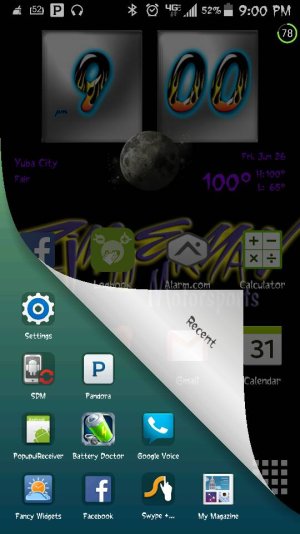
My boyfriend and I have the same phone, and his does this and mine doesn't. Can't figure out what setting it is either.

Posted via the Android Central App
 
Here is a screenshot

Posted via the Android Central App
 

Attachments

  • Screenshot_2015-06-26-21-00-32.jpg
    Screenshot_2015-06-26-21-00-32.jpg
    54.2 KB · Views: 51
Maybe he has a third party launcher installed and that's how it displays the recent apps

Posted via the Android Central App
 
The easiest way to find the app may be to go into Default applications and see which ones are selected. That should at least narrow the search.
 
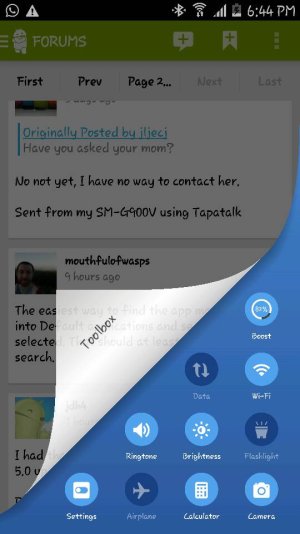
I had that toolbar on my screens but since the 5.0 update from AT&T I can't find it anywhere.

Posted via the Android Central App
 
What you are looking at is called "iSwipe". It belongs to Clean Master. You have to open the app and look at the bottom and you should see three tabs. You should see Home, Tools, and Me. Click on the me tab and look for settings. Click on it and look for iSwipe settings. Enable it and you shall have an awesome way to view your recents, favorites and toolbox

Posted via the Samsung Galaxy S5
 

Attachments

  • Screenshot_2015-07-06-18-44-14.jpg
    Screenshot_2015-07-06-18-44-14.jpg
    47 KB · Views: 19
What you are looking at is called "iSwipe". It belongs to Clean Master. You have to open the app and look at the bottom and you should see three tabs. You should see Home, Tools, and Me. Click on the me tab and look for settings. Click on it and look for iSwipe settings. Enable it and you shall have an awesome way to view your recents, favorites and toolbox

Posted via the Samsung Galaxy S5
Thank you so much, I thought it was some built-in feature. I had clean master for like 2 years and never seen this.

Sent from my SM-G900V using Tapatalk
 
659aff67897e39612ad335a0de5f7c9a.jpg


Sent from my SM-G900V using Tapatalk