Disable the undo email delete function?

  • Thread starter Thread starter AC Question
  • Start date Start date
A

AC Question

Is there any way to disable the undo bar that pops up after you delete an email in the generic email app? It locks the screen for a solid 5 seconds and does not allow the user to interact with the email app for the duration it stays on the screen.

Can this be turned off?
 
What phone do you have?

I have the exact same problem, and the phone is a Samsung Galaxy S5. I've looked everywhere I can think of to turn off that notification, but I'm not able to locate it. We should be able to turn that off instead of having the phone lock up for 4-5 seconds when a mail is deleted. Any help or pointers would be greatly appreciated!!
 
I have a moto g and although is a bit annoying to see that pop up every time I delete an email, it does not block my email app.
BTW I use the gmail app

Posted via the Android Central App
 
I have the exact same problem, and the phone is a Samsung Galaxy S5. I've looked everywhere I can think of to turn off that notification, but I'm not able to locate it. We should be able to turn that off instead of having the phone lock up for 4-5 seconds when a mail is deleted. Any help or pointers would be greatly appreciated!!
I just checked, and the stock e-mail doesn't have an UNDO function, so I'm guessing your issue is with the GMail client. In my case, a Note 3 and a Tab S (the latter should be really similar to the S5) and while I do get the UNDO function show up in the reading pane, it doesn't lock up my phone. As soon as I try to do something, the bar goes away.
 
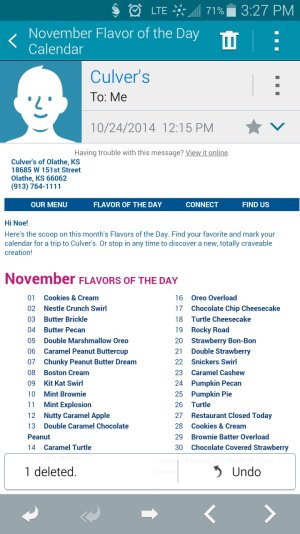
I have the same problem. On the GS5 default email app, open up an email. Hit the trash can icon to delete. The screen goes to list view and the undo popup will show. At this time I can't do anything until the popup goes away. I've resorted to deleting in list view only using the swipe to the side method. I also haven't found a way to disable this. It used to work before the latest update (AT&T). Anyone???
 
I have a Samsung S5, and I have the same problem. While waiting for the "Undo" message to go away, I can not do anything else with my mail client.
Very annoying!!
Can anyone helpÉÉ
 
I have the same issue. It has nothing to do with our email clients, rather it is an issue with the manner in which Samsung "assists" us with our email. Attached is a picture that shows what I and others have been experiencing. Once we delete a message, a graphic appears at the bottom with the message...1 Deleted (an undo arrow icon) Undo. It takes approximately 5 seconds for this to disappear. In the interim, in order to proceed, one must either wait, or click the undo arrow icon on the bottom of the phone. Very annoying!Screenshot_2014-10-28-15-27-22.jpg
 

Trending Posts

Forum statistics

Threads
960,548
Messages
6,982,836
Members
3,164,539
Latest member
Sexygirlsse