Display clock while charging

fx611

New member
Apr 1, 2017
4
0
0
(S8+)-since recent update the clock disappeared while charging in dock at night. I remember it was not easy to set last time this happened and cannot figure it out this time
 
(S8+)-since recent update the clock disappeared while charging in dock at night. I remember it was not easy to set last time this happened and cannot figure it out this time
I dont see that as a option anymore
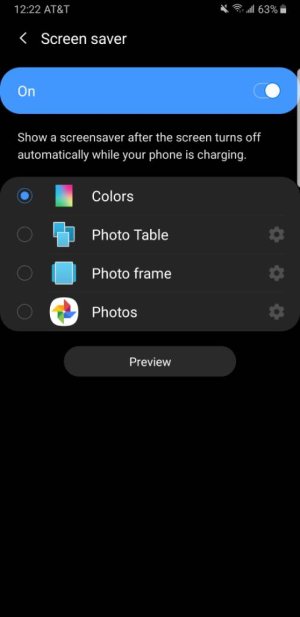
It's in settings >display >scroll all the way to the bottom screen saver Screenshot_20190606-002205_Settings.jpeg
 
I thought it had something to do with Always On. If i remember correctly, that had to be off. Doesnt seem logical but that may be why i remember. I'm going to be really disappointed if they removed it.
 
Wouldn't AOD always on display work for this? I don't know how bright the screen is when it displays a screen saver, because the AOD is pretty dim, but at night it would probably work pretty well. Since AOD is a pretty big thing it seems with Pie maybe that's why it doesn't appear in the screensaver menu anymore. The difference being that the screensaver would be something that would happen when the phone was plugged in and AOD would either have to be on, be scheduled or be turned on when you want to use it. If you kept a fairly regular schedule it would be simple enough to set a schedule and forget it but if you didn't it might get to be a pain.
 
Good lock has the option , for screen saver while charging? Dont recall.
No. Just the AOD on while charging and off the other times. That was what I understood the OP wanted.

If you wanted a screen saver while charging, just download a Clock app that has that feature. New options will appear in the screensaver menu if you install say Beautiful Widgets or Timely.
 
No. Just the AOD on while charging and off the other times. That was what I understood the OP wanted.

If you wanted a screen saver while charging, just download a Clock app that has that feature. New options will appear in the screensaver menu if you install say Beautiful Widgets or Timely.
Gotcha , so maybe those 2 options you recommend might be what OP looking for. I thought Samsung took the clock out since introduction of AOD for screen saver if I'm not wrong .
 
Gotcha , so maybe those 2 options you recommend might be what OP looking for. I thought Samsung took the clock out since introduction of AOD for screen saver if I'm not wrong .
Personally I won't recommend because I am not sure if the existing screen savers on the PlayStore have been optimized for AMOLEDs, and they might burn in. It's better to use the AOD.
 

Members online

Forum statistics

Threads
960,259
Messages
6,981,631
Members
3,164,449
Latest member
akadar6