- Nov 18, 2014
- 385
- 0
- 0

Only thing I can think of is a factory reset. I think another person had the same issue, not sure how they resolved it.
You could try installing a launcher (Nova) and then if you prefer TW switch back and see if that cures.
Posted via the Android Central App
The obvious thing to do if you have not done so is to press and drag each of those apps to the trash can (delete them), then go to the App Manager and select the same apps and drag them to the same spot on the home screen. Keep us posted.

Just drag additional icons to the icon bar at the bottom. The one you bring in will displace a present one, then repeat and drag your favorites back in. Have you cleared TW cache in applications manager?I've done that as well but can't get the apps icon to move. I think that's anchored on TW. How do I remove the apps icon?
Posted via the Next Big Thing, My Galaxy N4.
I don't know what else to tell you. Normally you can just remove each one of them as how I described it earlier. A factory reset may work. As for Nova Launcher, free, which I have...allows for more customization. You can always revert to TW.I've done that as well but can't get the apps icon to move. I think that's anchored on TW. How do I remove the apps icon?
Posted via the Next Big Thing, My Galaxy N4.
I don't know what else to tell you. Normally you can just remove each one of them as how I described it earlier. A factory reset may work. As for Nova Launcher, free, which I have...allows for more customization. You can always revert to TW.
Just drag additional icons to the icon bar at the bottom. The one you bring in will displace a present one, then repeat and drag your favorites back in. Have you cleared TW cache in applications manager?
No I have Not cleared TW cache. I will do that now.
Posted via the Next Big Thing, My Galaxy N4.
Have you tried to change wallpaper? It sounds insignificant but it cleared a similar problem I had.
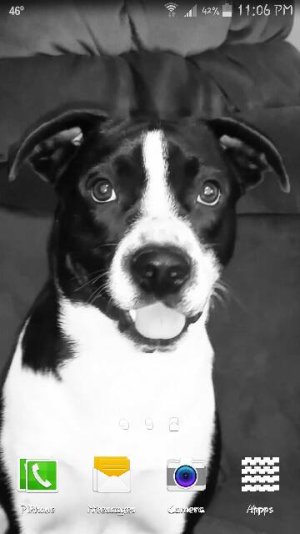
It looks like you used as wallpaper an screenshot with the same icons already there!! So your icons where over them just a little bit out of place.

I thought about that, but it's a shot from within a video. The same pic is on my instagram. I went and looked at it and the icons are Not there...but...it is possible. I just don't have a pic like that in my gallery. I don't know. It's fixed now. Woohoo!
Edit....that pics been my home screen for a few weeks now. I do have a thought tho...I do believe I was hacked, by my daughter. Lil shat. I wonder if she did that? LMAO! I'll find out when she gets home!
Posted via the Next Big Thing, My Galaxy N4.

Y
Maybe she took the screenshot to put it back after playing around a little bit, thinking she wasn't going to get caught




 Facebook
 Twitter
 Instagram