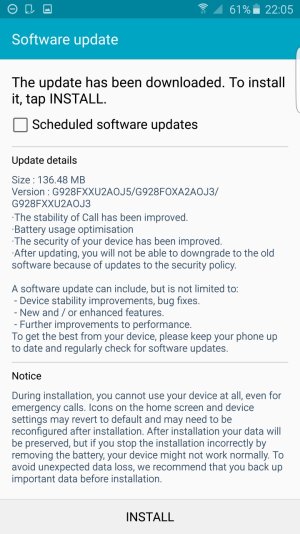
Galaxy S6 edge+ Software Update!

Snappy Phoenix

Well-known member
Jun 20, 2015
611
0
0
Finally!!! I've been checking for updates multiple times a day every day for the past 2 weeks in hope to get a new OS upgrade that may solve the issue of random freezing of the phone when trying to unlock it.

Just received a 144 MB OS update for my unlocked international S6 edge+ 64GB 928C phone

Changelog:

- The stability of call has been improved
- Battery Usage Optimization
- The security of your device has been improved
- After updating, you will not be able to downgrade to the old software because of updates to the security policy

EDIT:

Even newer update is out npw with more stability improvements and better battery performance - AOJ6:

4sgpck.jpg
 
Last edited:
Mine just popped up as well on my 928C. If you're using package disabler make sure you enable everything before updating.
 
Mine just popped up as well on my 928C. If you're using package disabler make sure you enable everything before updating.

I didn't use package disabler but I did disable Messenger + Hangouts from the Application Manager in the phone itself.

Is that a problem? I already did the update? :(

What shall I do now?
 
I didn't use package disabler but I did disable Messenger + Hangouts from the Application Manager in the phone itself.

Is that a problem? I already did the update? :(

What shall I do now?

It should be fine. It's just for package disabler since it disables core services that you wouldn't normally be able to disable without root.

Also, G928C got the update today but nothing on my G9287 so far.
 
It should be fine. It's just for package disabler since it disables core services that you wouldn't normally be able to disable without root.

Also, G928C got the update today but nothing on my G9287 so far.

Oh great! Thanks bro

now why didn't the OS version change if it claims all those bug fixes? I thought it should become Lollipop 5.1.2 right?

How to these OS updates work if the version didn't change?
 
Oh great! Thanks bro

now why didn't the OS version change if it claims all those bug fixes? I thought it should become Lollipop 5.1.2 right?

How to these OS updates work if the version didn't change?

That's not entirely how it works. This isn't an Android version update, it's just a firmware update from Samsung. If you look under the "About Device" section you will see the Android version and the Samsung firmware version.
 
That's not entirely how it works. This isn't an Android version update, it's just a firmware update from Samsung. If you look under the "About Device" section you will see the Android version and the Samsung firmware version.

Right, I really hope it fixes the random lock screen freeze issue. That's the only thing which took my stance about this phone from the initial "0 lag factory + snappy phone" to the worst phone I bought this year. I really want to use it as it was intended to, snappy + best camera.
 
No update on my 928F just yet... hope it will arrive soon and fixes the freezing issue...

Posted via the Android Central App
 
First thing I noticed is that now the battery drain on standby is fixed! Usually my battery life would drain from 100% to 70% in 2 hours even if I don't touch the phone! Now I went to the Gym and the battery life was 100%, finished the Gym after 2 hours and the battery life is still 97%!! This is how this phone should be.

Didn't experience the freezing bug so far but I guess this is too soon to judge yet as I had just done a factory reset after the firmware update just to ensure everything is 100% right.
 
well the firmware is available on sammobile however it keeps saying my phone is up to date when I manually check for updates
 
First thing I noticed is that now the battery drain on standby is fixed! Usually my battery life would drain from 100% to 70% in 2 hours even if I don't touch the phone! Now I went to the Gym and the battery life was 100%, finished the Gym after 2 hours and the battery life is still 97%!! This is how this phone should be.

Didn't experience the freezing bug so far but I guess this is too soon to judge yet as I had just done a factory reset after the firmware update just to ensure everything is 100% right.
If the battery drops 30% in 2hrs while doing nothing, then there's seriously something not right. You should try to limit the amount of apps running in the background, or worst case reset your phone. Also, 3% drop in 2hrs is the norm for this phone. I usually get a 10% drop overnight on a 8hr sleep, night clock takes a few % more.
 

Trending Posts

Members online

Forum statistics

Threads
959,850
Messages
6,980,378
Members
3,164,317
Latest member
jmarshallcleaning