Galaxy Tab 4 rogue white folder, how can I get rid of it?

  • Thread starter Thread starter AC Question
  • Start date Start date
A

AC Question

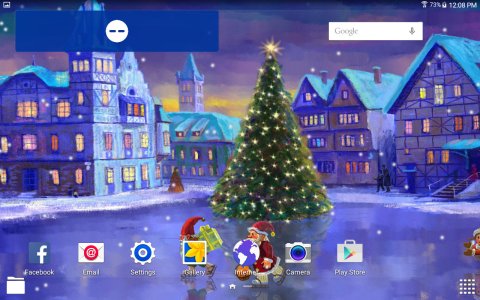
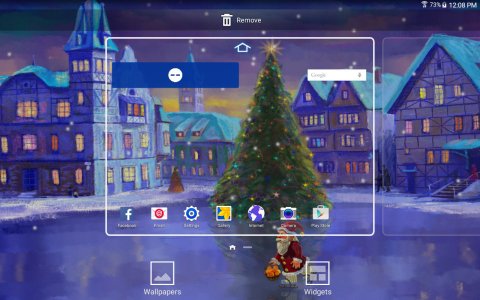
Bought Samsung Galaxy tab 4 10.1. Came with Android 5.0.2. Rogue white folder on bottom left of main screen leads to My Files. Can't move, delete etc. Hold and turns grey. Tap, takes to my files. Any help in getting rid of.
 
Welcome to Android Central! Does that tablet have Easy Mode?

Is the folder shortcut in the Favorites Tray (the bottom-most row), or is it on the main part of the homescreen?
 
This folder is not actually on the home page, as it does not move with the home pages. Note, white folder bottom left. It is not showing on Apps or Widget pages. Screenshot_2015-09-01-12-08-42.jpg Screenshot_2015-09-01-12-08-30.jpg
 
Last edited:
I wonder if that's actually part of the system, or if it's from a 3rd party app. Have you installed any kind of 3rd party file manager or "memory booster" apps?

Try booting into Safe Mode (https://support.t-mobile.com/docs/DOC-11558)--if it disappears in Safe Mode, it's associated with some 3rd party app you installed. If it's still there in Safe Mode, then it's presumably a new system "feature" that came with the update. You could try opening the My Files app and looking at its settings for some option to have a widget or shortcut on the homescreen.
 
Yes, it's part of the Lollipop update. I lke it because it allows me to access the file folder 'My Folder' from any App screen

Posted via the Android Central App
 
Did any1 here use samsung link before the update..It now says not compatible.. and its not even in the play store when trying from the tab4..Still works on s3 phone just fine, but it has not received the lollipop update yet..Thx in advance.
 

Trending Posts

Forum statistics

Threads
963,428
Messages
6,993,252
Members
3,165,024
Latest member
liquidsnake757