getting inverse colors within a block with text

  • Thread starter Thread starter Android Central Question
  • Start date Start date
A

Android Central Question

I have a battery bar that I want to place the battery percentage on top of. But I want the text color to be the opposite color of the battery bar as it discharges. In other words, when the battery is down to 50% half the text will be the foreground color while the remainder will be in the background color. Any ideas on how to do this? I thought I had seen it done once before but I can't remember where.
 
Welcome to Android Central! Are you developing an app, or is this some app or widget that came with your phone or that you installed?
 
I am trying to find a way to make a widget do what I want it to. I can probably make it with any good widget creation tool such as KWGT or Zooper (even though its no longer supported). I do not intend to try to program from scratch unless I have no other choice.
 
Oh I see. I'm trying to remember if any widget I've used does that -- it seems like there should be plenty out there. If I find one, I'll let you know.
 
I know I've seen it done because I've had it on homepage in the past. Just wish I could I remember where it came from.
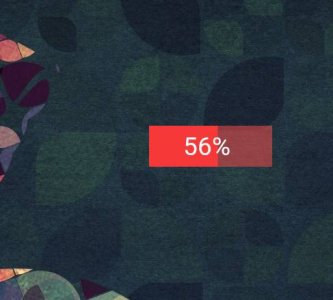
Welcome to the forums. Just to be sure, are you asking for a widget similar to this one but with the 56% changing colours as well? Same colours than the progress bar but opposite?
Screenshot_20181106-135544.jpeg
 
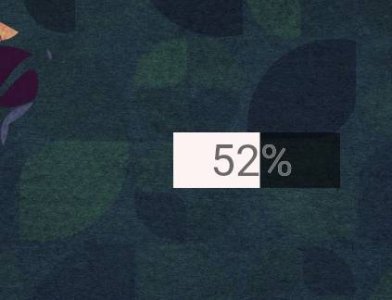
If that's what you want it's quite easy to do with Zooper. Create the battery progress bar, add one module for the battery percentage with the background colour and another one with the foreground colour. You'll need to use two very contrasting colours four better effect. This is with black and white for example.
Screenshot_20181106-141216.jpeg
 
No. I've seen that before. The effect I am trying to achieve is similar, but where the text uses the two opposing colors in reverse changing as the battery discharges.
 
Yeah I know. It's an interesting problem though. I know I've seen this before. Aaaagh! I have old man's memory and it's driving me nuts.
Haha. Maybe it could be done with Zooper using a battery progress bar, two texts one for each colour, a moving rectangular overlay and messing with the drawing modes. I haven't tried this before, maybe I'll give it a try when I get some spare time.

Have you ever tried Zooper? KWGT is more powerful but I've never dived into it.
 
Yeah I know. It's an interesting problem though. I know I've seen this before. Aaaagh! I have old man's memory and it's driving me nuts.
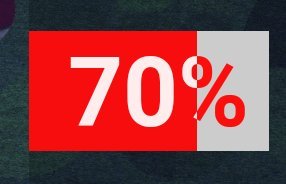
And here you go. :) This is with Zooper:

- Battery progress bar. FG - red / BG - white.
- Battery level BLEVN. Draw mode - Clear.
- Copy battery bar. Invert colours. Draw mode - XOR.
- Copy original battery bar. Draw mode - Overlay.

Screenshot_20181107-005511.jpegScreenshot_20181107-004417.jpegScreenshot_20181107-005127.jpeg
 
Yeah I know. It's an interesting problem though. I know I've seen this before. Aaaagh! I have old man's memory and it's driving me nuts.
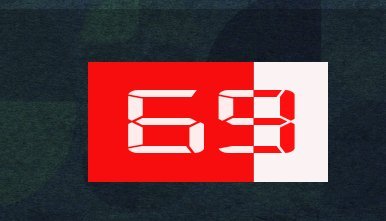
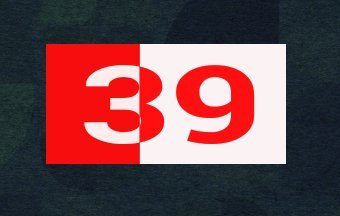
Ok, as you can see I like that kind of interesting problems as well. :) Got the idea last night while showering and created a quick widget. This is the logic behind this widget just in case you want to replicate it with a different app.

1. First background. It can be a plain rectangle, bigger than the text and, to avoid colour interference later, preferably the same size than the final battery bar. I used the battery bar for simplicity (FG - red/BG - white).

2. We need to cut the text out the background. Add a module with the battery level and use CLEAR as drawing mode.

3. Now we can create the text with changing colours according to the battery level. Copy the battery bar and invert the colours (FG - white/BG - red). Using XOR as drawing mode we get the not overlapping pixels (the text we cut out previously) and the result is the battery level text with the inverted colours.

4. Now we need to add the final battery progress bar. Normal colours (red/white) and OVERLAY as drawing mode, so it doesn't cover the text.

Let me know if you need any help creating this widget. Still working :)Screenshot_20181107-120444.jpeg
 
Last edited:
Yeah, I guess I'm going to need some help after all. I thought your description would be sufficient but I can't even get it to work with Zooper. I've tried other widget apps without success. I must be missing something.
 
Yeah, I guess I'm going to need some help after all. I thought your description would be sufficient but I can't even get it to work with Zooper. I've tried other widget apps without success. I must be missing something.
Do you have Zooper Pro or the free version? With Zooper Pro I can send you the file so you can see all the details.
 

Trending Posts

Members online

Forum statistics

Threads
962,681
Messages
6,991,339
Members
3,164,899
Latest member
cepat_tanggap