Goodlock for pie update is here

Task changer wasn't working for me either at first. It had some red writing at the bottom that said it wasn't ready and they were working on it. I just clicked the little shopping bad beside it and it took me to the download.
 
Last edited:
Task changer wasn't working for me either at first. It had some red writing at the bottom that said it wasn't ready and they were working on it. I just clocked the little shopping bad beside it and it took me to the download.

Same here.
 
Ok so now I'm in business with the Task changer. I downloaded the last available apk file from apkmirror. Once I installed it , I went to good lock and of course it says unplugged, but if you do what HarlemKnight says and click the bag it will take you to the update. Thank HarlemKnight.
 
Last edited:
I can’t get routines. I downloaded from APK, installed it but it’s nowhere to be found. Any suggestion?
 
How did you set up the task changer ? It's not on my list of things to install and it's not coming up through searching the Galaxy store.

task changer showed up in my initial download, do you thing it may be a carrier issue?!? that's strange...
 
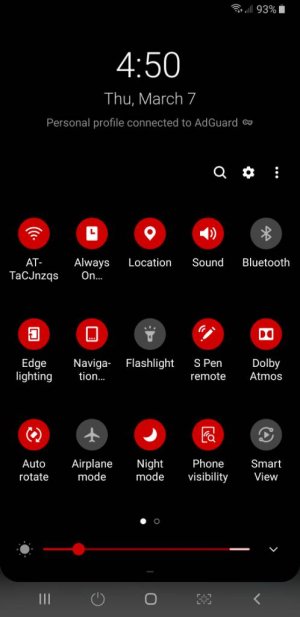
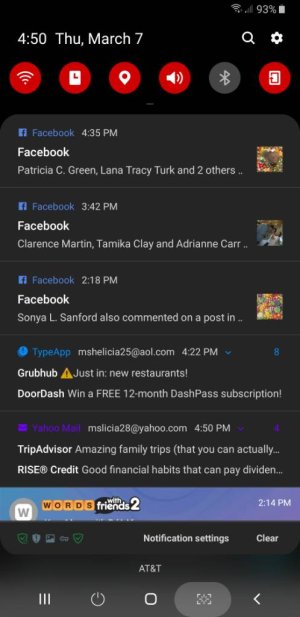
So I had gotten used to how the dark theme showed notifications. Black background, white messaged font, and it would use a color from the app for the app name usually. But now with Quickstar it changes ALL the lettering to one color, looks fugly. I love being able to change the quick setting color, but I would rather keep the old way for notifications. There doesn't seem to be a way to do this.
 
So I had gotten used to how the dark theme showed notifications. Black background, white messaged font, and it would use a color from the app for the app name usually. But now with Quickstar it changes ALL the lettering to one color, looks fugly. I love being able to change the quick setting color, but I would rather keep the old way for notifications. There doesn't seem to be a way to do this.

I used swift installer to change my quick settings , but my notifications are still only using the dark theme for notifications.Screenshot_20190307-165035.jpegScreenshot_20190307-165050.jpeg
 
I tried swift installer, but i could get the hang of it... do you think that it's better than/just as good as Goodlock?
I think both are equally good but different.you just have to play around with both to tweak the options in the way you want. You definitely have to keep at using Swift installer to get it.
 
I'm also in the US on AT&T and downloaded Good Lock this morning for the first time. It also didn't have Task Changer and Routines in the app download. I d/l and installed those two apk's and the only one that installed in the app was Task Changer. Routines installed but was not showing up anywhere. The only place i finally found it was by doing a search on the settings page. It was there and running and my only option was to uninstall, so I did for now, and will mess with it another day.
 
I thought mine didn't work but I had to press it twice. I guess technically it still doesn't work like it's supposed to.

I found out I can't have power button option on navigation area with gestures turned on. I can if I have navigation buttons visible. Oh well. I like gestures too much lmao so I'll just use physical power button.
 
I found out I can't have power button option on navigation area with gestures turned on. I can if I have navigation buttons visible. Oh well. I like gestures too much lmao so I'll just use physical power button.
Ooh. Makes sense. I don't fool with them gestures.lol
 
Love the new task layout. You now have the option for grid and list 👍

Still not available where I live. Somebody mentioned how they got it by removing their SIM card and using a VPN in the USA but I can't be bothered to do that. This "region- locking" of Samsung is also why I didn't get the 8 GB RAM version of the Note 9. No big deal. Life goes on.
 

Trending Posts

Forum statistics

Threads
960,688
Messages
6,983,237
Members
3,164,544
Latest member
bamboozled