Question Google Maps labeling Contacts addresses as Other instead of Home

ricardoburnsy

Well-known member
May 29, 2025
182
9
18
1000065190.jpg
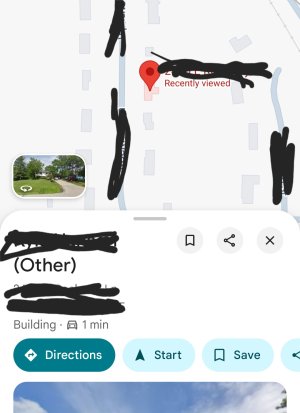
I saved a new contact in my Google Contacts app and included their home address. The address is saved under the Home label. In my Google Maps app, I allow my Contacts home addresses to appear. However, the new contacts home address does not appear on Maps. When I search for their name, their address displays with their name but it is labeled as Other in Maps even though they're address is saved as Home in Contacts. Because the address is labeled as Other in Maps it does not appear with a blue pin and their name. It seems like Maps has a flaw.
 
Are you sure the contact has this saved as Home in Google Contacts? (If it's saved locally or a different contact list it may not be able to read the address tags properly). If you open the contact, are there any other addresses saved to Other? Is the address you saved showing up as Home?
 
Are you sure the contact has this saved as Home in Google Contacts? (If it's saved locally or a different contact list it may not be able to read the address tags properly). If you open the contact, are there any other addresses saved to Other? Is the address you saved showing up as Home?
Its showing as home in google contact website. Also how do I add contact address to private label in Google maps ?
 
Its showing as home in google contact website. Also how do I add contact address to private label in Google maps ?
Does the contact (either in the app or the website for Contacts) have the same address in other fields, perhaps? Is Maps signed into the same Google account as where the contact is being saved? You can always sign out/stop sync for Contacts on your Google account settings on your phone, and then re-log in/sync so it forces an update and see if that helps.

I don't know what you mean by 'private label' so can't help with that.
 
Does the contact (either in the app or the website for Contacts) have the same address in other fields, perhaps? Is Maps signed into the same Google account as where the contact is being saved? You can always sign out/stop sync for Contacts on your Google account settings on your phone, and then re-log in/sync so it forces an update and see if that helps.

I don't know what you mean by 'private label' so can't help with that.
It has the address in google and samsung contacts. One of my older contacts with home address shows in google maps.
 
Does the contact (either in the app or the website for Contacts) have the same address in other fields, perhaps? Is Maps signed into the same Google account as where the contact is being saved? You can always sign out/stop sync for Contacts on your Google account settings on your phone, and then re-log in/sync so it forces an update and see if that helps.

I don't know what you mean by 'private label' so can't help with that.
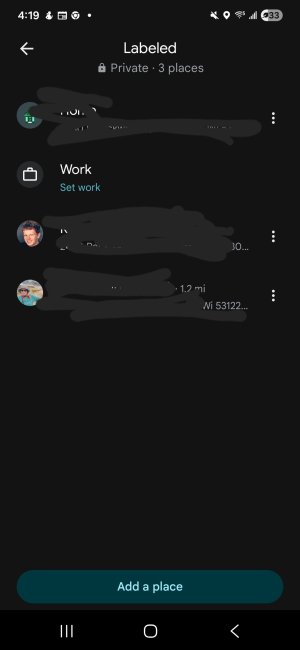
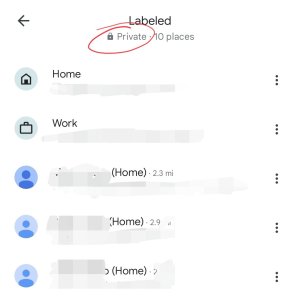
Private label is in your lists.
 

Attachments

  • Screenshot_20260117_161920_Maps.jpg
    Screenshot_20260117_161920_Maps.jpg
    67.7 KB · Views: 13
Ah! Those are just the labels 'saved' to your account. That's where Contacts (saved in your Google Account) will show up, but also if you use the button below in your image (ADD A PLACE), you can save locations with custom names; this does not apply to Contacts and is just custom addresses/names in Maps.

Not sure why yours isn't displaying correctly and I would just think of checking if the account is properly synced between Contacts and Maps. I tried on mine, changed a contact's address from Home to Work and while it took a few minutes to 'sync up', it eventually showed the change in Maps.
 
  • Like
Reactions: Laura Knotek
Ah! Those are just the labels 'saved' to your account. That's where Contacts (saved in your Google Account) will show up, but also if you use the button below in your image (ADD A PLACE), you can save locations with custom names; this does not apply to Contacts and is just custom addresses/names in Maps.

Not sure why yours isn't displaying correctly and I would just think of checking if the account is properly synced between Contacts and Maps. I tried on mine, changed a contact's address from Home to Work and while it took a few minutes to 'sync up', it eventually showed the change in Maps.
Did it add the contacts address to private label?
 
Yup. That's where all my contacts show up. You do have the option to remove them from there (and I wouldn't know where to see what you've removed/bring them back, so won't try that but there's that option).
 
  • Like
Reactions: Laura Knotek
Both. If I add a contact's address, the location shows up in my Private labels in Google Maps. But I can also add non-contact related locations to my Private labels there.
 
Both. If I add a contact's address, the location shows up in my Private labels in Google Maps. But I can also add non-contact related locations to my Private labels there.
Could you show a screenshot of that blacking out the address of person cause my isn't adding to private label and in google maps the contact says other not home. Even when I labeled it home on google contact.
 
Again, not sure why it's not working for you and the only thing I can think of is to re-sync your Contacts (remove Contacts account from phone, re-add) or to re-create the contact and ensuring no duplicate addresses exist.
 

Attachments

  • tempFileForShare_20260128-115149.jpg
    tempFileForShare_20260128-115149.jpg
    45.9 KB · Views: 7
This is a common sync/classification glitch. Maps doesn’t always respect the “Home” label from Contacts if the contact is stored in multiple sources (Google + Samsung) or has duplicate address fields. Try: remove the address from Samsung Contacts (keep only Google), force Contacts sync off/on, or delete and re-add the contact. It can also take hours for Maps to re-index labels. If it still shows as “Other,” it’s likely a Maps-side bug or delayed indexing—not something you’re doing wrong.
 
Again, not sure why it's not working for you and the only thing I can think of is to re-sync your Contacts (remove Contacts account from phone, re-add) or to re-create the contact and ensuring no duplicate addresses exist.
Yeah mine only shows a couple contacts address that were added a long time ago. If i try to add an address to new cobtact it doesnt show in private label. And instead of calling it home, it calls it other.
 
Again, not sure why it's not working for you and the only thing I can think of is to re-sync your Contacts (remove Contacts account from phone, re-add) or to re-create the contact and ensuring no duplicate addresses exist.
I tried adding an address to a new contact labeled it home and when I go to maps calls it other. I cant win.
 
Again, not sure why it's not working for you and the only thing I can think of is to re-sync your Contacts (remove Contacts account from phone, re-add) or to re-create the contact and ensuring no duplicate addresses exist.
So those addresses in your private label are all addresses you added to your contacts?
 
Yes. And if I add a contact with a different label, it shows up there as well (albeit after a few minutes, it's not instant). Sorry can't help more, but no idea why it wouldn't be syncing properly on your end.
 
Yes. And if I add a contact with a different label, it shows up there as well (albeit after a few minutes, it's not instant). Sorry can't help more, but no idea why it wouldn't be syncing properly on your end.
Even if you add an address to a contact you haven't before it will show in google maps private label?
 

Trending Posts

Members online

Forum statistics

Threads
963,128
Messages
6,992,725
Members
3,164,982
Latest member
xatvet7788