
GPS issues
- Thread starter Joe Vile
- Start date
You are using an out of date browser. It may not display this or other websites correctly.
You should upgrade or use an alternative browser.
You should upgrade or use an alternative browser.


skatergirl
Retired Moderator
- Mar 22, 2011
- 3,232
- 96
- 48
I don't have an answer as to why this is happening, but when my GSP icon starts going nuts, I turn my screen off and back on. Generally this stops it from searching.
Jim haslup
New member
- Jan 26, 2014
- 2
- 0
- 0
I have the same problem ever since the lolipop update. My gps used to lock on in mere seconds. Now it can take up to 20 mins sometimes. This is a HUGE issue for me as I travel a lot for work. I've done factory reset and everything else I've researched to resolve the issue. The other problems, and they are numerous, I can live with until a fix. But the GPS ISSUE issue is driving me MAD....
Posted via the Android Central App
Posted via the Android Central App

BarfingMonkey
Well-known member
- Dec 14, 2010
- 219
- 4
- 0
Kelly Kearns
Well-known member
- Jan 10, 2012
- 8,729
- 6
- 0
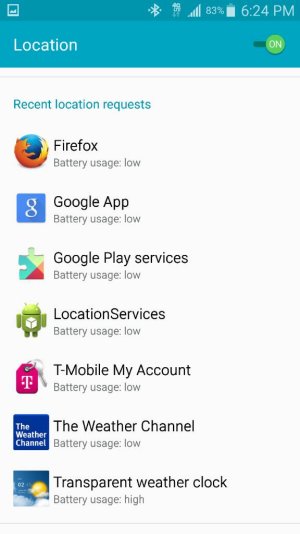
You can go to settings and location and see what apps are using the location and how much. That might help you track down the offender.
Have you at least done a cache wipe since you upgraded?
Have you at least done a cache wipe since you upgraded?
Sammuel1973
Well-known member
- Nov 24, 2013
- 990
- 3
- 18
I have TMobile, and I am having the same issue since my L update. I have tried wiping cache, did a factory reset once...my usage pattern has been the same all along, same phone case, same everything. I guess there is no solution? Oh well...My GPS icon is always flashing /trying to find location. Really annoying. I have my GPS set to high accuracy using wifi etc. Never had this on my s4. Is it just a lollipop issue?
Posted via the Android Central App
Kelly Kearns
Well-known member
- Jan 10, 2012
- 8,729
- 6
- 0
You need to look at the apps and see which one is using location constantly.I have TMobile, and I am having the same issue since my L update. I have tried wiping cache, did a factory reset once...my usage pattern has been the same all along, same phone case, same everything. I guess there is no solution? Oh well...
Sammuel1973
Well-known member
- Nov 24, 2013
- 990
- 3
- 18
Excuse me for my ignorance, not sure what you mean, but I have attached a picture for reference. As mentioned, nothing has changed, same apps I have been using since KK, same usage, same behavior, etc. Everything has been constant except for my L update.You need to look at the apps and see which one is using location constantly.
Attachments
Kelly Kearns
Well-known member
- Jan 10, 2012
- 8,729
- 6
- 0
That weather channel app, I've heard it is an offender of many things, supposed to be one of the worst apps. I would uninstall that one and see how it does.Excuse me for my ignorance, not sure what you mean, but I have attached a picture for reference. As mentioned, nothing has changed, same apps I have been using since KK, same usage, same behavior, etc. Everything has been constant except for my L update.
Also, you did a complete factory reset when you did a reset? You had to set your phone up again?
As far as apps before and after lollipop, the apps really have to be optimized for lollipop and if a developer hasn't done that yet, it could cause problems on lollipop.
Also going to Google settings on your phone and delete location history, can help sometimes also.
Sammuel1973
Well-known member
- Nov 24, 2013
- 990
- 3
- 18
Thanks for the suggestions. I have done all of them, problem still persist. I am inclined to do a factory reset again, hopefully that would do the trick. It was a chore, I did one right after my TMobile LL update...had to save and back up everything, took over an hour to reset up everything. I will try again, will keep you posted.That weather channel app, I've heard it is an offender of many things, supposed to be one of the worst apps. I would uninstall that one and see how it does.
Also, you did a complete factory reset when you did a reset? You had to set your phone up again?
As far as apps before and after lollipop, the apps really have to be optimized for lollipop and if a developer hasn't done that yet, it could cause problems on lollipop.
Also going to Google settings on your phone and delete location history, can help sometimes also.
Update: Did another factory reset, no luck. "Searching for GPS" takes too long when opening the Google Map app, so I am convinced it's the only culprit since my LL update. I guess my last resort is to call TMobile/Samsung. My phone has been working flawlessly until now.
Update 2: Spoke to TMobile, did all troubleshooting for 1 hr, no luck. They offered warranty exchange, but it's in backorder now, bummer. I may opt for the S6 Edge now, with out of pocket expense, so frustrating.

Last edited:
Kelly Kearns
Well-known member
- Jan 10, 2012
- 8,729
- 6
- 0
Thanks for the suggestions. I have done all of them, problem still persist. I am inclined to do a factory reset again, hopefully that would do the trick. It was a chore, I did one right after my TMobile LL update...had to save and back up everything, took over an hour to reset up everything. I will try again, will keep you posted.
Update: Did another factory reset, no luck. "Searching for GPS" takes too long when opening the Google Map app, so I am convinced it's the only culprit since my LL update. I guess my last resort is to call TMobile/Samsung. My phone has been working flawlessly until now.
Update 2: Spoke to TMobile, did all troubleshooting for 1 hr, no luck. They offered warranty exchange, but it's in backorder now, bummer. I may opt for the S6 Edge now, with out of pocket expense, so frustrating.
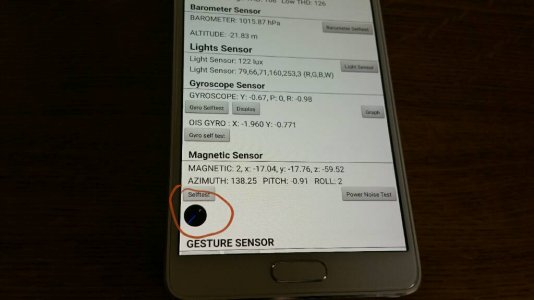
I've also read that calibrating the compass can help GPS problems. I calibrated mine out of the box.
Instructions
http://www.solvemix.com/index.php/a...amsung-galaxy-note-4-calibrate-compass-solved
Sammuel1973
Well-known member
- Nov 24, 2013
- 990
- 3
- 18
Thanks for continuing to help. The calibration instructions look promising. I wonder though if it would solve the "GPS signal lost" after 10-20 minutes using Google Map. If it doesn't, I just hate to reconfigure the phone all over again, cuz right now, it is ready to be shipped to TMobile for the warranty exchange.I've also read that calibrating the compass can help GPS problems. I calibrated mine out of the box.
Instructions
http://www.solvemix.com/index.php/a...amsung-galaxy-note-4-calibrate-compass-solved
Kelly Kearns
Well-known member
- Jan 10, 2012
- 8,729
- 6
- 0
Oh that battery calibration doesn't change anything to set back up and only takes a couple of seconds.Thanks for continuing to help. The calibration instructions look promising. I wonder though if it would solve the "GPS signal lost" after 10-20 minutes using Google Map. If it doesn't, I just hate to reconfigure the phone all over again, cuz right now, it is ready to be shipped to TMobile for the warranty exchange.
Sammuel1973
Well-known member
- Nov 24, 2013
- 990
- 3
- 18
Per the instructions, I am trying to get the blue line pointing north, but no success. I did get it from 0 to 3 though...Oh that battery calibration doesn't change anything to set back up and only takes a couple of seconds.
Attachments
Kelly Kearns
Well-known member
- Jan 10, 2012
- 8,729
- 6
- 0
Per the instructions, I am trying to get the blue line pointing north, but no success. I did get it from 0 to 3 though...
You just need it at 3, that means it is calibrated.
Sammuel1973
Well-known member
- Nov 24, 2013
- 990
- 3
- 18
Thanks again. Yup, got it at 3, but no luck, same issue. I think the problem isn't calibration, but that the internal GPS signal somehow is too finicky, gets lost. I tried all avenues including other navigation apps. Imagine driving 20 minutes to a new area, then the "GPS signal lost" comes on, so frustrating. Like some said, the "Searching for GPS" message stays on too long when I power on/off my phone.You just need it at 3, that means it is calibrated.
Sigh, I really love this phone. I think I will get myself the S6E, then the N5 come November. Thanks for trying to help though.
Last edited:
Kelly Kearns
Well-known member
- Jan 10, 2012
- 8,729
- 6
- 0
Thanks again. Yup, got it at 3, but no luck, same issue. I think the problem isn't calibration, but that the internal GPS signal somehow gets lost. I tried all avenues including other navigation apps. Imagine driving 20 minutes into a new area, then the "GPS signal lost" comes on, so frustrating. Like some said, the "Searching for GPS" message stays on too long when I power on/off my phone.
Sigh, I really love this phone. I think I will get myself the S6E, then the N5 come November. Thanks for trying to help though.
I would go for the exchange, myself if you really like this phone. Or, if you have an extra phone, send yours to Samsung for free, they will fix this issue and any others they see. They will remove the software and reinstall, not just flash the software like everyone else, so if you have any software issues that won't correct, and this could be one, that will correct it.

kirksucks
Well-known member
- May 26, 2011
- 2,089
- 27
- 0
Me and my girlfriend set navigation from our hotel to a restaurant. Me on note 4 and her on s5. Both on lollipop. My GPS never locked on until halfway there then got lost 10 mins later. The s5 was flawless.
The GPS on the note 4 us abysmal.
Posted via the Android Central App
The GPS on the note 4 us abysmal.
Posted via the Android Central App
Similar threads
- Replies
- 1
- Views
- 503

- Locked
- Solved
- Replies
- 3
- Views
- 985


- Replies
- 6
- Views
- 2K


Trending Posts
-

-

-
-
Google Pixel Fold phone—touch / thumbprint sensor
- Started by thewillfriedwald
- Replies: 0
-

Members online
Total: 4,004 (members: 10, guests: 3,994)
Forum statistics

Space.com is part of Future plc, an international media group and leading digital publisher. Visit our corporate site.
© Future Publishing Limited Quay House, The Ambury, Bath BA1 1UA. All rights reserved. England and Wales company registration number 2008885.
 Facebook
 Twitter
 Instagram