Hide detail in notifications not working

gomezz

Well-known member
May 8, 2021
432
174
43
On my previous Samsung Android 13 phone I was able to have it set so that my apps only displayed the first line in the notification and not the detail (until and unless I tapped on the notification).

Now on my new Samsung Android 16 phone I can't seem to find the settings to achieve the same effect. I have found the options to show or hide details but they do no seem to have any effect. Anyone able to help me on this?

This is specifically an issue I have with the PocketCasts podcatcher app where I do not want to see spoilers in sports review episode titles. Does each app have to be coded to support this Show/Hide detail option?


Post to a different community


2
 
Which Samsung phone do you have?

What steps have you taken to try and solve this on your own?

Since it is for a specific app, on my Samsung S24U, I open Settings>Notifications>App notifications>(goto your app) touch the name NOT the toggle>here you can adjust some settings and under Notification categories you could turn certain types off.

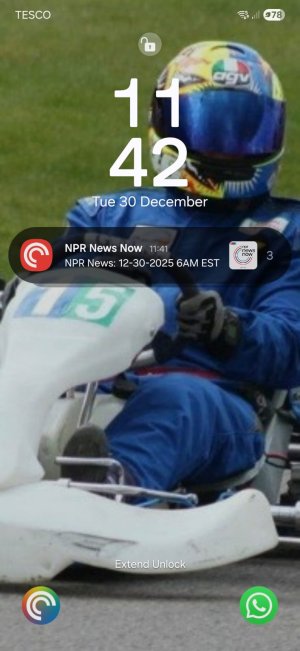
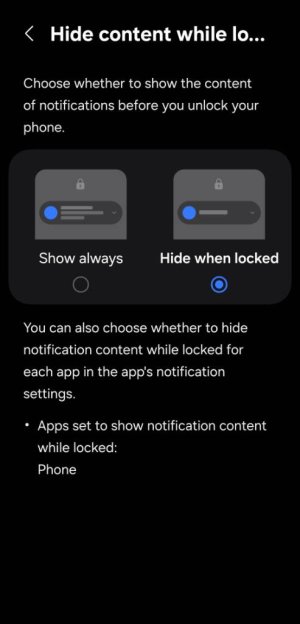
It sounds like from your post that you've already looked at the "Hide content while locked" options, and you're still getting too much detail? Would you show us a screenshot of the notifications after setting this to "Hide when locked"? Or show us a comparison of the two, On and Off.

Is this same app from your previous phone when you did not have this issue?

I can't answer the question about coding because I don't know anything about that but I would imagine that they probably set what a notification consists of but the setting for how much of that is displayed lay in the phone settings we've been talking about. If this is the same app from before and it worked then but doesn't now, I'm putting money on the difference being the new phone and/or UI. Let us know what you find and post some screenshots for us and we'll offer more advice.
 
Thanks for your reply. It takes some time to test each change as I need to wait for a new episode to drop to see the effect of each change. I have subscribed to an hourly news feed podcast to help speed this up but working today and tomorrow so will have another dedicated looked at this on New Years Day when I will wake up my old phone so I can do a side by side comparison.

New phone is a Samsung S25FE running Android 16 compared to my old Samsung S20FE running Android 13.
 
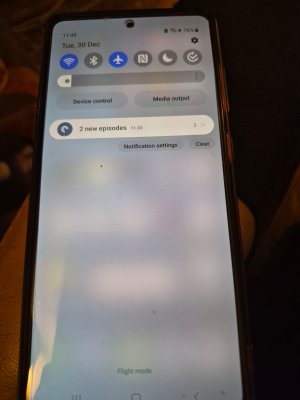
So it displays the detail of the first new podcast episode just added.

After messing around with this for ages I have decided to stick with my workaround of suppressing notifications for those sports-related podcasts which are the ones likely to show spoilers for events I have yet to see which is commonly over the weekend when I timeshift my viewing / listening to fit everything into my available time. I am not a multi-screener as I like to concentrate on one event at a time.

This goes along with my long term practise of splitting my All New episodes filter/playlist into Sports and Non-Sports filters/playlists which I switch between as and when safe or not safe to do so.
 
All that said I still think the suppress detail feature on the new phone is broken either by design or by implementation.
 
Stripping this back to basics all I want is to see that there are new podcasts by just looking at my lock screen but I do not want to see the details of what those new podcasts might be.

Is this such an unusual use case? Should it be so hard to achieve?
 
I didn't have time to read through all your responses but in settings >notifications

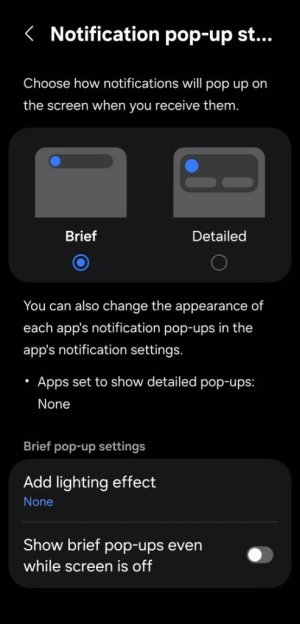
You have brief on ?
Also you have hide lock screen content in the same menu under notifications?Screenshot_20260101_122414_Settings.jpgScreenshot_20260101_122405_Settings.jpg
 

Trending Posts

Forum statistics

Threads
960,318
Messages
6,981,931
Members
3,164,475
Latest member
grastyvirginia200