How can I stop apps from occupying the memory in a non-rooted phone?

Sridip Dhar

New member
Sep 16, 2015
3
0
0
I know there are applications such as "Clean Master" which force stops apps for me...but they keep coming back and occupy the RAM making the phone gradually slow and non-responsive. Once I tried to limit the number of running jobs at background between a range of 1 to 5 by activating one System Settings. But that also slowed down the performance of Application StartUps. Hence I believe, there should be multiple profile management feature in future Android SmartPhones as well where we can limit the number of installed apps separately for each profile. Thus enjoying quick response time of applications by switching to appropriate profiles having specific set of running apps. Android needs to give serious makeover in this particular area....whereby we can install any number of apps without clogging the memory.
 
Last edited:
You don't want to stop apps from occupying memory. You want memory to be as full as possible and to let Android manage your RAM, etc. Micromanaging it is bad, letting it do its own thing is good.
 
I was wondering about this also for a while. My performance isn't lagging but I'm not a real power user either. Many folks say it's just supposed to run like that, maintains performance due to info being queued up, etc. Which may be true.
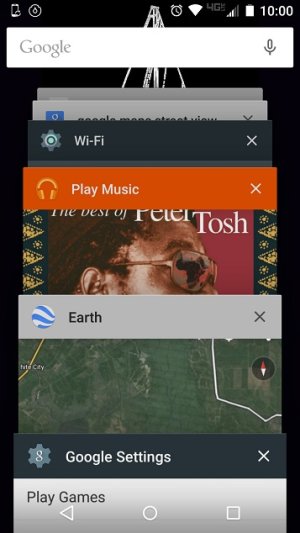
But a "cache out" feature might improve performance. There's no way all this history can be useful. Some of this stuff was weeks ago, and there are redundant ones for the same apps. Scrolling through this many would be too slow so it's mostly pointless as an app relaunch. Maybe have a variable setting for history cards (?), 0-All. And maybe a time limit on background processes for apps not actually in use, 0min-1mos, etc.History cards.jpg
Also, I'm not real savvy so some of this may not be accurate.
 
I was wondering about this also for a while. My performance isn't lagging but I'm not a real power user either. Many folks say it's just supposed to run like that, maintains performance due to info being queued up, etc. Which may be true.
But a "cache out" feature might improve performance. There's no way all this history can be useful. Some of this stuff was weeks ago, and there are redundant ones for the same apps. Scrolling through this many would be too slow so it's mostly pointless as an app relaunch. Maybe have a variable setting for history cards (?), 0-All. And maybe a time limit on background processes for apps not actually in use, 0min-1mos, etc.View attachment 197049

The recent apps doesn't correspond to apps in memory or background processing. Most of those are taking up 0 cycles and are basically placeholders to get back to a recent point. Android closes apps as needed to maintain optimal performance.
 
I installed loads of useful/utility apps and currently my phone is really lagging and sometimes hang forcing me to reboot......what except uninstalling the apps or buying a device with more RAM (I have Samsung Galaxy S4 i9500 with 2GB of RAM) would help me in such a case? Well...did I demand too much? :)
 
Depending on what all you have installed, you may be demanding too much. This will explain why you don't want to use memory cleaner apps

http://m.androidcentral.com/ram-what-it-how-its-used-and-why-you-shouldnt-care

Keep in mind, this is for a normally functioning system. There are the occasional rouge apps that can hog too much memory and cause problems, but those are best dealt with individually. And nothing will help if you're demanding too much. Android doesn't have swap space like Windows, where excess memory demands are handled via the hard drive. With Android, you get the RAM and that's it. If you have 2 GB RAM and 3 GB worth of app demands, then the result is the system is constantly opening and closing apps (which is essentially what happens when using cleaner apps). The above article explains the process and why it causes lag and increased battery usage.

I'd suggest you reevaluate some of your apps to see if you can make due without some. Any cleaner apps like Clean Master should go right away.
 
Agree with Assasin Droid that none of this stuff is beneficial in any way.

Uninstall any and all task killers, RAM memory optimizers/boosters, battery savers/repairers, cache cleaners, antivirus, etc etc. None of that stuff is necessary. They are counterproductive, waste power, disrupt system processes and degrade performance.

Please, read the links in the post linked below and the links in them. They contain a wealth of information about why none of such apps should ever be used. And why Android should be left alone to handle memory and system processes.

http://forums.androidcentral.com/samsung-galaxy-s5/580162-cache-cleaning.html#post4679402

Android since v1.0. Linux since 2001
 
I uninstalled all the so called Cache cleaning and Battery optimizer applications. Thanks for your advice guys!

But I have around 120 different apps....Udacity, Duolingo, Inbox, NoRoot Firewall, Superbeam, DroidIris, Dropbox, HomeBudget, Ivona TTS, Internet Speed Meter, GoingDutch..........just to name a few....and they all are pretty important to me.....

And as the number of android applications are increasing in leaps and bounds day-by-day and more and more sellers are encouraging their customers to purchase through apps.....I think it would be dangerously soon that our android handsets would have to efficiently manage 1000s of android apps together. It is pretty obvious that end-users will not manually work in more than 3-4 apps at a time....but those numerous apps would evidently fill-up the internal SD card (mine is 16GB which now has less than 1GB of free space even after shifting a lot of apps into External SD card) storage in no time leading us to a dead-end.

I think OEMs needs to give us the flexibility to increase the internal storage capacities as well.....what do you think? :)
 
If you make more internal space for apps, you have to take away space somewhere else. And of course it requires rooting the phone and a fair amount of partitioning savvy.

The best solution is, of course, devices with more memory. If no can do and space is getting low, then it might be time to do some weeding in your app garden.

Android since v1.0. Linux user since 2001.
