Question Moto G Pure How do I make the clock always show up on the lock screen?

RequiredLol

Member
Mar 30, 2026
5
0
1
The lock screen is only on when I push the power button so I have no idea why it doesn't always show when I turn on my phone to look at the lock screen. It's not affected by sleep display because that affects my phone when it's turned off. An answer would be appreciated. Thanks.
 
Welcome to Android Central! Are you saying that when you turn on the phone, it goes immediately to the homescreen? Is your phone set to require an unlock PIN/password/fingerprint? How long is the phone set to stay unlocked after the screen is off? (Look for an option called "Lock after screen timeout" or something similar in your system settings for that.)
 
I don't think your device has a true AOD(Always On Display)

It's usually triggered by a tap or motion, Notifications.

Go to settings>Display>peek display or maybe called Moto display make sure settings are turned on
 
I don't think your device has a true AOD(Always On Display)

It's usually triggered by a tap or motion, Notifications.

Go to settings>Display>peek display or maybe called Moto display make sure settings are turned on
It shouldn't need one. I should be able to click the power button, opening the lock screen and seeing the clock. I don't need to see the clock when the screen is off. Peek display doesn't exist on my pjone, I have sleep display. Nothing about sleep display fixes my problem, because it shows things on my screen when my phone is off. The lock screen is after turning the phone on and before unlocking the phone.
 
It shouldn't need one. I should be able to click the power button, opening the lock screen and seeing the clock. I don't need to see the clock when the screen is off. Peek display doesn't exist on my pjone, I have sleep display. Nothing about sleep display fixes my problem, because it shows things on my screen when my phone is off. The lock screen is after turning the phone on and before unlocking the phone.
Yes pressing the power button should show a lock screen with clock,time etc.
Is this a widget clock you set-up?
.


Post a screenshot like mentioned earlier of your lock screen when you press the power button
 
  • Like
Reactions: Laura Knotek
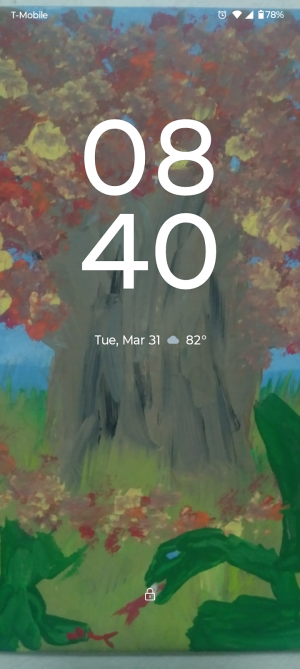
This is what it should look like, and what it usually looks like. But sometimes it looks like this but without the clock
 

Attachments

  • Screenshot_20260331-204020_System UI.png
    Screenshot_20260331-204020_System UI.png
    1.2 MB · Views: 7
This is what it should look like, and what it usually looks like. But sometimes it looks like this but without the clock
If that big clock disappears intermittent make sure low battery isn't the problem when it happens otherwise it's probably a glitch/bug in the OS , report it or see if next software update fixes it .
 
  • Like
Reactions: Laura Knotek
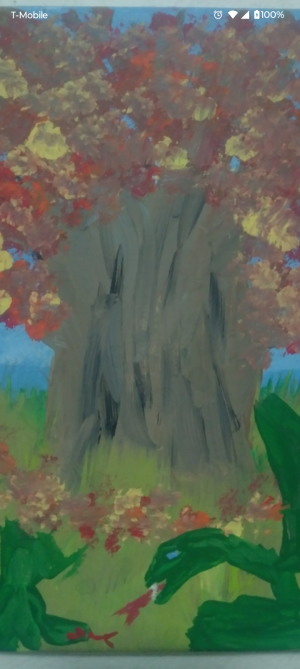
This is what it looks like without the clock. The show clock on lock screen setting also says when available, so I just don't understand why it wouldn't be available
 

Attachments

  • Screenshot_20260401-131258_System UI.png
    Screenshot_20260401-131258_System UI.png
    1.2 MB · Views: 4

Trending Posts

Members online

Forum statistics

Threads
963,164
Messages
6,992,768
Members
3,164,984
Latest member
mirhafatima0128