Question My phone, Samsung S10e, is stuck in "Phone is starting" loop

Status
Not open for further replies.
Dec 28, 2025
7
1
1
The reason why my phone was stuck on the starting loop was that I was trying to move my freshly installed CODM to my SD card. I noticed that my first try, my phone restarted even though the battery was 45%. I ignored the sign and tried again to move the app, and the second time was when my phone became stuck on "Phone is starting."

Since I could use the Setting, I uninstalled the CODM as well as the Roblox since they were the apps I recently installed, then I cleaned the cache of some apps (last updated) and uninstalled apps (mostly social media). Yet nothing works, and now, it is inevitable to see that resetting my phone can solve my problems. However, I don't want to lose my photos and files on my phone.

And so now, I'm trying to transfer my files from my phone by doing the ADB Pull as well as the ADB Shell to look at and transfer files from my phone storage.
The following are the results, and I don't know what to do anymore.

Doing the ADB Pull, I always get:
(saw this on a YouTube video -
)
adb.exe: unknown command pull/sdcard/DCIM

Doing the ADB Shell, the results were:
(1) saw this on a YouTube video -
mydevicename:/ $ sd card
/system/bin/sh: sd: inaccessible or not found

Or
(2) saw this on a YouTube video -
mydevicename:/ $ cd sd card
/system/bin/sh: cd: bad institution

Or
(3) saw this on a Reddit post:
mydevicename:/ $ storage/emulated/0
/system/bin/sh: storage/emulated/0: can't execute: Is a directory

Please, guys. I don't know what to do anymore. I need help huhu
 
I already tried to use Odin; however, my phone is still stuck on the loop. Is there a way to transfer the files from my phone to my laptop? I can't reset my phone because there are important things on it. :cry::cry:
 
Last edited:
Is it possible to retrieve the files from my Samsung S10e even though it is in the "phone is starting" loop? I've tried Odin flash tool to reboot the phone, however, it is still stuck. The ADB is not helpful because it can't read the results, which were always like this "/system/bin/sh: sd: inaccessible or not found."

I don't want to reset my phone and lose all my files. Are there any solutions for this problem aside from resetting the phone?
 
What have you tried besides Odin and ADB?

Are you rooted or running any custom ROMs?

You would need the phone to fully boot in order to back anything up or take anything off of the phone. The phone data is encrypted to the device which means the phone needs to be booted and unlocked to unencrypt the data, and the USB settings would need to be changed to transfer data which also requires the phone to fully booted.

While the phone may not boot normally you may have luck booting into the bootloader/recovery. If you can there's a chance that clearing the partition cache might end your bootloop. I would try the following in the this order.

-Remove the SD and SIM cards and try to reboot. There was an issue where booting with the, SIM or SD, inserted in the device caused this bootloop and rebooting with them allowed it get past whatever was holding it up. Once restarted it could be shutdown, intentionally, and controlled, put them back, and then the device could be rebooted normally.

-Clear the device partition cache. Updates and other system processes use the partition cache as temporary storage for those processes and sometimes things get stuck this cache and cause problems. To clear the partition cache, power off the device. Since you're in a bootloop you can probably press and hold the power button until the unit powers off. Then press and hold the Vol+ button and the power button. Hold both until the Samsung splash screen appears then release the power button and continue to hold the Vol+ button until the phone has fully booted and you should be on the bootloader/recovery screen. Use the Vol buttons to navigate and the power button to select and select Wipe Partition Cache. When the operation is complete, select Reboot and allow the phone to restart normally.


Let us know what you find.
 
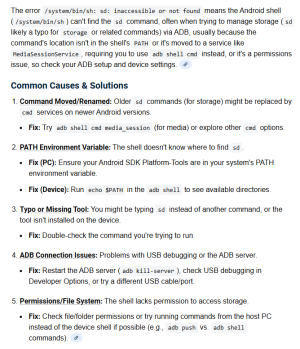
I plugged the error into search and came up with this:

1767836944710.png

I'd start with making sure you have ADB in either your PATH, or go to the folder you have ADB in and open a CLI there.

The other question I have is what ADB command did you use?
 
  • Like
Reactions: VidJunky
I already tried to use Odin; however, my phone is still stuck on the loop. Is there a way to transfer the files from my phone to my laptop? I can't reset my phone because there are important things on it. :cry::cry:
You had back up on through Google and Samsung? If not your not going be able to retrieve them , using Odin and didn't work means hardware issue
 
What have you tried besides Odin and ADB?

Are you rooted or running any custom ROMs?

You would need the phone to fully boot in order to back anything up or take anything off of the phone. The phone data is encrypted to the device which means the phone needs to be booted and unlocked to unencrypt the data, and the USB settings would need to be changed to transfer data which also requires the phone to fully booted.

While the phone may not boot normally you may have luck booting into the bootloader/recovery. If you can there's a chance that clearing the partition cache might end your bootloop. I would try the following in the this order.

-Remove the SD and SIM cards and try to reboot. There was an issue where booting with the, SIM or SD, inserted in the device caused this bootloop and rebooting with them allowed it get past whatever was holding it up. Once restarted it could be shutdown, intentionally, and controlled, put them back, and then the device could be rebooted normally.

-Clear the device partition cache. Updates and other system processes use the partition cache as temporary storage for those processes and sometimes things get stuck this cache and cause problems. To clear the partition cache, power off the device. Since you're in a bootloop you can probably press and hold the power button until the unit powers off. Then press and hold the Vol+ button and the power button. Hold both until the Samsung splash screen appears then release the power button and continue to hold the Vol+ button until the phone has fully booted and you should be on the bootloader/recovery screen. Use the Vol buttons to navigate and the power button to select and select Wipe Partition Cache. When the operation is complete, select Reboot and allow the phone to restart normally.


Let us know what you find.
I'm not really sure if the phone is rooted since it was just given to me by my aunt's in-laws.

About rebooting, I tried the recovery mode just like in the YT video, as well as cleared the cache. But nothing really works. It was just stuck on that loop.

Now, I'm trying to use Odin again and the ADB (will use Golfdriver's comment) to see if there will be any changes.
 
  • Like
Reactions: VidJunky
I plugged the error into search and came up with this:

View attachment 372952

I'd start with making sure you have ADB in either your PATH, or go to the folder you have ADB in and open a CLI there.

The other question I have is what ADB command did you use?
The only ADB command I use is adb shell, since adb pull is not working.

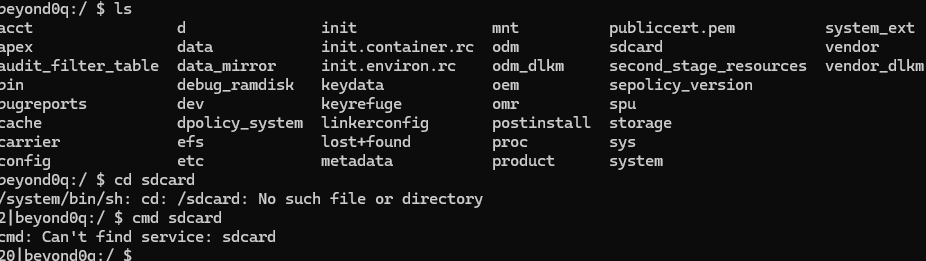
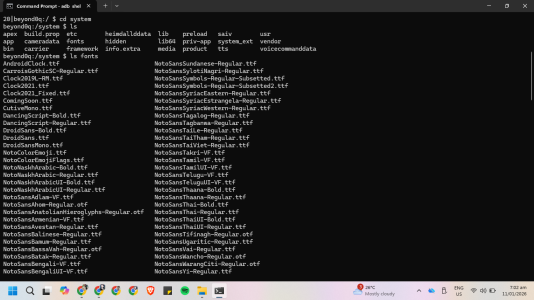
And so, I tried the ADB to copy files (again) and used cmd instead of cd, and the result was this. It stated "can't find service." So I tried to use cd to look at the system, and it worked. I looked at the fonts that my device uses. It seems that it can't read the $ cd sdcard, maybe because it is in the loop.
1768086533227.png1768086550816.png
 
Maybe, I can't really do this by myself. I'll be reaching out to android firmware technician to seek help. I just hope that the solution they will offer to me is not about resetting my phone to use it again.

crying-cat-meme-template-thumbnail-4e806a85.webp
 
You can try a forensic company I'm not sure they can retrieve it because how encrypted your data is .

Google you can find out very easily by going to your computer log in with the same Google credentials for photos, drive etc..

There is nothing else for us to recommend and I don't want people to give any illegal ways on how to try and get your information as that will Violate the Rules in the Forums.

[Thread Closed]
 
Status
Not open for further replies.

Trending Posts

Members online

Forum statistics

Threads
963,127
Messages
6,992,724
Members
3,164,981
Latest member
syedalihussainshah