Navigation issues - help appreciated

xxdisciplexx

Member
Jan 9, 2011
19
0
0
Just traded for a brand new Galaxy s3 last night. So far I am loving the phone. opened up the maps app and got a pretty good GPS lock. The only issue is when I try to use navigation, the phone gets stuck saying it is trying to find my location. To this point I have yet to be able to use Navigation. For the record I have all GPS services turned on including WiFi. Any help would be greatly appreciated. Thanks in advance.

Sent from my GS3
 
I had a problem with my GPS on my previous GS3 and had Verizon swap it out. Mine works perfectly now. Only thing I can recommend is you DL the GPS test application and find someone else with a GS3 to compare signals and how many satellites it sees. I would also compare it from different locations including indoors.
 
GPS Test Plus: http://market.android.com/details?id=com.chartcross.gpstestplus (there's a free version as well)
You could try clearing the application data: Menu -> Manage apps -> All -> Maps; Force stop; Clear data; Clear cache
Barring that, the usual troubleshooting steps may help:
1. Restart phone
2. Shut down/battery pull
3. Last resort - factory reset

Sent from my rooted, debloated, deodexed Sinclair ZX-80 running CM -0.001 using Tapatalk 2
 
I use GPS Status & Toolbox app. It will download the current GPS assistance data when the app first starts. So, I run it once a day or when I remember and I get much faster lock times.
 
ThIs is what I got when I opened the gps test app. It finds me but never gets better than "accurate to 30 meters"

by6e3eza.jpg


Sent from my SCH-I535 using Tapatalk 2
 
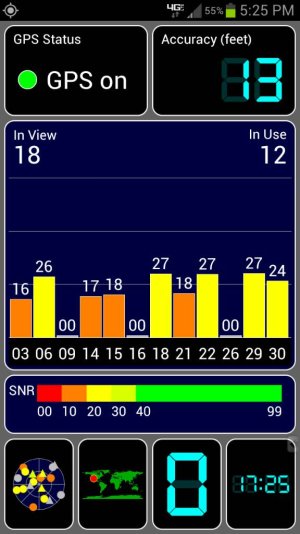
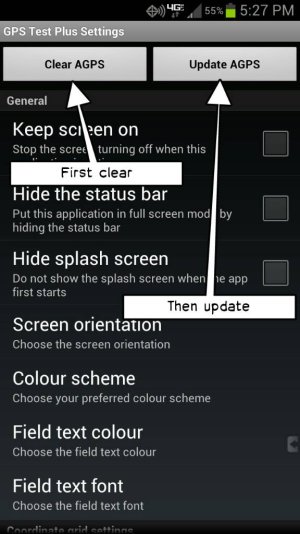
Strange, GPS isn't green and there are no satellites in use. It should look something like this:uploadfromtaptalk1350693820959.jpgTry pressing Menu -> Settings and select the two buttons at the top:uploadfromtaptalk1350693898162.jpgSent from my rooted, debloated, deodexed Sinclair ZX-80 running CM -0.001 using Tapatalk 2
 
My GPS locks immediate. But where are you finding that menu

Sent from my AT100 using Android Central Forums
 
Okay I did what you said by pressing those 2 buttons but that didn't make a difference. I tried restarting the phone and also turn it off and pulling the battery.

Sent from my SCH-I535 using Tapatalk 2
 
Okay I did what you said by pressing those 2 buttons but that didn't make a difference. I tried restarting the phone and also turn it off and pulling the battery.

Sent from my SCH-I535 using Tapatalk 2


Are you doing this OUTDOORS with a clear view of the sky?

If so, you may have bad hardware. It often get well over 9 satellites indoors even.
 
Yea I'm outside and skies are clear. Regardless it shouldn't make a difference if it's a blizzard and I'm inside of a building. My iPhone locked in a matter of 2 seconds no matter where I was

Sent from my SCH-I535 using Tapatalk 2
 
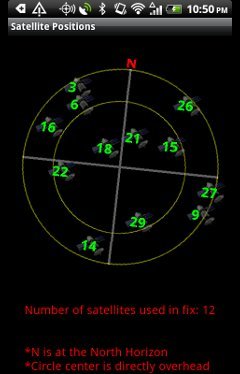
Do you have a view of the sky? Usually the gps chip in the GS3 is sensitive enough to get a static satellite fix even in most buildings, but if your in a structure built like a fortress you'll need to be close to a window. The gps chip may have "gone to sleep" in which case you can wake it up with a phone restart. I'd suggest downloading the free app, Polaris Navigation System which includes a map showing your satellite reception. If you don't see any satellites, try moving outside and if that doesn't work, restart the phone.
scr2_240x374.jpg

Here's the link to the app:
https://play.google.com/store/apps/details?id=com.discipleskies.android.polarisnavigation
 
Again, I am outside and my phone has already been restarted and I've downloaded every GPS app on the Market

Sent from my SCH-I535 using Tapatalk 2
 
Well I got up this morning and this is what I saw. Guess it just fixed itself because I didn't do anything

egyryre2.jpg


Sent from my SCH-I535 using Tapatalk 2
 
Well I got up this morning and this is what I saw. Guess it just fixed itself because I didn't do anything

Sent from my SCH-I535 using Tapatalk 2

I would keep an eye on it, might've been a random software glitch but you may also have a hardware issue. Don't let it linger passed your warranty period. When you're within the 30 day original purchase period, they should just exchange it for a brand new one in the store. After that you'll just a refurbished one.
 
Well I traded for it I didn't actually by it straight from Verizon. I've been checking it frequently all morning and it's been locking onto 6-9 satellites.

Sent from my SCH-I535 using Tapatalk 2
 
The person that you traded it from can still handle the warranty for you.

It appears that it just needed time to download the GPS catalog. It should have done that automatically when you were online.
So, in a few weeks, will it happen again when it needs an update?
 
Speaking of update, when are we thinking jelly bean will be here? I know the speculations get old but forgive me I'm new here

Sent from my SCH-I535 using Tapatalk 2
 
Those GPS signals look really weak if you're outdoors in the clear. I had the exact same problem you were having. I would get a lock sometimes, but it would usually take a long time. Sometimes it will be quick, but very rarely. Ever since I swapped out my phone, I'll get a lock in a few seconds even indoors. I would recommend you swap yours out while it's still under warranty. I had to swap mine out because it was stressing me out whenever I needed to use GPS to get somewhere and by the time it locked onto a signal, I was already almost to my destination blindly driving around.

Well I got up this morning and this is what I saw. Guess it just fixed itself because I didn't do anything

http://img.tapatalk.com/d/12/10/20/egyryre2.jpg

Sent from my SCH-I535 using Tapatalk 2
 

Latest posts

Trending Posts

Forum statistics

Threads
961,065
Messages
6,984,816
Members
3,164,636
Latest member
layahhhh