NoSpamPro: Spam SMS & Spam Call Blocker | AI Technology | Privacy, Security and Fast.

huseyinsari

Member
Jan 29, 2026
22
21
3
Hi Android Central community!

I’m the developer of NoSpamPro, an app I built because I was personally fed up with the increasing number of sophisticated phishing SMS and annoying robocalls. Most existing solutions either felt too invasive (data collection) or were bloated with unnecessary features.

NoSpamPro is designed with a "Set it and Forget it" philosophy, focusing heavily on speed, battery efficiency, and most importantly, your privacy.

🛡️ What makes NoSpamPro different?​

Unlike simple blacklisting apps, NoSpamPro uses a Hybrid Detection Engine:
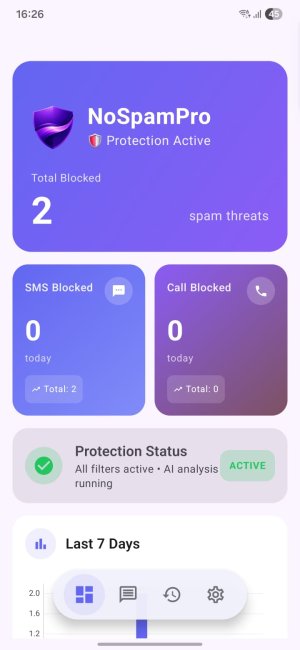
  1. Local Offline Filter: Instantly checks against a local database of known signatures and your own contacts.
  2. On-Device Heuristics: Analyzes message structure and intent to catch brand-new spam patterns without needing the internet.
  3. Contextual AI Analysis: For those tricky "gray area" messages, we use a lightweight AI model to understand the sentiment and context of the message—catching scams that keywords alone might miss.
WhatsApp Image 2026-01-29 at 16.26.37.jpeg

✨ Key Features:​

  • Automatic Spam Blocking: Works for both SMS and Phone calls.
  • Privacy-First: We NEVER collect, store, or sell your message content. Most of the heavy lifting happens right on your device.
  • Lightweight: Small app size (<15MB) and optimized for low battery consumption.
  • International Support: Built-in recognition for multiple languages and regional spam formats.
  • Clean UI: Modern Jetpack Compose interface with Dark Mode support.

🔒 Our Commitment to Privacy​

We believe your inbox should be private. NoSpamPro does not require you to create an account or upload your contact list to a cloud server to work.

🚀 Get it on Google Play:​

https://play.google.com/store/apps/details?id=com.byauth.nospampro

💬 Feedback Welcome!​

This project is under active development, and I would love to hear from this community. Whether it's feature ideas, UI suggestions, or technical feedback, please share your thoughts!

I'll be hanging around to answer any questions you might have.

Cheers!

 

Attachments

  • nsplogo.png
    nsplogo.png
    149.4 KB · Views: 10
With today's update, NoSpamPro now supports Japanese, Vietnamese, Filipino, Malay, Polish, and Italian – we're expanding globally!
 
NEW UPDATE

  • "Trust" button added to the "Calls" section on the History page
  • Storage issue that could occur after reinstalling the app has been fixed
  • AI strengthened based on countries/languages
  • New data added to our databases
  • 3 new themes and icons added for Premium (Premium Gold, Premium Royal, Premium Ruby)
  • 3 new spam notification sounds added for Premium (Elegant, Modern, Simple)
  • QR Scanner and Ghost Scanner shortcuts added to the home screen for Premium
 
I took a look at the permission list on your Play Store page, and I think that's way too many permissions required for an app that purportedly value privacy and works offline and locally.
 
I took a look at the permission list on your Play Store page, and I think that's way too many permissions required for an app that purportedly value privacy and works offline and locally.
Thank you for your concern! It's actually great that you are checking permissions – in today's digital world, everyone should. However, I want to clarify why a security app like NoSpamPro requires these specific permissions. It is impossible to provide this level of protection without them due to how the Android system works.

1. SMS & MMS Permissions (Read/Write/Send/Receive)

  • Why? Android requires an app to be the "Default SMS App" to effectively move spam messages to a separate folder or block them completely. Without these permissions, we would only be able to read incoming messages but not stop them from cluttering your inbox.
  • Privacy: We never read your personal conversations. The app processes messages locally in milliseconds to check for spam patterns.
2. Call Log & Phone State Permissions

  • Why? To identify the caller ID of an incoming call and block it if it matches a spam number.
  • Privacy: We do not upload your call history anywhere. This data stays on your device and is only used to catch spammers in real-time.
3. Contacts Permission

  • Why? This is critical for the "Whitelist" feature. To ensure we NEVER block your friends, family, or saved business contacts, the app needs to know who is in your address book.
  • Privacy: Your contact list is processed strictly on your device. It is never uploaded to our servers.
4. Internet Access

  • Why? To download the daily updated Global Spam Database (blocklist definitions) and for the optional AI Analysis.
5. Camera

  • Why? Used strictly for the QR Code Scanner feature within the app.

🛑 THE "AI ANALYSIS" & PRIVACY GUARANTEE

This is the most important part. By default, NoSpamPro works offline using an 8-Layer Protection Protocol.

We stick to a strict Local-First Policy. No data leaves your device. However, if you enable the AI Detection System, here is exactly how it works:

  1. The Trigger: Only if an incoming message passes the local 8-layer filter but is still deemed "Suspicious/Ambiguous", does the AI step in.
  2. Anonymization: The message content is anonymized.
  3. The Question: We send it to the AI with a single question: "Is this spam?"
  4. Zero-Log Policy: Once the AI replies, the data is instantly vaporized. We do not store, archive, backup, or view this data. It exists for mere seconds during analysis and then vanishes.

We built this app because we value privacy just as much as you do. We don't sell data; we sell a premium tool to protect you from scams.
 
I have been using this a couple of days. One thing I don't like is that I don't want to use it to be my primary texting app. I just want to use the call blocking feature. Of I don't set as my default texting app it sits on that screen and does not allow me to move around the app. It stays on that screen to force me to set as default sms app. Can you change this?
 
I have been using this a couple of days. One thing I don't like is that I don't want to use it to be my primary texting app. I just want to use the call blocking feature. Of I don't set as my default texting app it sits on that screen and does not allow me to move around the app. It stays on that screen to force me to set as default sms app. Can you change this?

Thank you for your valuable feedback! We truly understand your point.

The reason for this requirement is a technical limitation of the Android operating system. To filter and block spam SMS messages, Android strictly requires the app to be set as the 'Default SMS app'. Without this role, no app can legally 'touch' or block incoming text messages. However, we value your request to use only the Call Blocking features. We are currently evaluating an update for the onboarding flow that will include a 'Skip' or 'Minimal Setup' button. This will allow users who only want call protection to bypass the SMS setup.

In the meantime, as a workaround: You can set it as default to pass the setup screen, and then immediately switch back to your preferred texting app via Android Settings > Apps > Default Apps. This will keep the call blocking active while letting you use your original SMS app (though please note that SMS spam filtering will be disabled in this case).

We appreciate your patience as we improve NoSpamPro!
 
  • Like
Reactions: tube517
Been working well as a call blocker. Hope you can add the skip button on the SMS screen soon
 
Been working well as a call blocker. Hope you can add the skip button on the SMS screen soon
Thanks for your feedback! We’re glad it’s working well for you.
The skip button for the SMS screen was already on our roadmap, and we’re planning to include it in the next update. Stay tuned!
 
  • Like
Reactions: tube517
Thanks for your feedback! We’re glad it’s working well for you.
The skip button for the SMS screen was already on our roadmap, and we’re planning to include it in the next update. Stay tuned!
Another thing I want to ask is what does the paid version include that the free version does not have
 
Another thing I want to ask is what does the paid version include that the free version does not have
Thanks for your question!
All core protections in our app including AI-powered analysis are completely free.

The paid version removes the small in-app ads (around 15%) and unlocks extra features such as exclusive themes, custom app icons, special spam notification sounds, and shortcut creation for the Secure QR Scanner and Ghost Scanner.

The premium version is mainly for users who want to support the developers while enjoying extra customization and convenience features.

We created this app to keep people safe, and in doing so, we prioritized privacy. We don't sell security for a fee, and we never will.
 
  • Like
Reactions: tube517
Hi @tube517 ,

With today's update, you can now use only the call protection feature if you prefer.

Please follow these steps:

  1. Open Settings on your phone.
  2. Go to Apps.
  3. Find and tap NoSpamPro.
  4. Tap Storage.
  5. Select Clear Cache, then Clear Data.
This will reset the app.

Before doing this, make sure the app is updated to the latest version.
Alternatively, you can simply uninstall the app and download it again from the Play Store for a quicker solution.

nsbbanneren.png
 
  • Like
Reactions: tube517
Hi @tube517 ,

With today's update, you can now use only the call protection feature if you prefer.

Please follow these steps:

  1. Open Settings on your phone.
  2. Go to Apps.
  3. Find and tap NoSpamPro.
  4. Tap Storage.
  5. Select Clear Cache, then Clear Data.
This will reset the app.

Before doing this, make sure the app is updated to the latest version.
Alternatively, you can simply uninstall the app and download it again from the Play Store for a quicker solution.

View attachment 373370
Very nice improvements
Much appreciated
 
I have to say the call blocking portion of this app has worked well on both of my phones. I paid using youmail for virtually the same level of call blocking.

Please keep this app free. Some of us cannot afford paying the ridiculous amount that other apps charge. I was extremely disappointed in youmail for turning a free app into an extremely high paid app.

I am going to install your app into my wife's phone as well. I hope your app gets a high number of downloads and it succeeds
 
Thank you so much for your valuable feedback! I’m thrilled to hear that you’re happy with the app's performance and that we could save you from those high costs.

I want to make one thing very clear: All protection features of this app will remain free forever. Our Premium membership is only there for users who wish to support the project and it offers a few extra convenience features. Our goal is to ensure everyone has access to this security without paying ridiculous prices.

Knowing that you’ll be installing the app on your wife’s phone as well is a huge motivation for me. As a small token of my appreciation for your support, I would like to gift you 2 Premium membership codes for you and your wife.

Since the private messaging system is currently disabled here, could you please send an email to support@byauth.com? Once you reach out, I will send the codes and activation instructions to you within 12 hours.

Thank you again for your kind words and support. Enjoy using the app!

nsbbanneren.png
I have to say the call blocking portion of this app has worked well on both of my phones. I paid using youmail for virtually the same level of call blocking.

Please keep this app free. Some of us cannot afford paying the ridiculous amount that other apps charge. I was extremely disappointed in youmail for turning a free app into an extremely high paid app.

I am going to install your app into my wife's phone as well. I hope your app gets a high number of downloads and it succeeds
 
Last edited:
  • Like
Reactions: tube517

Latest posts

Trending Posts

Forum statistics

Threads
963,124
Messages
6,992,691
Members
3,164,979
Latest member
Flykxd133