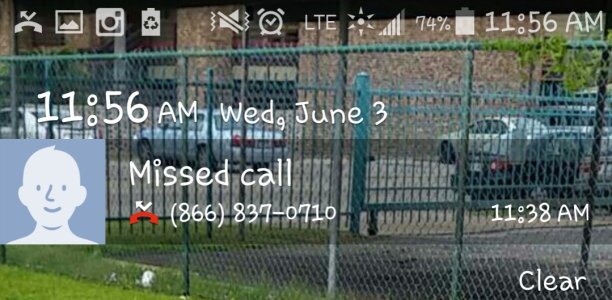
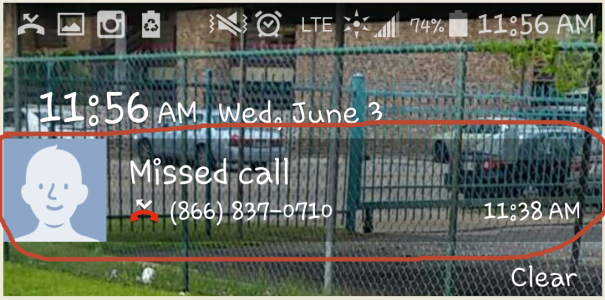
notification bar on lock screen now is clear

island409

Member
Jun 3, 2015
14
0
0
My notification bar for messed calls and messages are now a clear box on the lock screen, does anyone know how to fix this?
 
Welcome to Android Central! Do you mean that the lockscreen notification for your missed calls and messages is just blank?
 
Here is a better one!
When I receive new text messages or missed calls that bar is now clear, it used to be white.
screenshot1.png
 
Sorry, I'm not intimately familiar with the S5's settings to know if there is an option to change that. Let me ask someone else. Did that happen after a system update?
 
I woke this morning and that is the way it was. Yesterday it was fine. I have not done any updates.
 
I rebooted this morning after I noticed it and it was still doing it, I just did again and same thing.. it is very weird I've never seen it before.
 
OK, try the following:
1) Disable the lockscreen. Turn screen off, then on. Then re-enable it.
2) Same thing for lockscreen notifications. Disable them. Screen off and on. Then re-enable them.
 
Did you do a factory wipe and it's still there? What??!!! If it is, then it's gotta be a ROM bug :S
 
Give this a try, it won't harm anything ;)

Power down your phone, now press & hold the power button, volume up & the home button until your phone boots into Recovery. Now use the volume rocker to select Wipe Cache. Hit the power button to make it happen - give it a sec to clear the cache. Now use the volume rocker to select Reboot System - hit the power button & run you phone for a bit. See if this helps
 
If you boot your phone in Safe Mode... does it still do it? I wonder if it's an app doing it...
 
that was going to be my next guess SpookDroid :) a runaway app...
maybe try pulling the SD card out and see if that helps too.
 
OK, then it is part of the ROM. Are you sure you didn't update anything? Maybe a system file got corrupted, but that would be so odd, though...