S24 Ultra stuck in desktop mode

Apr 8, 2016
6
1
3
Hello, My s24 Ultra is stuck in desktop mode, this applies to the entire system UI and any app I open. I cant find anything online about it. I have already checked in developer options and force desktop mode isnt even listed in there so its not that. Any help would be appreciated as i can barely see the text on the screen and it makes using my phone a headache.
 
Welcome as a new member.

Try first a Power Off & Restart. If no go, try a Cache Partition wipe.

Developer Options, whatever may or may not be in there, is presumably switched off?
 
Thanks for your reply, Power off and restart was the first thing i tried. I will look up how to do cache partition wipe and try that when i get a chance. And yes developer mode is switched off.
 
Press volume up and the power button at the same time while the phone is off to boot into the screen for clearing the cache. Good luck!
 
  • Like
Reactions: Laura Knotek
I didn't see this in your original post - were you using DeX, then disconnected, then remained stuck in desktop mode?
 
  • Like
Reactions: Laura Knotek
Hello, My s24 Ultra is stuck in desktop mode, this applies to the entire system UI and any app I open. I cant find anything online about it. I have already checked in developer options and force desktop mode isnt even listed in there so its not that. Any help would be appreciated as i can barely see the text on the screen and it makes using my phone a headache.
Have you contacted an official Samsung Service Centre ?
 
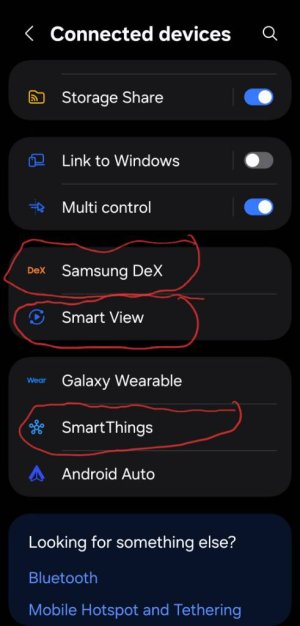
Check in settings>connected devices I circle in the 3 places to check if your phone is connected to anything and turn off .

If still the same
Try setting>general management>reset>reset settings

If still sane

Settings>apps>3 dots upper right corner tap>reset app preferences
View attachment 372582
 
Check in settings>connected devices I circle in the 3 places to check if your phone is connected to anything and turn off .

If still the same
Try setting>general management>reset>reset settings

If still sane

Settings>apps>3 dots upper right corner tap>reset app preferences
View attachment 372582
Phones not connected to anything, and I'm a bit hesitant to reset settings and app preferences as I have apps I need for work. Coming to end of contract next month so I'll probably stick it out until then and get a new one.
 
  • Like
Reactions: mustang7757
Phones not connected to anything, and I'm a bit hesitant to reset settings and app preferences as I have apps I need for work. Coming to end of contract next month so I'll probably stick it out until then and get a new one.
Ok no problem
 
Interesting that my S24 goes into the screen to select Clear cache and other system prompts with volume up /power press hold while off, while yours does not.
Sure you are doing it correctly?
 

Trending Posts

Forum statistics

Threads
960,193
Messages
6,981,431
Members
3,164,421
Latest member
dumpsterrentals89