Question S25U cannot connect to TV via USB-C to HDMI cord

Trail Boss

Well-known member
Oct 17, 2024
107
182
43
As stated, I can no longer connect my S25Ultra to a TV via a USB-C to HDMI cord. Used to be a able to; however, now when I plug it into the TV and I drop down the menu to USB settings, I get the standard screen but cannot pick any of the options. It remains in "Charging Phone Only."

I have tried new cords, blown out the connectors on cable and on phone and TV. Nothing changes.
This is via the Amazon Prime app.
Last year, on the same phone; not a problem.
Anyone know if there was some update the killed this feature.
Have also tried a powered docking station.
Beginning to wonder if the phone is defective......
Any help is appreciated.
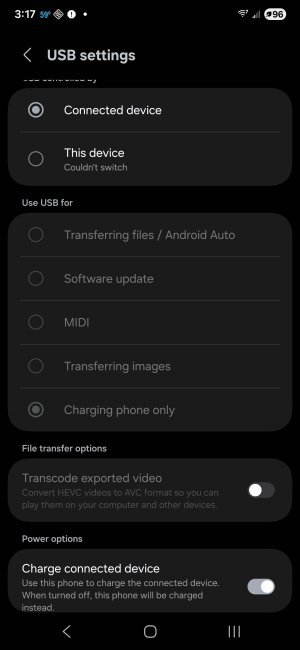
Screenshot_20260305_151732_Settings.jpg
 
Yeah, that's weird for sure. Let's clear the cache for your USB options app. Settings>Apps>click the small sort icon above the app list and enable system apps>USBSettings>Storage>Clear cache. You could clear the data for this one too because there really isn't any saved information for this app that would be lost to a reset.

The only other thing I can think of would be the cable. Is this the same cable you've always used or is it different? I ask because I'm not sure what options you would get from a "charge only" cable. If you haven't try a different cable.

Let us know what you find.
 
Really that should be it, I don't see why if it worked in the past this setting would make difference now, but you can also try enabling USB Debugging in Developer Options. Settings>About phone>System information>tap build number 7 times to unlock Developer Mode menu>back out one level>Developer options>Enable USB debugging.
 
Thanks.

Used two different USB-HDMI cables, the original one from last year that worked, as well as ordering a new on from Amazon (ACER) and giving it a try also tried different usb cables and two different TVs: one in the trailer used last year and a Sony 55" I have in the house. Even tried a Subrent powered hub (powered on and off).
Did the developer options; no luck.
If I directly plug the phone into a computer I get to pick files transfer with no problem.

One place I looked noted the HDMI does not supply power so try a powered hub; which I did and the same.
Been considering a S26 U but now not sure if it is just this phone or all Samsungs. Might just get a new one and if the same, return it withing the 15 day period.
 
I don't mind asking the dumb questions!

You took that screenshot while it was in Charge the Connected Device mode, but it's not that way with the HDMI connected, right?
 
  • Like
Reactions: mustang7757
usb, can't you connect with wi-fi??? how old is your tv? :cool:
If I am at home, I can connect via internet to basically all TVs; two Samsungs (65" is two years old; 75" is less than a year old), two Sonys (55" is about four years old, 48" is about five years old). However, I cannot connect via the USB/HDMI cable anymore and this is how I connect to watch Amazon recorded movies located on my samsung phone, that I want to play on a TV in a travel trailer. And testing the phone and connection cables cannot connect to the 55" sony TV,
I do not have internet in the trailer for wi-fi connection. Last year it worked, that's why I believe my S25U has a major problem.
Probably, just get the S26U and if it works then...ok. If not send the S26U back.
 
I started the response below and was reviewing the posts and noticed that you have "Charge Connected Devices" enabled. This is not to charge your phone, this is to charge the external device, whatever your phone is connected to. When in this mode it disables the USB actions. That is why they are all grey, and always grey, Turn this off and try again.

@Trail Boss I was looking at your post #4. In that post you mentioned trying other cables and other TVs, I assume with the cables the result was the same and it didn't work, but what happened with the TVs, the same?

If you're not able to get this to work with any cable or any TV, it points to the phone. Do you have a tablet or other Android device that you could try to connect in this way? This would once and for all put the issue with the phone.
 
  • Like
Reactions: BerryBubbles
When plugged into a TV via HDMI, only thing I can do is hit to change a setting is "This Device." When I hit it, a screen pops up for my fingerprint, and after it recognizes the fingerprint, it just goes back to the existing screen.
One of the first things I tried was to turn off the charging a connected device.

No other android devices.

Thanks...

Just ordered a S26U; hopefully, it works ok. If not it can be returned and might be time to try an apple.....
 
You probably can use a cheap/used Chromecast 2 or later plugged in to the HDMI to cast your phone to the presumably non - wifi trailer TV.
I'm using one this week (and regularly) to stream You Tube and other content to a Samsung hotel TV. It will work off my phone's Hotspot connection rather than hotel WiFi, but I'm not 100% on that as I write.
I know you want to run downloaded content from your phone, so whether it will use up your phone's data allowance I'm not sure or don't remember.

If the trailer TV has a cast function you may be off to the races anyway.
Yes, you do have a cable / port problem, probably, as you can't connect one? of your home TV's. I have never had a phone with a USB C 3.2 port but it's on my shortlist for my next phone, in probably 2036!
My home TV is a superb 2012 Panasonic Plasma, but I have to move shortly and I can't bring it with, sadly.
 
I use my Tab s6 or Tab s8 Ultra to connect to the TV's in the RV for the no Wifi areas.

But just to check, I plugged my s24 Ultra into a TV & it does work. I'm on UI8 Jan 2026 patch. (Charge connected device toggled off automatically when I connected) Unfortunately, I don't have a s25 to check. So none of this helps you except to say hopefully Samsung hasn't disabled the feature.

Let us know when you receive your new s26U. 🤞
 
Last edited:
  • Like
Reactions: Madd62
This setting literally disables all USB functions. Turn off "Charge Connected Devices".

What is the result of turning this off?

If you're saying that you cannot change this setting when trying this with the HDMI cable, plug in a regular USB, connect to something like a laptop or PC, change the setting, then go to the HDMI cable and connection.

What is the result?
 
Last edited:

Latest posts

Trending Posts

Forum statistics

Threads
963,124
Messages
6,992,689
Members
3,164,979
Latest member
Flykxd133
