S26 ultra privacy screen

I currently use a privacy protector but its all or nothing. I'm going to love being able to turn it off and on. I like it because there's people atmy office who like to pop up beside my desk. They can't see that I'm watching "tv". What I don't like is having to almost have someone on my back to show them something on my phone. Yeah, the option is awesome!
 
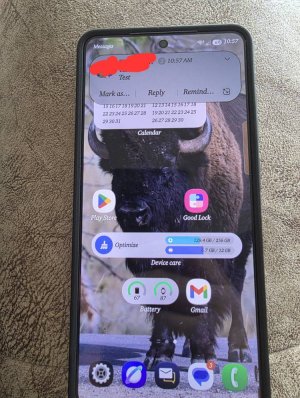
If anybody uses this party notifications such as dynamic punch, dynamic spot bad news.

Privacy screen does not work with them. The notification box will not be darkened like the native notification box. If you go and select one of those as an app to apply privacy screen to, first notification will turn privacy screen on for everything, you have to go turn it off.

Only reason I wanted to use one of those is to control the time box stays open, the native goes off so fast. Does anyone know of a way to make native stay open longer then 2 seconds
 
  • Like
Reactions: Rose4uKY
I currently use a privacy protector but its all or nothing. I'm going to love being able to turn it off and on. I like it because there's people atmy office who like to pop up beside my desk. They can't see that I'm watching "tv". What I don't like is having to almost have someone on my back to show them something on my phone. Yeah, the option is awesome!
It sounds really cool I can't wait to try it out. I'm going to be so antsy at work just waiting to get home and I don't get off till 9:30 I go in at 1:00. And my time is 12:00 to 3:00. But if we're not busy maybe they'll let me leave an hour early.