S6 bug with SwiftKey

jevalladares

Samsung Galaxy S6 Champion
Q&A Team
Nov 1, 2013
87
0
0
Hi has anyone had this bug using swiftkey and the SG?

Some times swiftkey hangs and won't type any caracters on screen and even if I hit the home screen it stays on foreground and I can't select any of the bellow icons. I haven't been able to reproduce the error but I'll include a screenshot of the problem. It happens frequently.
Mobile phone details are:
Samsung Galaxy S6
Android Lollipop 5.1.1
Touchwiz standard UI
Swiftkey 6.2.3.86 with autoupate to the latest version.
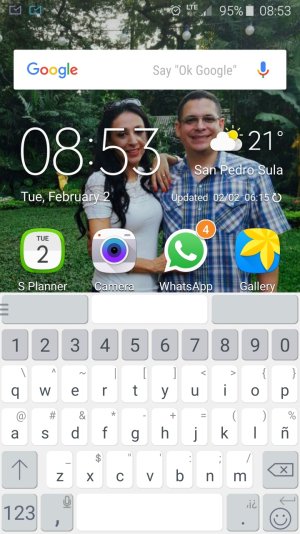
Screenshot_2016-02-02-08-53-19.jpg

I opened a ticket with SwiftKey support and the answer was quote "Sadly, there is nothing that can be done about this issue on our end. You will have to wait for an OS update or perhaps you might switch to a new device." So I have gone back to the stock keyboard for the moment.

Any help or workarounds identified will be usefull.

Regards
 
Hi has anyone had this bug using swiftkey and the SG?

Some times swiftkey hangs and won't type any caracters on screen and even if I hit the home screen it stays on foreground and I can't select any of the bellow icons. I haven't been able to reproduce the error but I'll include a screenshot of the problem. It happens frequently.
Mobile phone details are:
Samsung Galaxy S6
Android Lollipop 5.1.1
Touchwiz standard UI
Swiftkey 6.2.3.86 with autoupate to the latest version.
View attachment 220600

I opened a ticket with SwiftKey support and the answer was quote "Sadly, there is nothing that can be done about this issue on our end. You will have to wait for an OS update or perhaps you might switch to a new device." So I have gone back to the stock keyboard for the moment.

Any help or workarounds identified will be usefull.

Regards

Hello jevalladares,

I am running the EXACT same specs as you. And I have been using Swiftkey for about 3 years and have not had this issue.
I am thinking the only difference between our devices may be that I have the SM-G920W8 Exynos 7420 Octa
 
I have a 920i Ran into this exact same issue about 4 months ago. Finally just un-installed swiftkey and went back to the stock keyboard
 
My swift key has always lagged visually especially when you compare it to Google keyboard and the latest Samsung keyboard. I hate when I am trying and the letters pop up after I hit the key. I have had swift key on every Samsung phone I have owned from the s3 to the s6 and it always had lag.

Posted via the Android Central App
 
This has only started happening to me after the recent update to SwiftKey. Hoping the next update fixes it

Posted via the Android Central App
 
My swiftkey has been doing the exact same thing! The problem seems to occur when I leave the keyboard up and then lock my phone, but it doesn't happen every time. The only way I know how to get rid of the keyboard after is to lock and unlock the phone again; that usually fixes the problem temporarily. I'll probably just delete the keyboard because there doesn't seem to be a permanent fix.

Posted via the Android Central App
 
I'm getting this bug, all of the sudden it happens and like it was said locking and unlocking the phone solved it. I think it's OS related because I've also seen this after a recent OS update and with Minuum and Swype, at a lesser degree. Swiftkey is my favorite keyboard, so I'm riding along hoping a future OS update solves this.

Posted via the Android Central App
 
Hi, Thanks all for your comments.

Seems the issue happens to several others. So far the last update the issue happens less but it's still there. Now the keyboard is by far the best options in my opinion so every time I go back to the stock keyboard I just end up going back to swiftkey. I'll try the uninstall route and post back any results.

Cheers
 

Forum statistics

Threads
960,243
Messages
6,981,587
Members
3,164,446
Latest member
brianatem32
