Samsung Galaxy Tab 3 8.0 Battery Problem

AKamiKaziKat

Member
Aug 10, 2014
11
0
0
Hey all,

I have had my Samsung Galaxy Tab 3.0 8 Inch since May 2014 and everything has been swimmingly until yesterday, when my 100% battery dropped to 17% to 7% right before my eyes, and then after a little research, 47% down to 6%, rebooted and it went back to 44%, but the battery dropped instantly to 20% or so.

I have Wifi on all the time, location/GPS off all the time, max power saving options on (limited processor and brightness) Half brightness (tried lowest & auto, but to no avail).

The device is not rooted, it is legitimate.

Bluetooth is always off as well

Solutions I tried
  • Clearing the cache
  • Using either charger from my phone and tablet
  • Scanned for malware etc...
  • Uninstalled several unconsuming applications, uninstalled facebook + messanger
  • Used Super Task Killer Free + Quick Settings
  • Unmounted and remove 16GB SD Card & restarted

The settings -> Battery show my screen constantly at 45-50% even at idle/use and refuses to go down, leading me to think this is the problem but I have no idea how to lower this.

Any other solutions? If my 0% to charge tactic solution I seen doesn't work I will end up contacting support/taking it to a shop to get it fixed.

Picture:
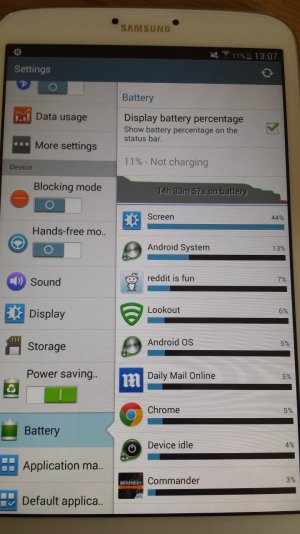
20140810_130526.jpg

Thanks.
 
You say you've cleared the cache....is that the App Cache or the System Cache? If the former, try a System Cache Partition wipe.

Posted via Android Central App
 
You say you've cleared the cache....is that the App Cache or the System Cache? If the former, try a System Cache Partition wipe.

Posted via Android Central App

Thanks for the reply!

I went Settings -> Storage -> Cached Data -> Clear Cache.


Just tried wiping the System Cache Partition, I had 7% Battery before I did it, now I suddenly have 23% battery.

This suddenly dropped to 19% Battery however, and now down to 13% as I type this (I tried an app quickly to see if it still went down incredibly fast, didnt even do anything but open it.

The screen is at 44% battery usage still in the settings -> Battery

EDIT: Now on 9% by doing nothing
 
Thanks for the reply!

I went Settings -> Storage -> Cached Data -> Clear Cache.


Just tried wiping the System Cache Partition, I had 7% Battery before I did it, now I suddenly have 23% battery.

This suddenly dropped to 19% Battery however, and now down to 13% as I type this (I tried an app quickly to see if it still went down incredibly fast, didnt even do anything but open it.

The screen is at 44% battery usage still in the settings -> Battery

EDIT: Now on 9% by doing nothing

Give it a full charge and see what happens. Allow it to drop to about 35% (normal use) and post the screenshots of the battery stats.
 
Now. Letting it drain is overall not great for the battery.

I charged to 100%, left for food and now had a little go on a game (Battlefield 4 commander mode) and the battery drain is from 100% to 92% (much slower drain, slower by miles) still drains quite fast but the game is battery drainer so no surprises.

However, I can view my battery going down 1% by 1% still so it still is worrying, any more solutions or is it the best i can get? the screen still takes 42%
 
I charged to 100%, left for food and now had a little go on a game (Battlefield 4 commander mode) and the battery drain is from 100% to 92% (much slower drain, slower by miles) still drains quite fast but the game is battery drainer so no surprises.

However, I can view my battery going down 1% by 1% still so it still is worrying, any more solutions or is it the best i can get? the screen still takes 42%

The screen is almost always going to be the biggest battery draw. Especially if the game, like you mentioned, relies heavily on the CPU, and screen.
 
I would just wait and see how this charge comes out.

Signed, an M8, Liquidsmooth, and the AC Forums App

Last night, the battery went down by 2% every minute, until it reached 0% and turned off. I turned it back on in which came up with 33% battery, however that went down all the way till 1% which it stayed there for a good 5 minutes. Afterwards, I decided to turn it on again, in which it was constantly on 1%, however I could use it for the next few hours and even survived until morning. I read somewhere about the battery needing to be re calibrated, is this possibly the problem?
 
Last night, the battery went down by 2% every minute, until it reached 0% and turned off. I turned it back on in which came up with 33% battery, however that went down all the way till 1% which it stayed there for a good 5 minutes. Afterwards, I decided to turn it on again, in which it was constantly on 1%, however I could use it for the next few hours and even survived until morning. I read somewhere about the battery needing to be re calibrated, is this possibly the problem?

I would try a reset, and clearing the cache in recovery.

Signed, an M8, Liquidsmooth, and the AC Forums App
 

Latest posts

Trending Posts

Forum statistics

Threads
963,023
Messages
6,992,473
Members
3,164,967
Latest member
uOttawaGrad_22
